


Views
No views yet
[!NOTE]1. Qwen3.6-35B-A3B-FP8 / Q4_K_M / MTP / GGUF
- You want near-BF16 fidelity with ~50% memory savings and improved bandwidth efficiency.
- This model was exported from FP8 (F8_E4M3) precision provided by Qwen, then quantized to Q4_K_M for GGUF compatibility.
- When running with llama.cpp, you get efficient inference via optimized integer kernels and reduced memory footprint.
[!NOTE]2. This model leverages the FP8 (F8_E4M3) export base to deliver:
- **Near-BF16 fidelity**: Maintains numerical stability for most inference tasks while reducing precision overhead.
- **~50% memory savings**: Q4_K_M uses ~4 bits per weight vs BF16's 16 bits, enabling larger contexts or batch sizes on the same hardware.
- **Improved bandwidth efficiency**: Less data movement translates to higher throughput, especially in memory-bound scenarios.
[!NOTE]3. Synergy with Multi-Token Prediction (MTP)
When combined with MTP, the reduced memory footprint unlocks additional efficiency gains:- The lighter weight representation alleviates pressure on the **KV-cache**, allowing MTP to speculate more tokens in parallel without OOM risks. - Efficient dequantization kernels in llama.cpp accelerate inference while maintaining quality.
[!TIP]To fully benefit from this combination, ensure your inference stack supports:
- A recent build of llama.cpp with CUDA support (`-DGGML_CUDA=ON`)
- MTP-aware decoding (available in latest llama.cpp main branch)
- Sufficient VRAM for your target context length and batch size
[!IMPORTANT] ℹ️ About FP8 + Q4_K_M:
This model was exported from FP8 (F8_E4M3) precision and then quantized to GGUF's Q4_K_M scheme. While the final weights use mixed-precision quantization (mostly ~4-bit), the FP8 export step helps preserve numerical stability for sensitive tensors. The observed speedup comes from reduced memory footprint + efficient GGUF kernels + MTP synergy when running with llama.cpp.
[!CAUTION] Native FP8 acceleration on Ada GPUs is only achievable using the original Transformers checkpoint with a compatible runtime (as documented in Qwen's official FP8 repository).
[!TIP] Enjoy!
[!Note] References:
convert.py: The script used to graft MTP layers into the GGUFs. Taken from havenoammo/Qwen3.6-35B-A3B-MTP-GGUF35BA3B-MTP.gguf: The raw Q8_0 MTP layer source file (extracted only) used as input toconvert.py.Thanks to havenoammo and Qwen team
[!TIP] I'm using this settings on RTX4080 16GB:

[!Note] This repository contains FP8-quantized model weights and configuration files for the post-trained model in the Hugging Face Transformers format.These artifacts are compatible with Hugging Face Transformers, vLLM, SGLang, KTransformers, etc.The quantization method is fine-grained fp8 quantization with block size of 128, and its performance metrics are nearly identical to those of the original model.
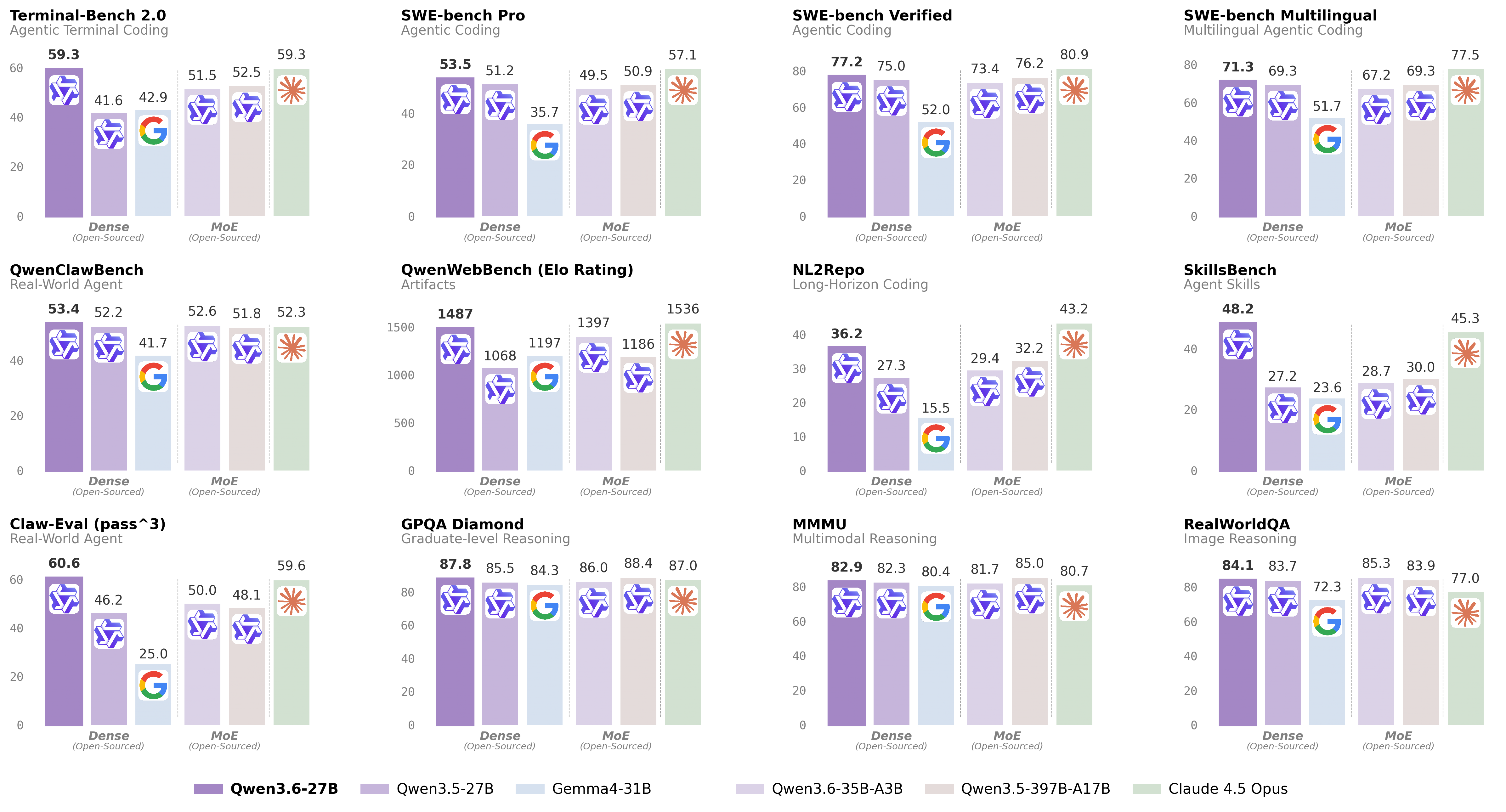
| Qwen3.5-27B | Qwen3.5-397B-A17B | Gemma4-31B | Claude 4.5 Opus | Qwen3.6-35B-A3B | Qwen3.6-27B | |
|---|---|---|---|---|---|---|
| Coding Agent | ||||||
| SWE-bench Verified | 75.0 | 76.2 | 52.0 | 80.9 | 73.4 | 77.2 |
| SWE-bench Pro | 51.2 | 50.9 | 35.7 | 57.1 | 49.5 | 53.5 |
| SWE-bench Multilingual | 69.3 | 69.3 | 51.7 | 77.5 | 67.2 | 71.3 |
| Terminal-Bench 2.0 | 41.6 | 52.5 | 42.9 | 59.3 | 51.5 | 59.3 |
| SkillsBench Avg5 | 27.2 | 30.0 | 23.6 | 45.3 | 28.7 | 48.2 |
| QwenWebBench | 1068 | 1186 | 1197 | 1536 | 1397 | 1487 |
| NL2Repo | 27.3 | 32.2 | 15.5 | 43.2 | 29.4 | 36.2 |
| Claw-Eval Avg | 64.3 | 70.7 | 48.5 | 76.6 | 68.7 | 72.4 |
| Claw-Eval Pass^3 | 46.2 | 48.1 | 25.0 | 59.6 | 50.0 | 60.6 |
| QwenClawBench | 52.2 | 51.8 | 41.7 | 52.3 | 52.6 | 53.4 |
| Knowledge | ||||||
| MMLU-Pro | 86.1 | 87.8 | 85.2 | 89.5 | 85.2 | 86.2 |
| MMLU-Redux | 93.2 | 94.9 | 93.7 | 95.6 | 93.3 | 93.5 |
| SuperGPQA | 65.6 | 70.4 | 65.7 | 70.6 | 64.7 | 66.0 |
| C-Eval | 90.5 | 93.0 | 82.6 | 92.2 | 90.0 | 91.4 |
| STEM & Reasoning | ||||||
| GPQA Diamond | 85.5 | 88.4 | 84.3 | 87.0 | 86.0 | 87.8 |
| HLE | 24.3 | 28.7 | 19.5 | 30.8 | 21.4 | 24.0 |
| LiveCodeBench v6 | 80.7 | 83.6 | 80.0 | 84.8 | 80.4 | 83.9 |
| HMMT Feb 25 | 92.0 | 94.8 | 88.7 | 92.9 | 90.7 | 93.8 |
| HMMT Nov 25 | 89.8 | 92.7 | 87.5 | 93.3 | 89.1 | 90.7 |
| HMMT Feb 26 | 84.3 | 87.9 | 77.2 | 85.3 | 83.6 | 84.3 |
| IMOAnswerBench | 79.9 | 80.9 | 74.5 | 84.0 | 78.9 | 80.8 |
| AIME26 | 92.6 | 93.3 | 89.2 | 95.1 | 92.7 | 94.1 |
| Qwen3.5-27B | Qwen3.5-397B-A17B | Gemma4-31B | Claude 4.5 Opus | Qwen3.6-35B-A3B | Qwen3.6-27B | |
|---|---|---|---|---|---|---|
| STEM & Puzzle | ||||||
| MMMU | 82.3 | 85.0 | 80.4 | 80.7 | 81.7 | 82.9 |
| MMMU-Pro | 75.0 | 79.0 | 76.9 | 70.6 | 75.3 | 75.8 |
| MathVista mini | 87.8 | -- | 79.3 | -- | 86.4 | 87.4 |
| DynaMath | 87.7 | 86.3 | 79.5 | 79.7 | 82.8 | 85.6 |
| VlmsAreBlind | 96.9 | -- | 87.2 | -- | 96.6 | 97.0 |
| General VQA | ||||||
| RealWorldQA | 83.7 | 83.9 | 72.3 | 77.0 | 85.3 | 84.1 |
| MMStar | 81.0 | 83.8 | 77.3 | 73.2 | 80.7 | 81.4 |
| MMBenchEN-DEV-v1.1 | 92.6 | -- | 90.9 | -- | 92.8 | 92.3 |
| SimpleVQA | 56.0 | 67.1 | 52.9 | 65.7 | 58.9 | 56.1 |
| Document Understanding | ||||||
| CharXiv RQ | 79.5 | 80.8 | 67.9 | 68.5 | 78.0 | 78.4 |
| CC-OCR | 81.0 | 82.0 | 75.7 | 76.9 | 81.9 | 81.2 |
| OCRBench | 89.4 | -- | 86.1 | -- | 90.0 | 89.4 |
| Spatial Intelligence | ||||||
| ERQA | 60.5 | 67.5 | 57.5 | 46.8 | 61.8 | 62.5 |
| CountBench | 97.8 | 97.2 | 96.1 | 90.6 | 96.1 | 97.8 |
| RefCOCO avg | 90.9 | 92.3 | -- | -- | 92.0 | 92.5 |
| EmbSpatialBench | 84.5 | -- | -- | -- | 84.3 | 84.6 |
| RefSpatialBench | 67.7 | -- | 4.7 | -- | 64.3 | 70.0 |
| Video Understanding | ||||||
| VideoMME(w sub.) | 87.0 | 87.5 | -- | 77.7 | 86.6 | 87.7 |
| VideoMMMU | 82.3 | 84.7 | 81.6 | 84.4 | 83.7 | 84.4 |
| MLVU | 85.9 | 86.7 | -- | 81.7 | 86.2 | 86.6 |
| MVBench | 74.6 | 77.6 | -- | 67.2 | 74.6 | 75.5 |
| Visual Agent | ||||||
| V* | 93.7 | 95.8 | -- | 67.0 | 90.1 | 94.7 |
| AndroidWorld | 64.2 | -- | -- | -- | -- | 70.3 |
[!Important] Inference efficiency and throughput vary significantly across frameworks. We recommend using the latest framework versions to ensure optimal performance and compatibility. For production workloads or high-throughput scenarios, dedicated serving engines such as SGLang, KTransformers or vLLM are strongly recommended.
[!Important] The model has a default context length of 262,144 tokens. If you encounter out-of-memory (OOM) errors, consider reducing the context window. However, because Qwen3.6 leverages extended context for complex tasks, we advise maintaining a context length of at least 128K tokens to preserve thinking capabilities.
sglang>=0.5.10 is recommended for Qwen3.6, which can be installed using the following command in a fresh environment:uv pip install sglang[all]http://localhost:8000/v1:python -m sglang.launch_server --model-path Qwen/Qwen3.6-27B-FP8 --port 8000 --tp-size 8 --mem-fraction-static 0.8 --context-length 262144 --reasoning-parser qwen3python -m sglang.launch_server --model-path Qwen/Qwen3.6-27B-FP8 --port 8000 --tp-size 8 --mem-fraction-static 0.8 --context-length 262144 --reasoning-parser qwen3 --tool-call-parser qwen3_coderpython -m sglang.launch_server --model-path Qwen/Qwen3.6-27B-FP8 --port 8000 --tp-size 8 --mem-fraction-static 0.8 --context-length 262144 --reasoning-parser qwen3 --speculative-algo NEXTN --speculative-num-steps 3 --speculative-eagle-topk 1 --speculative-num-draft-tokens 4vllm>=0.19.0 is recommended for Qwen3.6, which can be installed using the following command in a fresh environment:uv pip install vllm --torch-backend=autohttp://localhost:8000/v1:vllm serve Qwen/Qwen3.6-27B-FP8 --port 8000 --tensor-parallel-size 8 --max-model-len 262144 --reasoning-parser qwen3 vllm serve Qwen/Qwen3.6-27B-FP8 --port 8000 --tensor-parallel-size 8 --max-model-len 262144 --reasoning-parser qwen3 --enable-auto-tool-choice --tool-call-parser qwen3_coder vllm serve Qwen/Qwen3.6-27B-FP8 --port 8000 --tensor-parallel-size 8 --max-model-len 262144 --reasoning-parser qwen3 --speculative-config '{"method":"qwen3_next_mtp","num_speculative_tokens":2}'vllm serve Qwen/Qwen3.6-27B-FP8 --port 8000 --tensor-parallel-size 8 --max-model-len 262144 --reasoning-parser qwen3 --language-model-onlytransformers is required for Qwen3.6:pip install "transformers[serving]"transformers serve to launch a server with API endpoints at http://localhost:8000/v1; it will place the model on accelerators if available:transformers serve Qwen/Qwen3.6-27B-FP8 --port 8000 --continuous-batching1pip install -U openai
2
3# Set the following accordingly
4export OPENAI_BASE_URL="http://localhost:8000/v1"
5export OPENAI_API_KEY="EMPTY"[!Tip] We recommend using the following set of sampling parameters for generation
- Thinking mode for general tasks:
temperature=1.0, top_p=0.95, top_k=20, min_p=0.0, presence_penalty=0.0, repetition_penalty=1.0- Thinking mode for precise coding tasks (e.g. WebDev):
temperature=0.6, top_p=0.95, top_k=20, min_p=0.0, presence_penalty=0.0, repetition_penalty=1.0- Instruct (or non-thinking) mode:
temperature=0.7, top_p=0.80, top_k=20, min_p=0.0, presence_penalty=1.5, repetition_penalty=1.0Please note that the support for sampling parameters varies according to inference frameworks.
[!Important] Qwen3.6 models operate in thinking mode by default, generating thinking content signified by<think>\n...</think>\n\nbefore producing the final responses. To disable thinking content and obtain direct response, refer to the examples here.
1from openai import OpenAI
2# Configured by environment variables
3client = OpenAI()
4
5messages = [
6    {"role": "user", "content": "Type \"I love Qwen3.6\" backwards"},
7]
8
9chat_response = client.chat.completions.create(
10    model="Qwen/Qwen3.6-27B-FP8",
11    messages=messages,
12    max_tokens=81920,
13    temperature=1.0,
14    top_p=0.95,
15    presence_penalty=0.0,
16    extra_body={
17        "top_k": 20,
18    },
19)
20print("Chat response:", chat_response)1from openai import OpenAI
2# Configured by environment variables
3client = OpenAI()
4
5messages = [
6 {
7 "role": "user",
8 "content": [
9 {
10 "type": "image_url",
11 "image_url": {
12 "url": "https://qianwen-res.oss-accelerate.aliyuncs.com/Qwen3.5/demo/CI_Demo/mathv-1327.jpg"
13 }
14 },
15 {
16 "type": "text",
17 "text": "The centres of the four illustrated circles are in the corners of the square. The two big circles touch each other and also the two little circles. With which factor do you have to multiply the radii of the little circles to obtain the radius of the big circles?\nChoices:\n(A) $\\frac{2}{9}$\n(B) $\\sqrt{5}$\n(C) $0.8 \\cdot \\pi$\n(D) 2.5\n(E) $1+\\sqrt{2}$"
18 }
19 ]
20 }
21]
22
23chat_response = client.chat.completions.create(
24 model="Qwen/Qwen3.6-27B-FP8",
25 messages=messages,
26 max_tokens=81920,
27 temperature=1.0,
28 top_p=0.95,
29 presence_penalty=0.0,
30 extra_body={
31 "top_k": 20,
32 },
33)
34print("Chat response:", chat_response)1from openai import OpenAI
2# Configured by environment variables
3client = OpenAI()
4
5messages = [
6 {
7 "role": "user",
8 "content": [
9 {
10 "type": "video_url",
11 "video_url": {
12 "url": "https://qianwen-res.oss-accelerate.aliyuncs.com/Qwen3.5/demo/video/N1cdUjctpG8.mp4"
13 }
14 },
15 {
16 "type": "text",
17 "text": "How many porcelain jars were discovered in the niches located in the primary chamber of the tomb?"
18 }
19 ]
20 }
21]
22
23# When vLLM is launched with `--media-io-kwargs '{"video": {"num_frames": -1}}'`,
24# video frame sampling can be configured via `extra_body` (e.g., by setting `fps`).
25# This feature is currently supported only in vLLM.
26#
27# By default, `fps=2` and `do_sample_frames=True`.
28# With `do_sample_frames=True`, you can customize the `fps` value to set your desired video sampling rate.
29chat_response = client.chat.completions.create(
30 model="Qwen/Qwen3.6-27B-FP8",
31 messages=messages,
32 max_tokens=81920,
33 temperature=1.0,
34 top_p=0.95,
35 presence_penalty=0.0,
36 extra_body={
37 "top_k": 20,
38 "mm_processor_kwargs": {"fps": 2, "do_sample_frames": True},
39 },
40)
41
42print("Chat response:", chat_response)[!Important] Qwen3.6 does not officially support the soft switch of Qwen3, i.e.,/thinkand/nothink.
1from openai import OpenAI
2# Configured by environment variables
3client = OpenAI()
4
5messages = [
6    {
7        "role": "user",
8        "content": [
9            {
10                "type": "image_url",
11                "image_url": {
12                    "url": "https://qianwen-res.oss-accelerate.aliyuncs.com/Qwen3.6/demo/RealWorld/RealWorld-04.png"
13                }
14            },
15            {
16                "type": "text",
17                "text": "Where is this?"
18            }
19        ]
20    }
21]
22
23chat_response = client.chat.completions.create(
24    model="Qwen/Qwen3.6-27B-FP8",
25    messages=messages,
26    max_tokens=32768,
27    temperature=0.7,
28    top_p=0.8,
29    presence_penalty=1.5,
30    extra_body={
31        "top_k": 20,
32        "chat_template_kwargs": {"enable_thinking": False},
33    },
34)
35print("Chat response:", chat_response)
[!Note] If you are using APIs from Alibaba Cloud Model Studio, in addition to changingmodel, please use"enable_thinking": Falseinstead of"chat_template_kwargs": {"enable_thinking": False}.
preserve_thinking option:1from openai import OpenAI
2# Configured by environment variables
3client = OpenAI()
4
5messages = [...]
6
7chat_response = client.chat.completions.create(
8 model="Qwen/Qwen3.6-27B-FP8",
9 messages=messages,
10 max_tokens=32768,
11 temperature=0.6,
12 top_p=0.95,
13 presence_penalty=0.0,
14 extra_body={
15 "top_k": 20,
16 "chat_template_kwargs": {"preserve_thinking": True},
17 },
18)
19print("Chat response:", chat_response)[!Note] If you are using APIs from Alibaba Cloud Model Studio, in addition to changingmodel, please use"preserve_thinking": Trueinstead of"chat_template_kwargs": {"preserve_thinking": False}.
1import os
2from qwen_agent.agents import Assistant
3
4# Define LLM
5# Using Alibaba Cloud Model Studio
6llm_cfg = {
7    # Use the OpenAI-compatible model service provided by DashScope:
8    'model': 'qwen3.6-27b',
9    'model_type': 'qwenvl_oai',
10    'model_server': 'https://dashscope.aliyuncs.com/compatible-mode/v1',
11    'api_key': os.getenv('DASHSCOPE_API_KEY'),
12
13    'generate_cfg': {
14        'use_raw_api': True,
15        # When using Dash Scope OAI API, pass the parameter of whether to enable thinking mode in this way
16        'extra_body': {
17            'enable_thinking': True,
18            'preserve_thinking': True,
19        },
20    },
21}
22
23# Using OpenAI-compatible API endpoint.
24# functionality of the deployment frameworks and let Qwen-Agent automate the related operations.
25#
26# llm_cfg = {
27#     # Use your own model service compatible with OpenAI API by vLLM/SGLang:
28#     'model': 'Qwen/Qwen3.6-27B-FP8',
29#     'model_type': 'qwenvl_oai',
30#     'model_server': 'http://localhost:8000/v1',  # api_base
31#     'api_key': 'EMPTY',
32#
33#     'generate_cfg': {
34#         'use_raw_api': True,
35#         # When using vLLM/SGLang OAI API, pass the parameter of whether to enable thinking mode in this way
36#         'extra_body': {
37#             'chat_template_kwargs': {'enable_thinking': True, 'preserve_thinking': True}
38#         },
39#     },
40# }
41
42# Define Tools
43tools = [
44    {'mcpServers': {  # You can specify the MCP configuration file
45            "filesystem": {
46                "command": "npx",
47                "args": ["-y", "@modelcontextprotocol/server-filesystem", "/Users/xxxx/Desktop"]
48            }
49        }
50    }
51]
52
53# Define Agent
54bot = Assistant(llm=llm_cfg, function_list=tools)
55
56# Streaming generation
57messages = [{'role': 'user', 'content': 'Help me organize my desktop.'}]
58for responses in bot.run(messages=messages):
59    pass
60print(responses)
61
62# Streaming generation
63messages = [{'role': 'user', 'content': 'Develop a dog website and save it on the desktop'}]
64for responses in bot.run(messages=messages):
65    pass
66print(responses)transformers, vllm, ktransformers and sglang.
In general, there are two approaches to enabling YaRN for supported frameworks:config.json file, change the rope_parameters fields in text_config to:1{
2 "mrope_interleaved": true,
3 "mrope_section": [
4 11,
5 11,
6 10
7 ],
8 "rope_type": "yarn",
9 "rope_theta": 10000000,
10 "partial_rotary_factor": 0.25,
11 "factor": 4.0,
12 "original_max_position_embeddings": 262144,
13}vllm, you can useVLLM_ALLOW_LONG_MAX_MODEL_LEN=1 vllm serve ... --hf-overrides '{"text_config": {"rope_parameters": {"mrope_interleaved": true, "mrope_section": [11, 11, 10], "rope_type": "yarn", "rope_theta": 10000000, "partial_rotary_factor": 0.25, "factor": 4.0, "original_max_position_embeddings": 262144}}}' --max-model-len 1010000 sglang and ktransformers, you can useSGLANG_ALLOW_OVERWRITE_LONGER_CONTEXT_LEN=1 python -m sglang.launch_server ... --json-model-override-args '{"text_config": {"rope_parameters": {"mrope_interleaved": true, "mrope_section": [11, 11, 10], "rope_type": "yarn", "rope_theta": 10000000, "partial_rotary_factor": 0.25, "factor": 4.0, "original_max_position_embeddings": 262144}}}' --context-length 1010000[!NOTE] All the notable open-source frameworks implement static YaRN, which means the scaling factor remains constant regardless of input length, potentially impacting performance on shorter texts. We advise modifying therope_parametersconfiguration only when processing long contexts is required. It is also recommended to modify thefactoras needed. For example, if the typical context length for your application is 524,288 tokens, it would be better to setfactoras 2.0.
temperature=1.0, top_p=0.95, top_k=20, min_p=0.0, presence_penalty=0.0, repetition_penalty=1.0temperature=0.6, top_p=0.95, top_k=20, min_p=0.0, presence_penalty=0.0, repetition_penalty=1.0temperature=0.7, top_p=0.80, top_k=20, min_p=0.0, presence_penalty=1.5, repetition_penalty=1.0presence_penalty parameter between 0 and 2 to reduce endless repetitions. However, using a higher value may occasionally result in language mixing and a slight decrease in model performance.answer field with only the choice letter, e.g., "answer": "C"."size parameter in the released video_preprocessor_config.json is conservatively configured. It is recommended to set the longest_edge parameter in the video_preprocessor_config file to 469,762,048 (corresponding to 224k video tokens) to enable higher frame-rate sampling for hour-scale videos and thereby achieve superior performance. For example,{"longest_edge": 469762048, "shortest_edge": 4096}1@misc{qwen3.6-27b,
2 title = {{Qwen3.6-27B}: Flagship-Level Coding in a {27B} Dense Model},
3 author = {{Qwen Team}},
4 month = {April},
5 year = {2026},
6 url = {https://qwen.ai/blog?id=qwen3.6-27b}
7}