


Views
No views yet

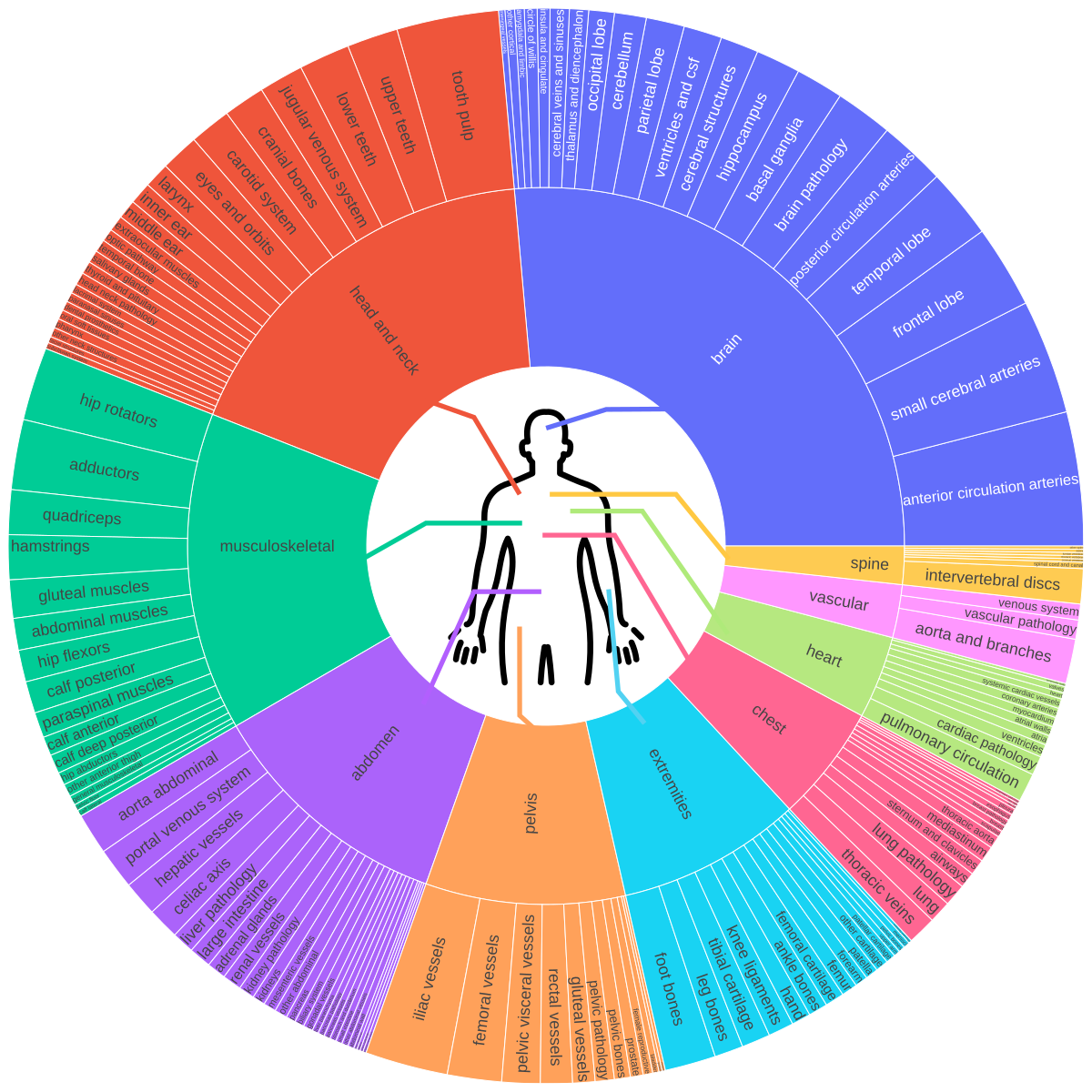
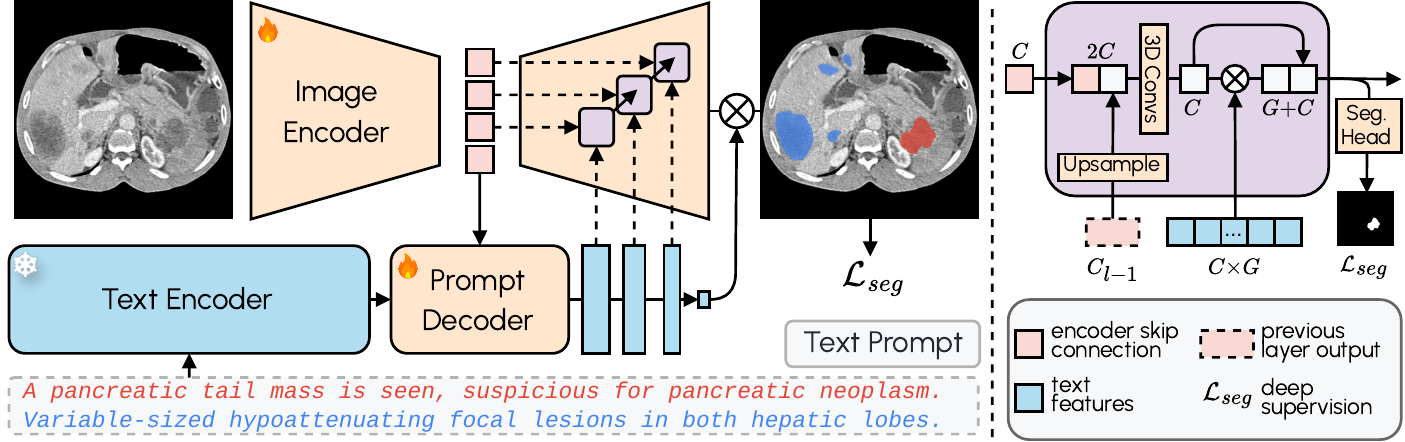
1conda create -n voxtell python=3.12
2conda activate voxtell[!WARNING] Temporary Compatibility Warning
There is a known issue with PyTorch 2.9.0 causing OOM errors during inference (related to 3D convolutions — see the PyTorch issue here).
Until this is resolved, please use PyTorch 2.8.0 or earlier.
pip install torch==2.8.0 torchvision==0.23.0 --index-url https://download.pytorch.org/whl/cu126pip install git+https://github.com/MIC-DKFZ/VoxTell.git1git clone https://github.com/MIC-DKFZ/VoxTell
2cd VoxTell
3pip install -e .voxtell_v1.1) automatically on first use and caches it (in
the standard Hugging Face cache, ~/.cache/huggingface), so the examples below work without any
setup.huggingface_hub library:1import os
2from huggingface_hub import snapshot_download
3
4MODEL_NAME = "voxtell_v1.1" # the default model
5DOWNLOAD_DIR = "/home/user/temp" # where to put the model
6
7local = snapshot_download("mrokuss/VoxTell", allow_patterns=f"{MODEL_NAME}/*", local_dir=DOWNLOAD_DIR)
8model_path = os.path.join(local, MODEL_NAME) # e.g. "/home/user/temp/voxtell_v1.1"VOXTELL_MODEL environment variable (or pass
-m/model_dir to override per run):export VOXTELL_MODEL=/path/to/voxtell_v1.1 # a local model directory (e.g. add to ~/.bashrc)voxtell-predict -i input.nii.gz -o output_folder -p "liver" "spleen" "kidney"1voxtell-predict -i case001.nii.gz -o output_folder -p "liver"
2# Output: output_folder/case001_liver.nii.gz1voxtell-predict -i case001.nii.gz -o output_folder -p "liver" "spleen" "right kidney"
2# Outputs:
3# output_folder/case001_liver.nii.gz
4# output_folder/case001_spleen.nii.gz
5# output_folder/case001_right_kidney.nii.gz1voxtell-predict -i case001.nii.gz -o output_folder -p "liver" "spleen" --save-combined
2# Output: output_folder/case001.nii.gz (multi-label: 1=liver, 2=spleen)
3# ⚠️ WARNING: Overlapping structures will be overwritten by later prompts| Argument | Short | Required | Description |
|---|---|---|---|
--input | -i | Yes | Path to input NIfTI file |
--output | -o | Yes | Path to output folder |
--model | -m | No | Path to a local model directory. If omitted, uses VOXTELL_MODEL or downloads the default model (voxtell_v1.1) from Hugging Face |
--prompts | -p | Yes | Text prompt(s) for segmentation |
--device | No | Device to use: cuda (default) or cpu | |
--gpu | No | GPU device ID (default: 0) | |
--save-combined | No | Save multi-label file instead of individual files | |
--embeddings | No | Use a local precomputed-embeddings file (.npz) instead of auto-download | |
--no-precomputed | No | Skip the automatic precomputed-embeddings download; embed every prompt with the backbone | |
--list-embeddings | No | List the available precomputed prompts and exit | |
--no-overwrite | No | Skip images whose outputs already exist | |
--verbose | No | Enable verbose output |
--inputis either a single folder (all NIfTI files in it) or one or more NIfTI files (absolute or relative to the current directory) — not a mix. The text prompts are embedded once and reused across all images.
1# Every NIfTI in a folder
2voxtell-predict -i images_folder -o output_folder -p "liver" "spleen"
3
4# An explicit list of files
5voxtell-predict -i a.nii.gz b.nii.gz c.nii.gz -o out -p "liver"--jobs to bind each image to its own prompts (images come from the file, so -i is not used).
The union of all prompts across the jobs is embedded only once.voxtell-predict --jobs jobs.json -o out1// jobs.json
2[
3 {"image": "a.nii.gz", "prompts": ["liver", "spleen"]},
4 {"image": "b.nii.gz", "prompts": ["tumor"]}
5]-p with -i instead.)1import torch
2from voxtell.inference.predictor import VoxTellPredictor
3from nnunetv2.imageio.nibabel_reader_writer import NibabelIOWithReorient
4
5# Select device
6device = torch.device("cuda:0" if torch.cuda.is_available() else "cpu")
7
8# Load image
9# Keep `props`: it stores the original affine/orientation and is required to save the masks correctly.
10image_path = "/path/to/your/image.nii.gz"
11img, props = NibabelIOWithReorient().read_images([image_path])
12
13# Define text prompts
14text_prompts = ["liver", "right kidney", "left kidney", "spleen"]
15
16# Initialize predictor
17predictor = VoxTellPredictor(
18 model_dir="/path/to/voxtell_model_directory", # optional; omit to use $VOXTELL_MODEL or auto-download
19 device=device,
20)
21
22# Run prediction
23# Output shape: (num_prompts, x, y, z)
24voxtell_seg = predictor.predict_single_image(img, text_prompts)1import os
2import numpy as np
3
4output_folder = "/path/to/output"
5os.makedirs(output_folder, exist_ok=True)
6writer = NibabelIOWithReorient()
7
8# Option A - one 3D mask per prompt
9for prompt, seg in zip(text_prompts, voxtell_seg):
10 out_path = os.path.join(output_folder, f"{prompt.replace(' ', '_')}.nii.gz")
11 writer.write_seg(seg, out_path, props)
12
13# Option B - a single multi-label 3D file, where each prompt gets its own label
14# value (1, 2, 3, ...). Overlapping structures are overwritten by later prompts.
15combined = np.zeros_like(voxtell_seg[0], dtype=np.uint8)
16for i, seg in enumerate(voxtell_seg):
17 combined[seg > 0] = i + 1 # label 1=first prompt, 2=second, ...
18writer.write_seg(combined, os.path.join(output_folder, "combined.nii.gz"), props)
19# Label legend: {i + 1: prompt for i, prompt in enumerate(text_prompts)}voxtell-predict CLI and predictor.predict_from_files /
predict_from_jobs (below) handle this saving for you.predict_from_files. The text prompts are
embedded once and reused across every image (a folder, a single file, or a list of files):1predictor = VoxTellPredictor(device=device) # model auto-downloads (or set $VOXTELL_MODEL)
2
3written = predictor.predict_from_files(
4 inputs="/path/to/images_folder", # folder, file, or list of files
5 output_folder="/path/to/output",
6 text_prompts=["liver", "spleen"],
7 save_combined=False, # one file per prompt (default)
8)predict_from_jobs (the union of all prompts is embedded
once):1predictor.predict_from_jobs(
2 jobs=[
3 {"image": "a.nii.gz", "prompts": ["liver", "spleen"]},
4 {"image": "b.nii.gz", "prompts": ["tumor"]},
5 ],
6 output_folder="/path/to/output",
7)predict_single_image to reuse
them across custom loops:1embeddings = predictor.embed_text_prompts(["liver", "spleen"])
2seg = predictor.predict_single_image(img, text_embeddings=embeddings)1VoxTellPredictor(embedding_bank="/path/to/embeddings.npz") # explicit local file
2VoxTellPredictor(use_precomputed_embeddings=False) # always use the backbonepip install napari[all]💡 Tip
If you work in napari already, the napari-voxtell plugin offers the fastest way to explore VoxTell results interactively.
1import napari
2import numpy as np
3
4# Create a napari viewer and add the original image
5viewer = napari.Viewer()
6viewer.add_image(img, name='Image')
7
8# Add segmentation results as label layers for each prompt
9for i, prompt in enumerate(text_prompts):
10      viewer.add_labels(voxtell_seg[i].astype(np.uint8), name=prompt)
11
12# Run napari
13napari.run()1export nnUNet_raw=/path/to/nnUNet_raw
2export nnUNet_preprocessed=/path/to/nnUNet_preprocessed
3export nnUNet_results=/path/to/nnUNet_results
4nnUNetv2_plan_and_preprocess -d DATASET_ID --verify_dataset_integritydataset configuration fold):1voxtell-finetune DATASET_ID 3d_fullres 0 \
2 -pretrained_weights /path/to/voxtell_model/fold_0/checkpoint_final.pth-tr VoxTellTrainer_noMirroring for datasets whose labels distinguish left/right. The
CLI mirrors nnUNetv2_train (--c to resume, --val to validate, etc.), see the
nnU-Net repository for the full argument reference.1@inproceedings{rokuss2026voxtell,
2 title={Voxtell: Free-text promptable universal 3d medical image segmentation},
3 author={Rokuss, Maximilian and Langenberg, Moritz and Kirchhoff, Yannick and Isensee, Fabian and Hamm, Benjamin and Ulrich, Constantin and Regnery, Sebastian and Bauer, Lukas and Katsigiannopulos, Efthimios and Norajitra, Tobias and Maier-Hein, Klaus},
4 booktitle={Proceedings of the IEEE/CVF Conference on Computer Vision and Pattern Recognition},
5 pages={37538--37557},
6 year={2026}
7}





