The Fast and Simple Face Swap Extension Nodes for ComfyUI, based on blocked ReActor - now it has a nudity detector to avoid using this software with 18+ content
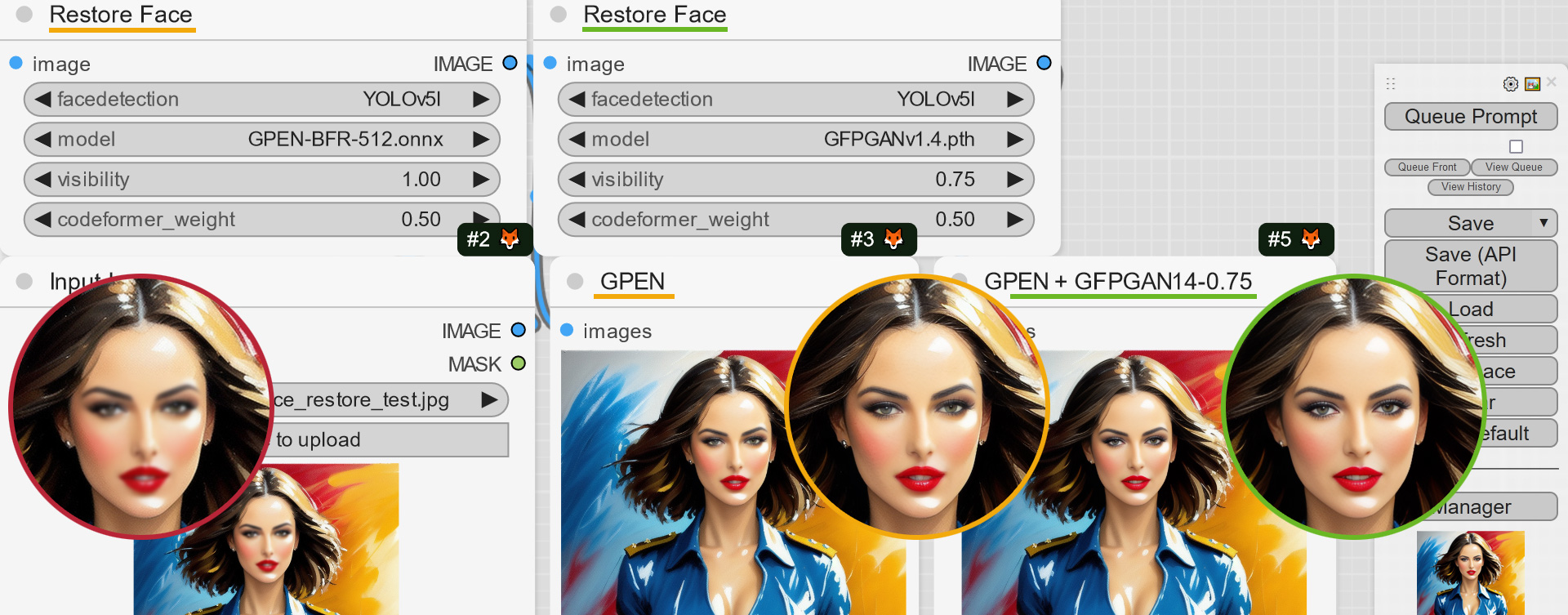
[Experimental] At last! Face restoration process affects only swapped faces
0.6.2-whatsnew-01
[Experimental] New Node "Restore Face Advanced" with Face Restore Filter, thanks https://github.com/Buumcode for implementation of "Restore Face Filter" This node helps you apply the restoration process to the face(s) you need
0.6.2-whatsnew-02
Added FACE_MODEL_NAME output for "Load Face Model" node
0.6.2-whatsnew-03
0.6.1
Gender detection better logic for many faces and many indexes
MaskHelper node 2x speed up - not perfect yet but 1.5x-2x faster then before
ReSwapper models support. Although Inswapper still has the best similarity, but ReSwapper is evolving - thanks @somanchiu https://github.com/somanchiu/ReSwapper for the ReSwapper models and the ReSwapper project! This is a good step for the Community in the Inswapper's alternative creation!
ReActorFaceBoost Node - an attempt to improve the quality of swapped faces. The idea is to restore and scale the swapped face (according to the face_size parameter of the restoration model) BEFORE pasting it to the target image (via inswapper algorithms), more information is here (PR#321)
Fixes: "RAM issue", "No detection" for MaskingHelper
0.5.0 BETA2
You can now build a blended face model from a batch of face models you already have, just add the "Make Face Model Batch" node to your workflow and connect several models via "Load Face Model"
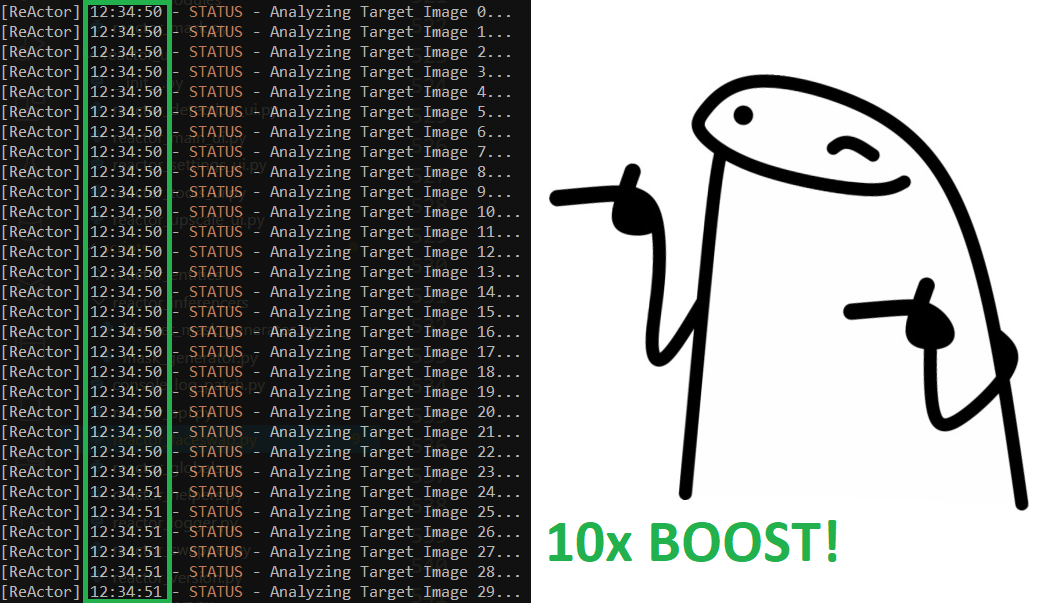
Huge performance boost of the image analyzer's module! 10x speed up! Working with videos is now a pleasure!
0.5.0-whatsnew-05
0.5.0 BETA1
SWAPPED_FACE output for the Masking Helper Node
FIX: Empty A-channel for Masking Helper IMAGE output (causing errors with some nodes) was removed
0.5.0 ALPHA1
ReActorBuildFaceModel Node got "face_model" output to provide a blended face model directly to the main Node:
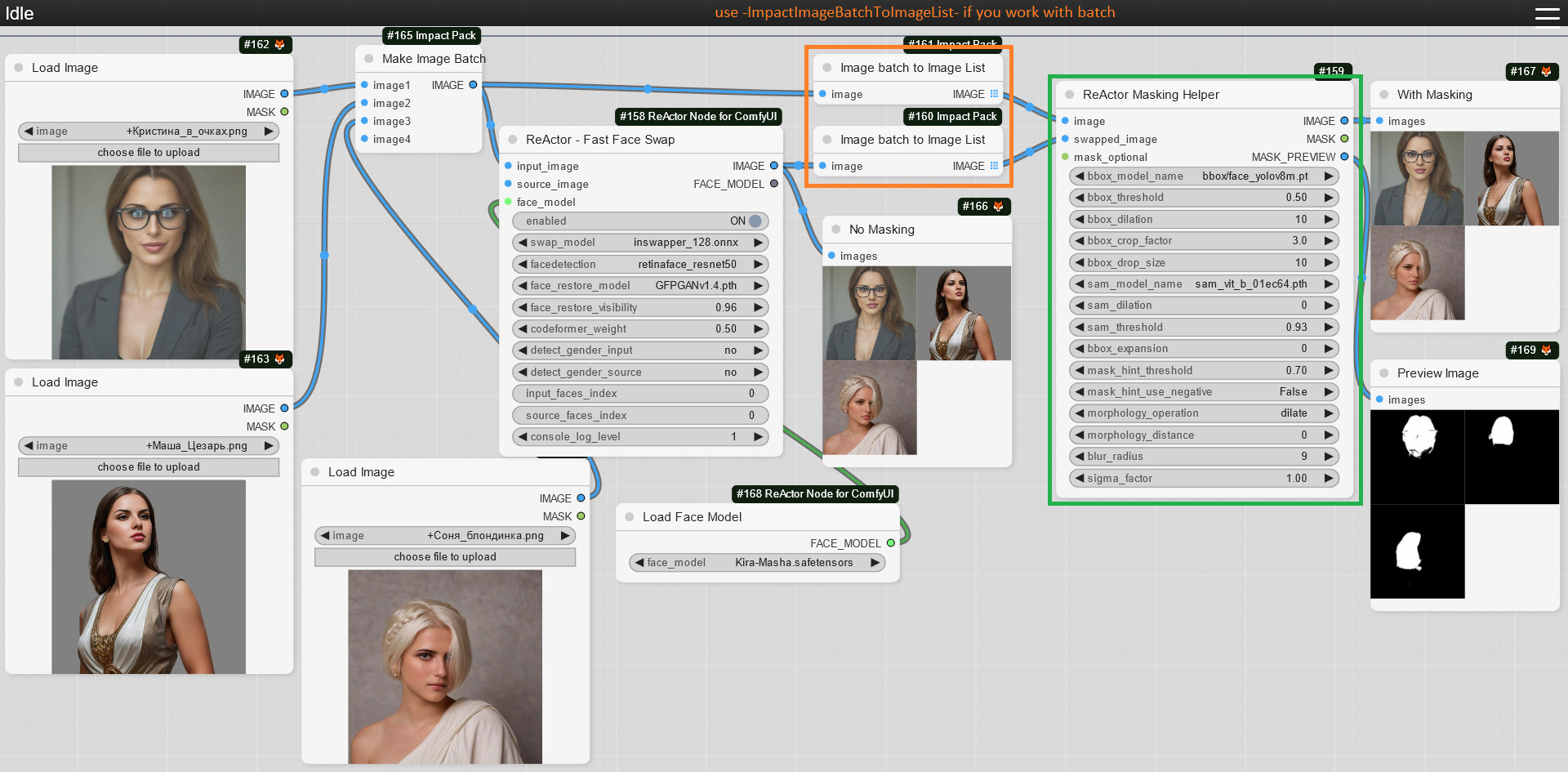
Face Masking feature is available now, just add the "ReActorMaskHelper" Node to the workflow and connect it as shown below:
0.5.0-whatsnew-01
If you don't have the "face_yolov8m.pt" Ultralytics model - you can download it from the Assets and put it into the "ComfyUI\models\ultralytics\bbox" directory
As well as "sam_vit_b_01ec64.pth" model - download (if you don't have it) and put it into the "ComfyUI\models\sams" directory;
Use this Node to gain the best results of the face swapping process:
0.5.0-whatsnew-02
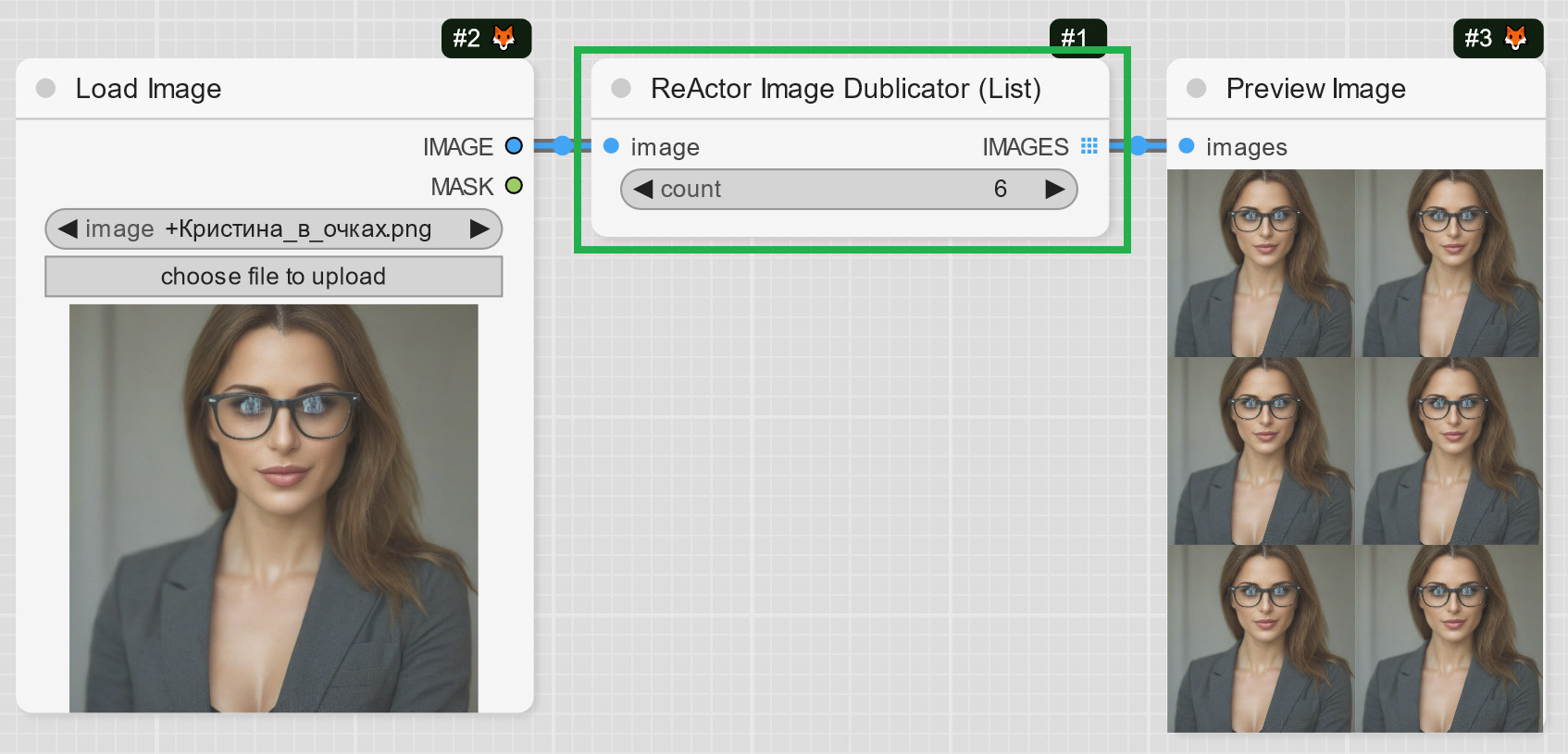
ReActorImageDublicator Node - rather useful for those who create videos, it helps to duplicate one image to several frames to use them with VAE Encoder (e.g. live avatars):
0.5.0-whatsnew-03
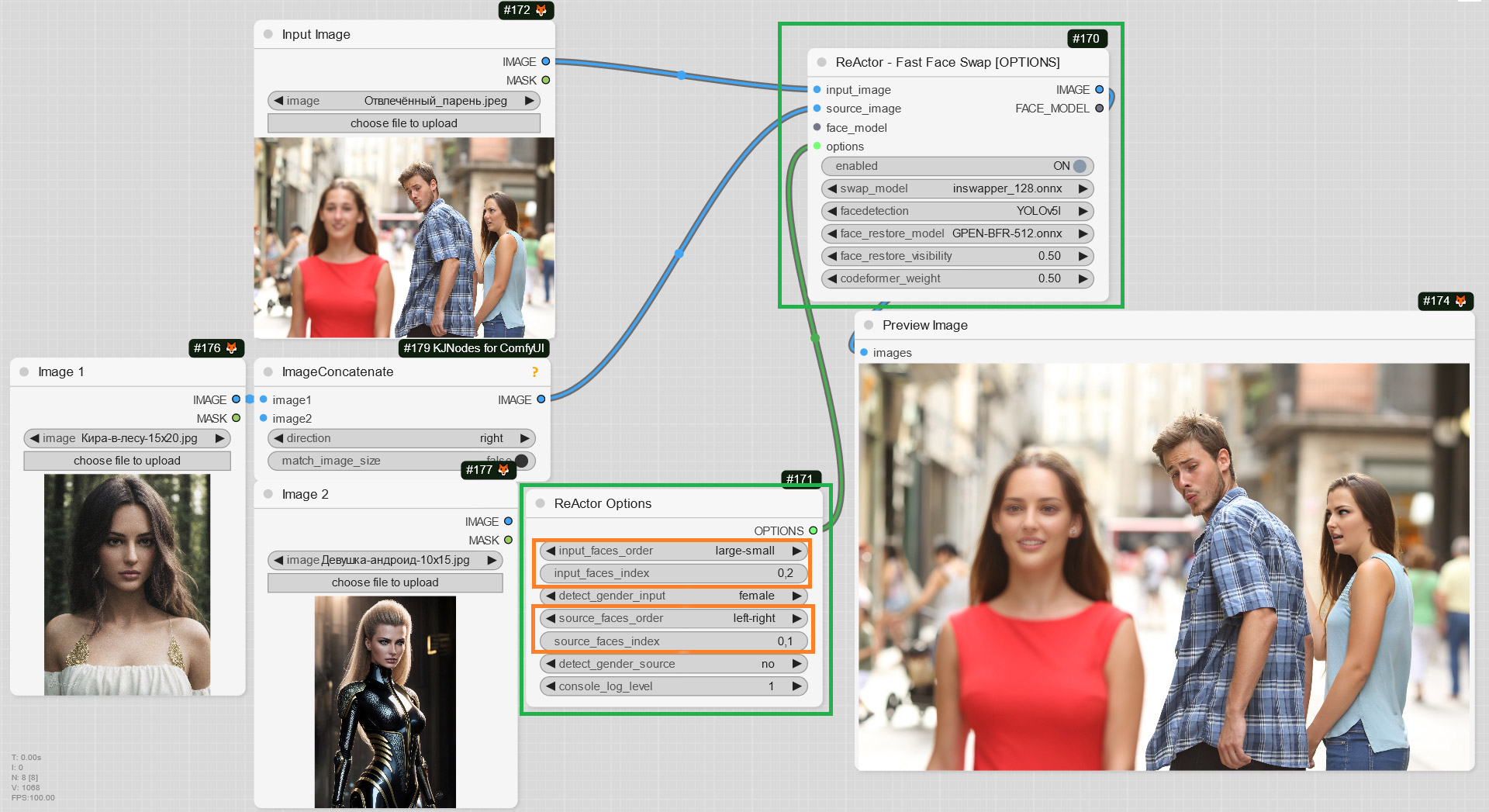
ReActorFaceSwapOpt (a simplified version of the Main Node) + ReActorOptions Nodes to set some additional options such as (new) "input/source faces separate order". Yes! You can now set the order of faces in the index in the way you want ("large to small" goes by default)!
0.5.0-whatsnew-04
Little speed boost when analyzing target images (unfortunately it is still quite slow in compare to swapping and restoring...)
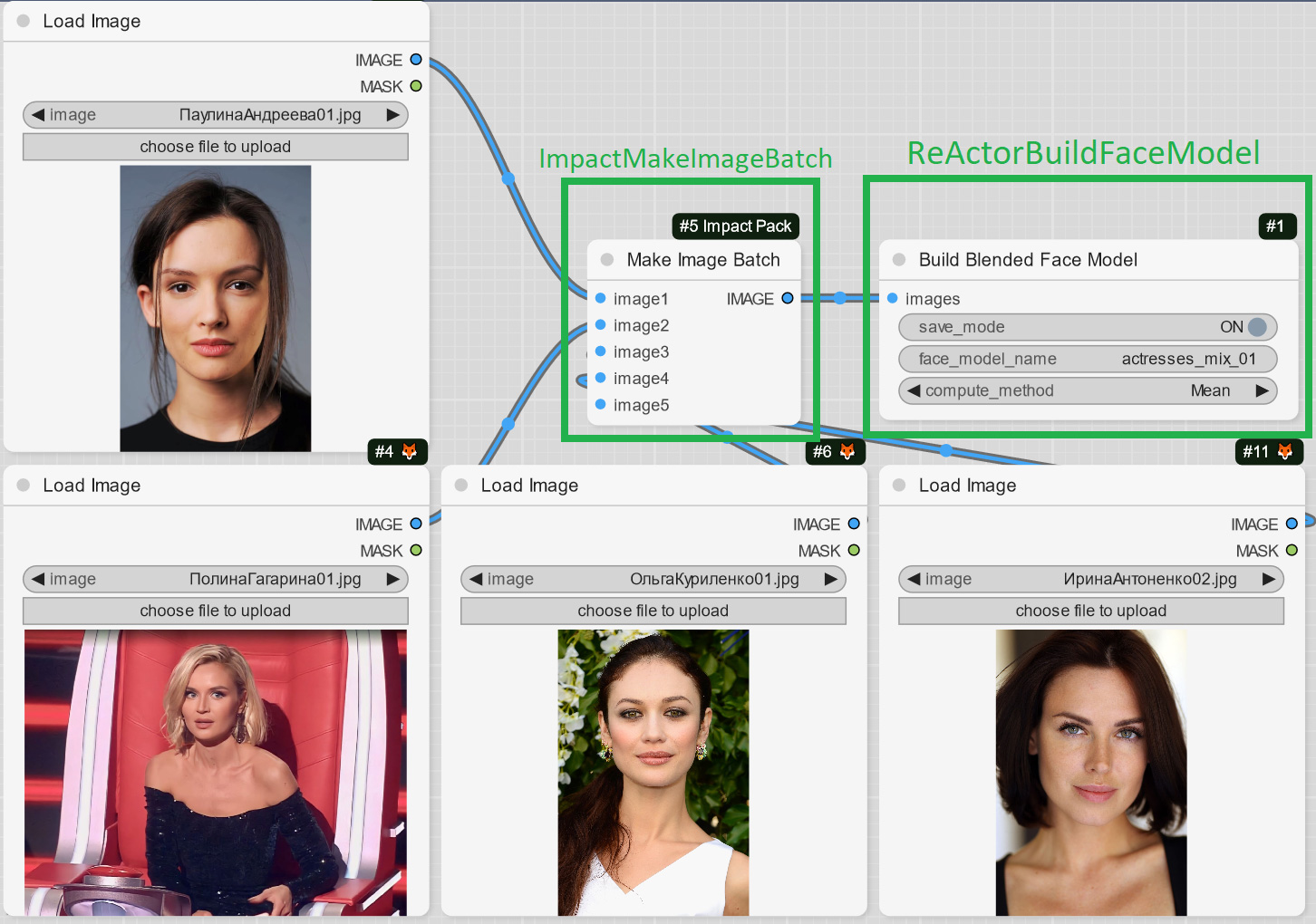
Due to popular demand - you can now blend several images with persons into one face model file and use it with "Load Face Model" Node or in SD WebUI as well;
Experiment and create new faces or blend faces of one person to gain better accuracy and likeness!
Just add the ImpactPack's "Make Image Batch" Node as the input to the ReActor's one and load images you want to blend into one model:
0.4.2-whatsnew-01
Result example (the new face was created from 4 faces of different actresses):
Input "input_image" goes first now, it gives a correct bypass and also it is right to have the main input first;
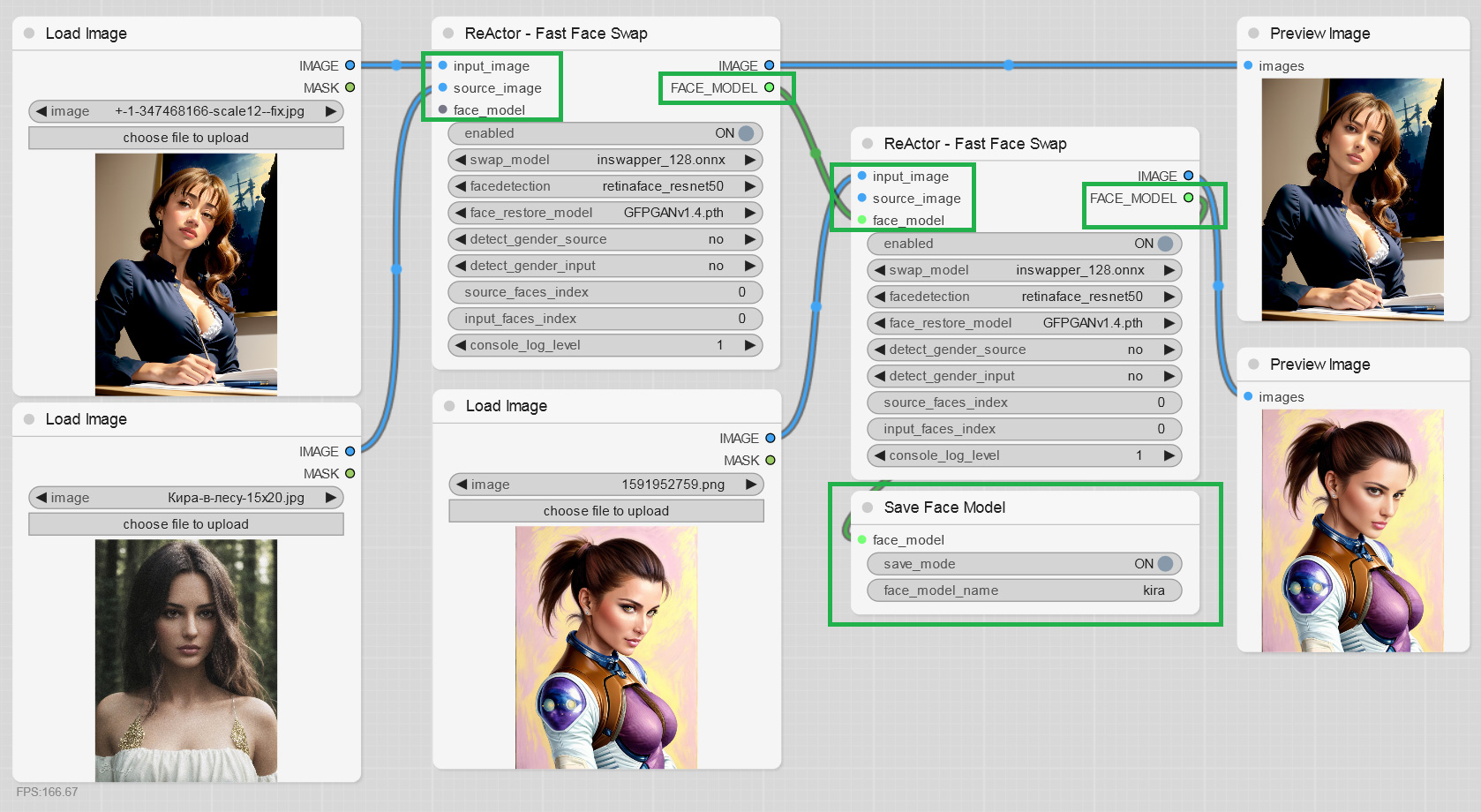
You can now save face models as "safetensors" files (ComfyUI\models\reactor\faces) and load them into ReActor implementing different scenarios and keeping super lightweight face models of the faces you use:
0.4.0-whatsnew-01
0.4.0-whatsnew-02
Ability to build and save face models directly from an image:
0.4.0-whatsnew-03
Both the inputs are optional, just connect one of them according to your workflow; if both is connected - image has a priority.
Different fixes making this extension better.
Thanks to everyone who finds bugs, suggests new features and supports this project!
Install Visual Studio 2022 (Community version - you need this step to build Insightface)
OR only VS C++ Build Tools and select "Desktop Development with C++" under "Workloads -> Desktop & Mobile"
OR if you don't want to install VS or VS C++ BT - follow this steps (sec. I)
Choose between two options:
(ComfyUI Manager) Open ComfyUI Manager, click "Install Custom Nodes", type "ReActor" in the "Search" field and then click "Install". After ComfyUI will complete the process - please restart the Server.
(Manually) Go to ComfyUI\custom_nodes, open Console and run git clone https://github.com/Gourieff/ComfyUI-ReActor
Go to ComfyUI\custom_nodes\ComfyUI-ReActor and run install.bat
If you don't have the "face_yolov8m.pt" Ultralytics model - you can download it from the Assets and put it into the "ComfyUI\models\ultralytics\bbox" directory As well as one or both of "Sams" models from here - download (if you don't have them) and put into the "ComfyUI\models\sams" directory
Run ComfyUI and find there ReActor Nodes inside the menu ReActor or by using a search
Models
buffalo_l: downloaded on first launch into ComfyUI\models\insightface\models\buffalo_l, or you can download manually from here
inswapper_128: downloaded during installation into ComfyUI\models\insightface, or you can download manually from here
You can find ReActor Nodes inside the menu ReActor or by using a search (just type "ReActor" in the search field)
List of Nodes:
••• Main Nodes •••
ReActorFaceSwap (Main Node)
ReActorFaceSwapOpt (Main Node with the additional Options input)
ReActorOptions (Options for ReActorFaceSwapOpt)
ReActorFaceBoost (Face Booster Node)
ReActorMaskHelper (Masking Helper)
ReActorSetWeight (Set Face Swap Weight)
••• Operations with Face Models •••
ReActorSaveFaceModel (Save Face Model)
ReActorLoadFaceModel (Load Face Model)
ReActorBuildFaceModel (Build Blended Face Model)
ReActorMakeFaceModelBatch (Make Face Model Batch)
••• Additional Nodes •••
ReActorRestoreFace (Face Restoration)
ReActorImageDublicator (Dublicate one Image to Images List)
ImageRGBA2RGB (Convert RGBA to RGB)
ReActorUnload (Unload ReActor models from VRAM)
Connect all required slots and run the query.
Main Node Inputs
input_image - is an image to be processed (target image, analog of "target image" in the SD WebUI extension);
Supported Nodes: "Load Image", "Load Video" or any other nodes providing images as an output;
source_image - is an image with a face or faces to swap in the input_image (source image, analog of "source image" in the SD WebUI extension);
Supported Nodes: "Load Image" or any other nodes providing images as an output;
face_model - is the input for the "Load Face Model" Node or another ReActor node to provide a face model file (face embedding) you created earlier via the "Save Face Model" Node;
Supported Nodes: "Load Face Model", "Build Blended Face Model";
options - to connect ReActorOptions;
Supported Nodes: "ReActorOptions";
face_boost - to connect ReActorFaceBoost;
Supported Nodes: "ReActorFaceBoost";
Main Node Outputs
IMAGE - is an output with the resulted image;
Supported Nodes: any nodes which have images as an input;
FACE_MODEL - is an output providing a source face's model being built during the swapping process;
Supported Nodes: "Save Face Model", "ReActor", "Make Face Model Batch";
ORIGINAL_IMAGE - input_image bypass;
Face Restoration
Since version 0.3.0 ReActor Node has a buil-in face restoration. Just download the models you want (see Installation instruction) and select one of them to restore the resulting face(s) during the faceswap. It will enhance face details and make your result more accurate.
Face Indexes
By default ReActor detects faces in images from "large" to "small". You can change this option by adding ReActorFaceSwapOpt node with ReActorOptions.
And if you need to specify faces, you can set indexes for source and input images.
Index of the first detected face is 0.
You can set indexes in the order you need.
E.g.: 0,1,2 (for Source); 1,0,2 (for Input). This means: the second Input face (index = 1) will be swapped by the first Source face (index = 0) and so on.
Genders
You can specify the gender to detect in images.
ReActor will swap a face only if it meets the given condition.
Face Models
Since version 0.4.0 you can save face models as "safetensors" files (stored in ComfyUI\models\reactor\faces) and load them into ReActor implementing different scenarios and keeping super lightweight face models of the faces you use.
To make new models appear in the list of the "Load Face Model" Node - just refresh the page of your ComfyUI web application.
(I recommend you to use ComfyUI Manager - otherwise you workflow can be lost after you refresh the page if you didn't save it before that).
Masking Helper
Face Masking feature is available since version 0.5.0, just add the "ReActorMaskHelper" Node to the workflow and connect it as shown below:
0.5.0-whatsnew-01
If you don't have the "face_yolov8m.pt" Ultralytics model - you can download it from the Assets and put it into the "ComfyUI\models\ultralytics\bbox" directory
As well as "sam_vit_b_01ec64.pth" or "sam_vit_l_0b3195.pth" (better occlusion) - download (if you don't have it) and put it into the "ComfyUI\models\sams" directory;
Use this Node to gain the best results of the face swapping process:
0.5.0-whatsnew-02
Face Swap Weigth
You can set the strength of face swap for source_image or face_model from 0% to 100% (in 12.5% step) with ReActorSetWeight node
Just put .bat or .sh script from this Repo to the ComfyUI\custom_nodes directory and run it when you need to check for updates
Disclaimer
This software is meant to be a productive contribution to the rapidly growing AI-generated media industry. It will help artists with tasks such as animating a custom character or using the character as a model for clothing etc.
The developers of this software are aware of its possible unethical applications and are committed to take preventative measures against them. We will continue to develop this project in the positive direction while adhering to law and ethics.
Users of this software are expected to use this software responsibly while abiding the local law. If face of a real person is being used, users are suggested to get consent from the concerned person and clearly mention that it is a deepfake when posting content online. Developers and Contributors of this software are not responsible for actions of end-users.
By using this extension you are agree not to create any content that:
violates any laws;
causes any harm to a person or persons;
propagates (spreads) any information (both public or personal) or images (both public or personal) which could be meant for harm;
spreads misinformation;
targets vulnerable groups of people.
This software utilizes the pre-trained models buffalo_l and inswapper_128.onnx, which are provided by InsightFace. These models are included under the following conditions:
From insighface license: The InsightFace’s pre-trained models are available for non-commercial research purposes only. This includes both auto-downloading models and manually downloaded models.
Users of this software must strictly adhere to these conditions of use. The developers and maintainers of this software are not responsible for any misuse of InsightFace’s pre-trained models.
Please note that if you intend to use this software for any commercial purposes, you will need to train your own models or find models that can be used commercially.