Same as before. It uses the extended Alpaca format,
with ### Input: immediately preceding user inputs and ### Response: immediately preceding
model outputs. While Alpaca wasn't originally intended for multi-turn responses, in practice this
is not a problem; the format follows a pattern already used by other models.
### Instruction:
Character's Persona: {bot character description}

User's Persona: {user character description}

Scenario: {what happens in the story}

Play the role of Character. You must engage in a roleplaying chat with User below this line. Do not write dialogues and narration for User.

### Input:
User: {utterance}

### Response:
Character: {utterance}

### Input
User: {utterance}

### Response:
Character: {utterance}

(etc.)
You should:
Replace all text in curly braces (curly braces included) with your own text.
Replace User and Character with appropriate names.
Message length control
Inspired by the previously named "Roleplay" preset in SillyTavern, with this
version of LimaRP it is possible to append a length modifier to the response instruction
sequence, like this:
This has an immediately noticeable effect on bot responses. The available lengths are:
tiny, short, medium, long, huge, humongous, extreme, unlimited. The
recommended starting length is medium. Keep in mind that the AI may ramble
or impersonate the user with very long messages.
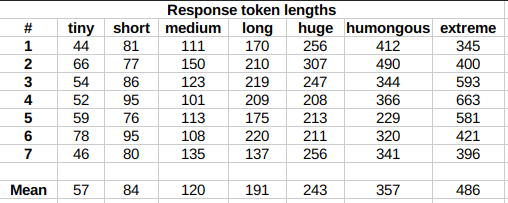
The length control effect is reproducible, but the messages will not necessarily follow
lengths very precisely, rather follow certain ranges on average, as seen in this table
with data from tests made with one reply at the beginning of the conversation:
lengths
Response length control appears to work well also deep into the conversation.
Suggested settings
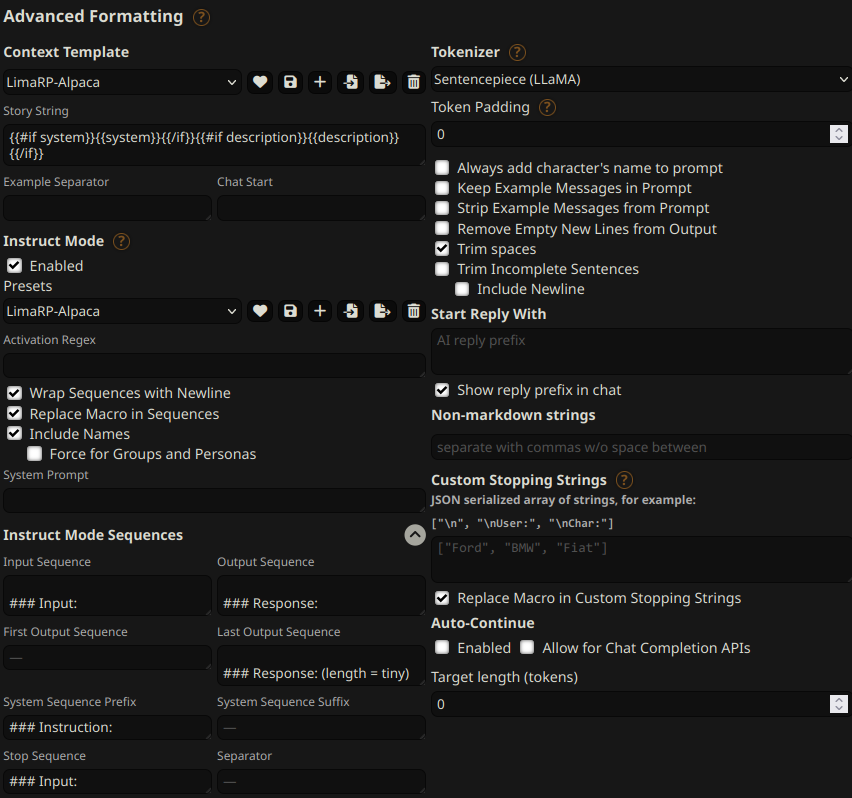
You can follow these instruction format settings in SillyTavern. Replace tiny with
your desired response length:
settings
Text generation settings
Extensive testing with Mistral has not been performed yet, but suggested starting text
generation settings may be: