### Instruction:
Character's Persona: bot character description

User's persona: user character description

Scenario: what happens in the story

Play the role of Character. You must engage in a roleplaying chat with User below this line. Do not write dialogues and narration for User. Character should respond with messages of medium length.

### Input:
User: {prompt}

### Response:
Character:
Compatibility
These quantised GGUFv2 files are compatible with llama.cpp from August 27th onwards, as of commit d0cee0d
They are also compatible with many third party UIs and libraries - please see the list at the top of this README.
Explanation of quantisation methods
Click to see details
The new methods available are:
GGML_TYPE_Q2_K - "type-1" 2-bit quantization in super-blocks containing 16 blocks, each block having 16 weight. Block scales and mins are quantized with 4 bits. This ends up effectively using 2.5625 bits per weight (bpw)
GGML_TYPE_Q3_K - "type-0" 3-bit quantization in super-blocks containing 16 blocks, each block having 16 weights. Scales are quantized with 6 bits. This end up using 3.4375 bpw.
GGML_TYPE_Q4_K - "type-1" 4-bit quantization in super-blocks containing 8 blocks, each block having 32 weights. Scales and mins are quantized with 6 bits. This ends up using 4.5 bpw.
GGML_TYPE_Q5_K - "type-1" 5-bit quantization. Same super-block structure as GGML_TYPE_Q4_K resulting in 5.5 bpw
GGML_TYPE_Q6_K - "type-0" 6-bit quantization. Super-blocks with 16 blocks, each block having 16 weights. Scales are quantized with 8 bits. This ends up using 6.5625 bpw
Refer to the Provided Files table below to see what files use which methods, and how.
very large, extremely low quality loss - not recommended
Note: the above RAM figures assume no GPU offloading. If layers are offloaded to the GPU, this will reduce RAM usage and use VRAM instead.
How to download GGUF files
Note for manual downloaders: You almost never want to clone the entire repo! Multiple different quantisation formats are provided, and most users only want to pick and download a single file.
The following clients/libraries will automatically download models for you, providing a list of available models to choose from:
LM Studio
LoLLMS Web UI
Faraday.dev
In text-generation-webui
Under Download Model, you can enter the model repo: TheBloke/Mistral-ClaudeLimaRP-v3-7B-GGUF and below it, a specific filename to download, such as: mistral-claudelimarp-v3-7b.Q4_K_M.gguf.
Then click Download.
On the command line, including multiple files at once
I recommend using the huggingface-hub Python library:
pip3 install huggingface-hub
Then you can download any individual model file to the current directory, at high speed, with a command like this:
Windows Command Line users: You can set the environment variable by running set HF_HUB_ENABLE_HF_TRANSFER=1 before the download command.
Example llama.cpp command
Make sure you are using llama.cpp from commit d0cee0d or later.
./main -ngl 32 -m mistral-claudelimarp-v3-7b.Q4_K_M.gguf --color -c 2048 --temp 0.7 --repeat_penalty 1.1 -n -1 -p "### Instruction:\nCharacter's Persona: bot character description\n\nUser's persona: user character description\n \nScenario: what happens in the story\n\nPlay the role of Character. You must engage in a roleplaying chat with User below this line. Do not write dialogues and narration for User. Character should respond with messages of medium length.\n\n### Input:\nUser: {prompt}\n\n### Response:\nCharacter:"
Change -ngl 32 to the number of layers to offload to GPU. Remove it if you don't have GPU acceleration.
Change -c 2048 to the desired sequence length. For extended sequence models - eg 8K, 16K, 32K - the necessary RoPE scaling parameters are read from the GGUF file and set by llama.cpp automatically.
If you want to have a chat-style conversation, replace the -p <PROMPT> argument with -i -ins
How to load this model in Python code, using ctransformers
First install the package
Run one of the following commands, according to your system:
shell
1# Base ctransformers with no GPU acceleration2pip install ctransformers
3# Or with CUDA GPU acceleration4pip install ctransformers[cuda]5# Or with AMD ROCm GPU acceleration (Linux only)6CT_HIPBLAS=1 pip install ctransformers --no-binary ctransformers
7# Or with Metal GPU acceleration for macOS systems only8CT_METAL=1 pip install ctransformers --no-binary ctransformers
Simple ctransformers example code
python
1from ctransformers import AutoModelForCausalLM
23# Set gpu_layers to the number of layers to offload to GPU. Set to 0 if no GPU acceleration is available on your system.4llm = AutoModelForCausalLM.from_pretrained("TheBloke/Mistral-ClaudeLimaRP-v3-7B-GGUF", model_file="mistral-claudelimarp-v3-7b.Q4_K_M.gguf", model_type="mistral", gpu_layers=50)56print(llm("AI is going to"))
How to use with LangChain
Here are guides on using llama-cpp-python and ctransformers with LangChain:
I've had a lot of people ask if they can contribute. I enjoy providing models and helping people, and would love to be able to spend even more time doing it, as well as expanding into new projects like fine tuning/training.
If you're able and willing to contribute it will be most gratefully received and will help me to keep providing more models, and to start work on new AI projects.
Donaters will get priority support on any and all AI/LLM/model questions and requests, access to a private Discord room, plus other benefits.
Patreon special mentions: Brandon Frisco, LangChain4j, Spiking Neurons AB, transmissions 11, Joseph William Delisle, Nitin Borwankar, Willem Michiel, Michael Dempsey, vamX, Jeffrey Morgan, zynix, jjj, Omer Bin Jawed, Sean Connelly, jinyuan sun, Jeromy Smith, Shadi, Pawan Osman, Chadd, Elijah Stavena, Illia Dulskyi, Sebastain Graf, Stephen Murray, terasurfer, Edmond Seymore, Celu Ramasamy, Mandus, Alex, biorpg, Ajan Kanaga, Clay Pascal, Raven Klaugh, 阿明, K, ya boyyy, usrbinkat, Alicia Loh, John Villwock, ReadyPlayerEmma, Chris Smitley, Cap'n Zoog, fincy, GodLy, S_X, sidney chen, Cory Kujawski, OG, Mano Prime, AzureBlack, Pieter, Kalila, Spencer Kim, Tom X Nguyen, Stanislav Ovsiannikov, Michael Levine, Andrey, Trailburnt, Vadim, Enrico Ros, Talal Aujan, Brandon Phillips, Jack West, Eugene Pentland, Michael Davis, Will Dee, webtim, Jonathan Leane, Alps Aficionado, Rooh Singh, Tiffany J. Kim, theTransient, Luke @flexchar, Elle, Caitlyn Gatomon, Ari Malik, subjectnull, Johann-Peter Hartmann, Trenton Dambrowitz, Imad Khwaja, Asp the Wyvern, Emad Mostaque, Rainer Wilmers, Alexandros Triantafyllidis, Nicholas, Pedro Madruga, SuperWojo, Harry Royden McLaughlin, James Bentley, Olakabola, David Ziegler, Ai Maven, Jeff Scroggin, Nikolai Manek, Deo Leter, Matthew Berman, Fen Risland, Ken Nordquist, Manuel Alberto Morcote, Luke Pendergrass, TL, Fred von Graf, Randy H, Dan Guido, NimbleBox.ai, Vitor Caleffi, Gabriel Tamborski, knownsqashed, Lone Striker, Erik Bjäreholt, John Detwiler, Leonard Tan, Iucharbius
Thank you to all my generous patrons and donaters!
And thank you again to a16z for their generous grant.
Original model card: Undi's Mistral ClaudeLimaRP v3 7B
Same as before. It uses the extended Alpaca format,
with ### Input: immediately preceding user inputs and ### Response: immediately preceding
model outputs. While Alpaca wasn't originally intended for multi-turn responses, in practice this
is not a problem; the format follows a pattern already used by other models.
### Instruction:
Character's Persona: {bot character description}

User's Persona: {user character description}

Scenario: {what happens in the story}

Play the role of Character. You must engage in a roleplaying chat with User below this line. Do not write dialogues and narration for User.

### Input:
User: {utterance}

### Response:
Character: {utterance}

### Input
User: {utterance}

### Response:
Character: {utterance}

(etc.)
You should:
Replace all text in curly braces (curly braces included) with your own text.
Replace User and Character with appropriate names.
Message length control
Inspired by the previously named "Roleplay" preset in SillyTavern, with this
version of LimaRP it is possible to append a length modifier to the response instruction
sequence, like this:
This has an immediately noticeable effect on bot responses. The available lengths are:
tiny, short, medium, long, huge, humongous, extreme, unlimited. The
recommended starting length is medium. Keep in mind that the AI may ramble
or impersonate the user with very long messages.
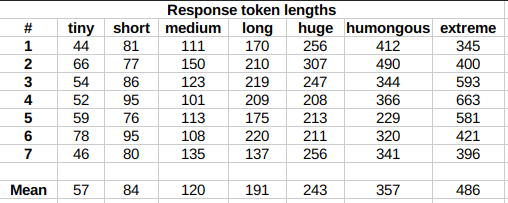
The length control effect is reproducible, but the messages will not necessarily follow
lengths very precisely, rather follow certain ranges on average, as seen in this table
with data from tests made with one reply at the beginning of the conversation:
lengths
Response length control appears to work well also deep into the conversation.
Suggested settings
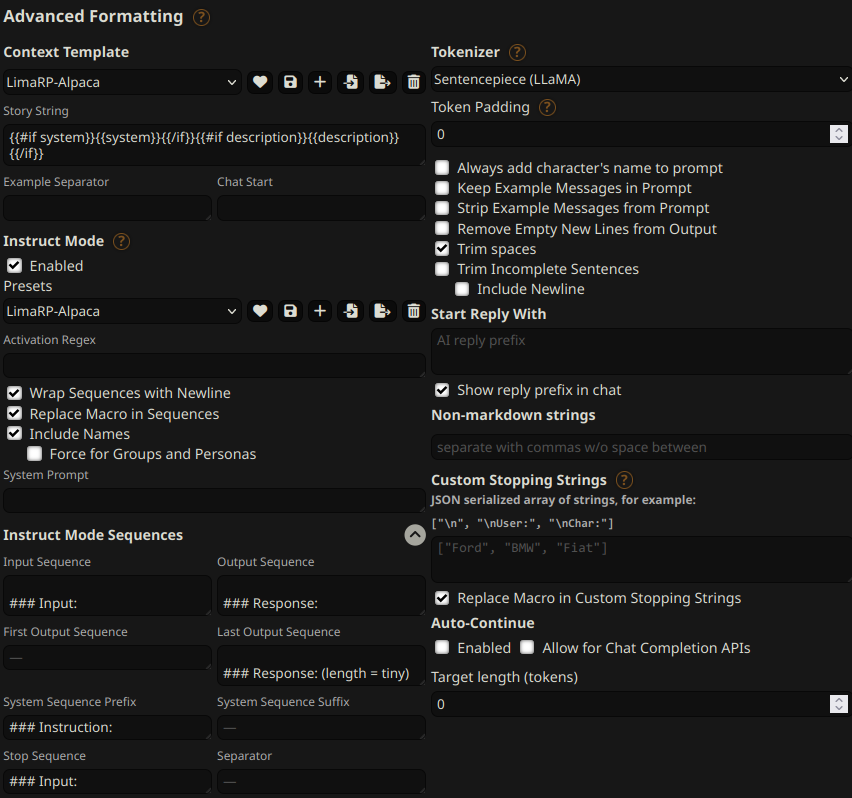
You can follow these instruction format settings in SillyTavern. Replace tiny with
your desired response length:
settings
Text generation settings
Extensive testing with Mistral has not been performed yet, but suggested starting text
generation settings may be: