Hunyuan-DiT : A Powerful Multi-Resolution Diffusion Transformer with Fine-Grained Chinese Understanding
This repo contains PyTorch model definitions, pre-trained weights and inference/sampling code for our paper exploring Hunyuan-DiT. You can find more visualizations on our project page.
Jun 13, 2024: :zap: HYDiT-v1.1 version is released, which mitigates the issue of image oversaturation and alleviates the watermark issue. Please check HunyuanDiT-v1.1 and
Distillation-v1.1 for more details.
Jun 06, 2024: :tada: Hunyuan-DiT is now available in ComfyUI. Please check ComfyUI for more details.
Jun 06, 2024: 🚀 We introduce Distillation version for Hunyuan-DiT acceleration, which achieves 50% acceleration on NVIDIA GPUs. Please check Distillation for more details.
Jun 05, 2024: 🤗 Hunyuan-DiT is now available in 🤗 Diffusers! Please check the example below.
Jun 04, 2024: :globe_with_meridians: Support Tencent Cloud links to download the pretrained models! Please check the links below.
May 22, 2024: 🚀 We introduce TensorRT version for Hunyuan-DiT acceleration, which achieves 47% acceleration on NVIDIA GPUs. Please check TensorRT-libs for instructions.
May 22, 2024: 💬 We support demo running multi-turn text2image generation now. Please check the script below.
🤖 Try it on the web
Welcome to our web-based Tencent Hunyuan Bot, where you can explore our innovative products! Just input the suggested prompts below or any other imaginative prompts containing drawing-related keywords to activate the Hunyuan text-to-image generation feature. Unleash your creativity and create any picture you desire, all for free!
You can use simple prompts similar to natural language text
画一只穿着西装的猪
draw a pig in a suit
生成一幅画,赛博朋克风,跑车
generate a painting, cyberpunk style, sports car
or multi-turn language interactions to create the picture.
画一个木制的鸟
draw a wooden bird
变成玻璃的
turn into glass
📑 Open-source Plan
Hunyuan-DiT (Text-to-Image Model)
Inference
Checkpoints
Distillation Version
TensorRT Version
Training
Lora
Controlnet (Pose, Canny, Depth, Tile)
IP-adapter
Hunyuan-DiT-XL checkpoints (0.7B model)
Caption model (Re-caption the raw image-text pairs)
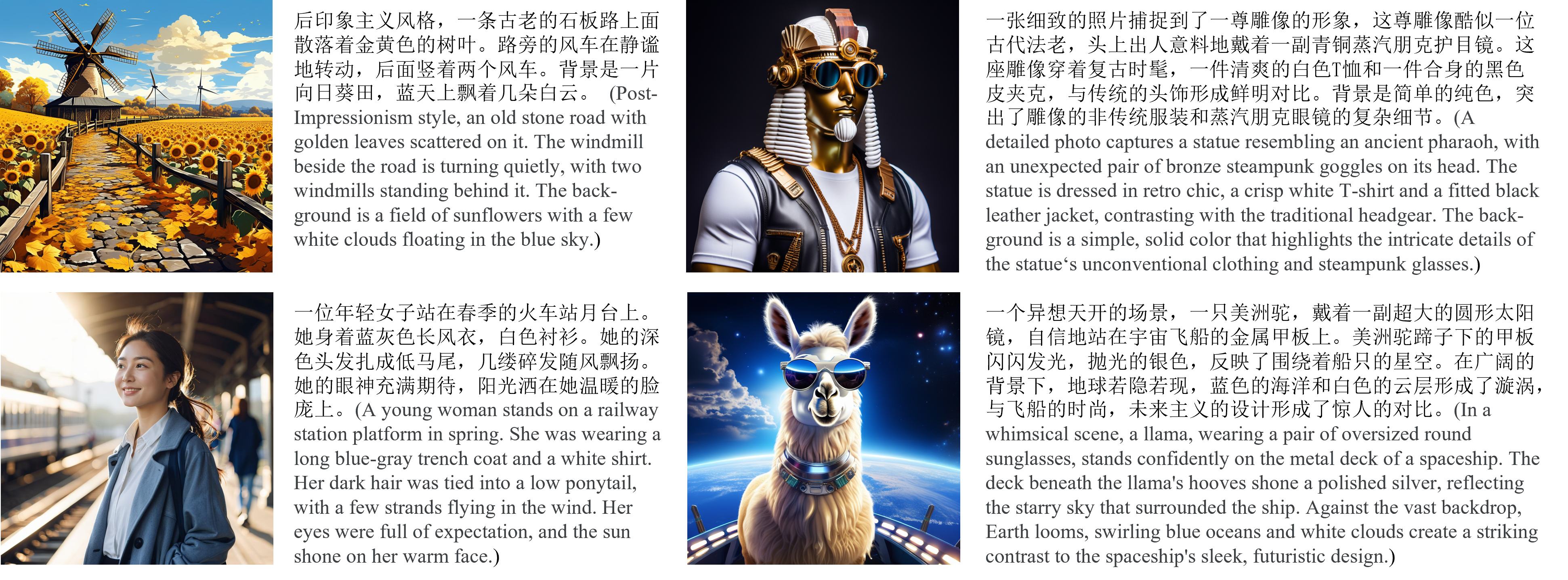
We present Hunyuan-DiT, a text-to-image diffusion transformer with fine-grained understanding of both English and Chinese. To construct Hunyuan-DiT, we carefully designed the transformer structure, text encoder, and positional encoding. We also build from scratch a whole data pipeline to update and evaluate data for iterative model optimization. For fine-grained language understanding, we train a Multimodal Large Language Model to refine the captions of the images. Finally, Hunyuan-DiT can perform multi-round multi-modal dialogue with users, generating and refining images according to the context.
Through our carefully designed holistic human evaluation protocol with more than 50 professional human evaluators, Hunyuan-DiT sets a new state-of-the-art in Chinese-to-image generation compared with other open-source models.
🎉 Hunyuan-DiT Key Features
Chinese-English Bilingual DiT Architecture
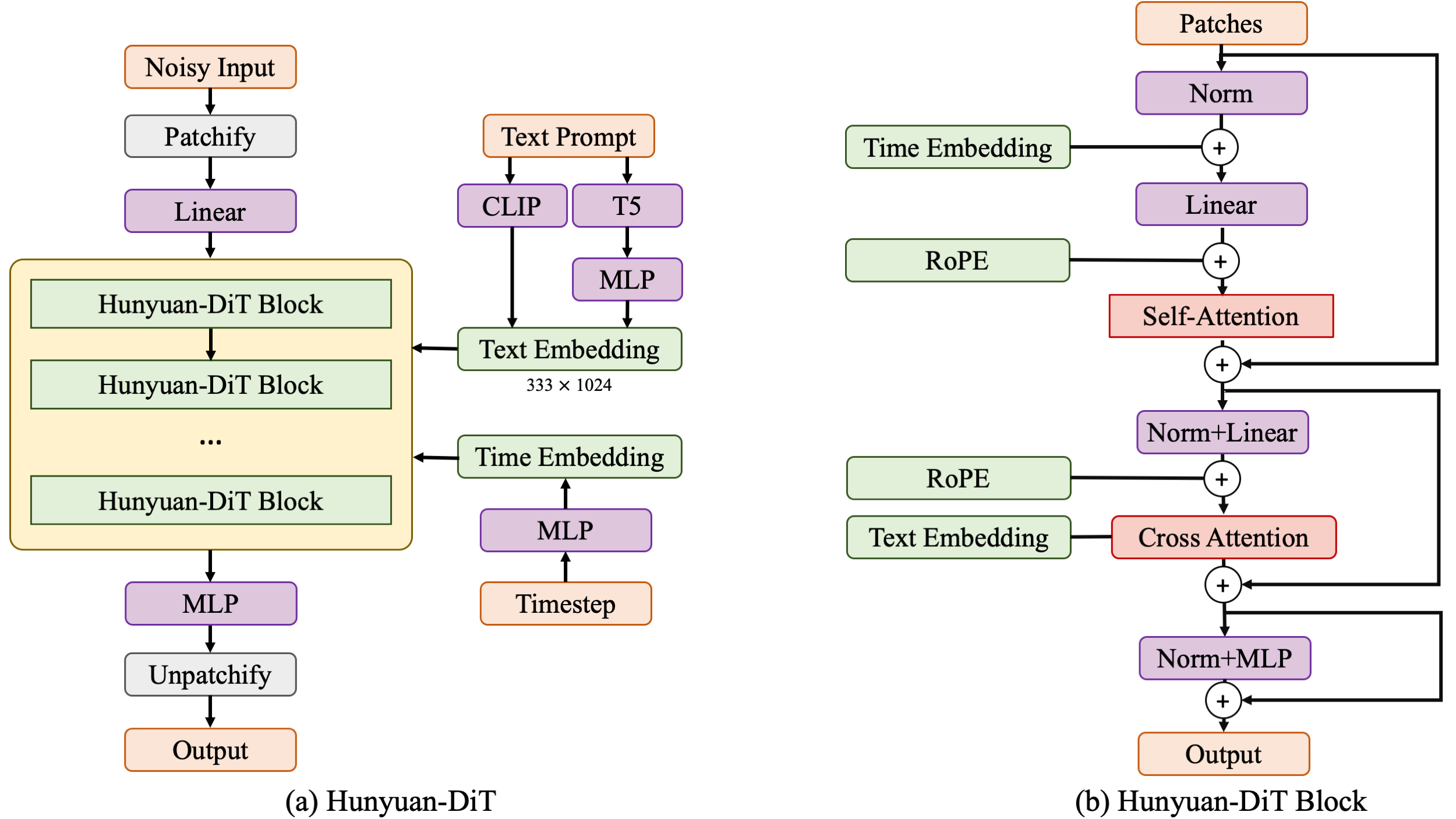
Hunyuan-DiT is a diffusion model in the latent space, as depicted in figure below. Following the Latent Diffusion Model, we use a pre-trained Variational Autoencoder (VAE) to compress the images into low-dimensional latent spaces and train a diffusion model to learn the data distribution with diffusion models. Our diffusion model is parameterized with a transformer. To encode the text prompts, we leverage a combination of pre-trained bilingual (English and Chinese) CLIP and multilingual T5 encoder.
Multi-turn Text2Image Generation
Understanding natural language instructions and performing multi-turn interaction with users are important for a
text-to-image system. It can help build a dynamic and iterative creation process that bring the user’s idea into reality
step by step. In this section, we will detail how we empower Hunyuan-DiT with the ability to perform multi-round
conversations and image generation. We train MLLM to understand the multi-round user dialogue
and output the new text prompt for image generation.
📈 Comparisons
In order to comprehensively compare the generation capabilities of HunyuanDiT and other models, we constructed a 4-dimensional test set, including Text-Image Consistency, Excluding AI Artifacts, Subject Clarity, Aesthetic. More than 50 professional evaluators performs the evaluation.
To download the model, first install the huggingface-cli. (Detailed instructions are available here.)
python -m pip install "huggingface_hub[cli]"
Then download the model using the following commands:
shell
1# Create a directory named 'ckpts' where the model will be saved, fulfilling the prerequisites for running the demo.2mkdir ckpts
3# Use the huggingface-cli tool to download the model.4# The download time may vary from 10 minutes to 1 hour depending on network conditions.5huggingface-cli download Tencent-Hunyuan/HunyuanDiT --local-dir ./ckpts
💡Tips for using huggingface-cli (network problem)
1. Using HF-Mirror
If you encounter slow download speeds in China, you can try a mirror to speed up the download process. For example,
huggingface-cli supports resuming downloads. If the download is interrupted, you can just rerun the download
command to resume the download process.
Note: If an No such file or directory: 'ckpts/.huggingface/.gitignore.lock' like error occurs during the download
process, you can ignore the error and rerun the download command.
All models will be automatically downloaded. For more information about the model, visit the Hugging Face repository here.
Refer to the commands below to prepare the training data.
Install dependencies
We offer an efficient data management library, named IndexKits, supporting the management of reading hundreds of millions of data during training, see more in docs.
Create a CSV file for training data with the fields listed in the table below.
Fields
Required
Description
Example
image_path
Required
image path
./dataset/porcelain/images/0.png
text_zh
Required
text
青花瓷风格,一只蓝色的鸟儿站在蓝色的花瓶上,周围点缀着白色花朵,背景是白色
md5
Optional
image md5 (Message Digest Algorithm 5)
d41d8cd98f00b204e9800998ecf8427e
width
Optional
image width
1024
height
Optional
image height
1024
⚠️ Optional fields like MD5, width, and height can be omitted. If omitted, the script below will automatically calculate them. This process can be time-consuming when dealing with large-scale training data.
We utilize Arrow for training data format, offering a standard and efficient in-memory data representation. A conversion script is provided to transform CSV files into Arrow format.
shell
1# 3 Data conversion
2python ./hydit/data_loader/csv2arrow.py ./dataset/porcelain/csvfile/image_text.csv ./dataset/porcelain/arrows
Data Selection and Configuration File Creation
We configure the training data through YAML files. In these files, you can set up standard data processing strategies for filtering, copying, deduplicating, and more regarding the training data. For more details, see docs.
For a sample file, please refer to file. For a full parameter configuration file, see file.
Create training data index file using YAML file.
shell
1# Single Resolution Data Preparation2 idk base -c dataset/yamls/porcelain.yaml -t dataset/porcelain/jsons/porcelain.json
34# Multi Resolution Data Preparation 5 idk multireso -c dataset/yamls/porcelain_mt.yaml -t dataset/porcelain/jsons/porcelain_mt.json
The directory structure for porcelain dataset is:
shell
1cd ./dataset
23 porcelain
4 ├──images/ (image files)5 │ ├──0.png
6 │ ├──1.png
7 │ ├──......8 ├──csvfile/ (csv files containing text-image pairs)9 │ ├──image_text.csv
10 ├──arrows/ (arrow files containing all necessary training data)11 │ ├──00000.arrow
12 │ ├──00001.arrow
13 │ ├──......14 ├──jsons/ (final training data index files whichread data from arrow files during training)15 │ ├──porcelain.json
16 │ ├──porcelain_mt.json
Full-parameter Training
To leverage DeepSpeed in training, you have the flexibility to control single-node / multi-node training by adjusting parameters such as --hostfile and --master_addr. For more details, see link.
shell
1# Single Resolution Data Preparation2PYTHONPATH=./ sh hydit/train.sh --index-file dataset/porcelain/jsons/porcelain.json
34# Multi Resolution Data Preparation5PYTHONPATH=./ sh hydit/train.sh --index-file dataset/porcelain/jsons/porcelain.json --multireso --reso-step 64
LoRA
We provide training and inference scripts for LoRA, detailed in the guidances.
🔑 Inference
Using Gradio
Make sure the conda environment is activated before running the following command.
shell
1# By default, we start a Chinese UI.2python app/hydit_app.py
34# Using Flash Attention for acceleration.5python app/hydit_app.py --infer-mode fa
67# You can disable the enhancement model if the GPU memory is insufficient.8# The enhancement will be unavailable until you restart the app without the `--no-enhance` flag. 9python app/hydit_app.py --no-enhance
1011# Start with English UI12python app/hydit_app.py --lang en
1314# Start a multi-turn T2I generation UI. 15# If your GPU memory is less than 32GB, use '--load-4bit' to enable 4-bit quantization, which requires at least 22GB of memory.16python app/multiTurnT2I_app.py
Then the demo can be accessed through http://0.0.0.0:443. It should be noted that the 0.0.0.0 here needs to be X.X.X.X with your server IP.
Using 🤗 Diffusers
Please install PyTorch version 2.0 or higher in advance to satisfy the requirements of the specified version of the diffusers library.
Install 🤗 diffusers, ensuring that the version is at least 0.28.1:
You can generate images with both Chinese and English prompts using the following Python script:
py
1import torch
2from diffusers import HunyuanDiTPipeline
34pipe = HunyuanDiTPipeline.from_pretrained("Tencent-Hunyuan/HunyuanDiT-Diffusers", torch_dtype=torch.float16)5pipe.to("cuda")67# You may also use English prompt as HunyuanDiT supports both English and Chinese8# prompt = "An astronaut riding a horse"9prompt ="一个宇航员在骑马"10image = pipe(prompt).images[0]
You can use our distilled model to generate images even faster:
py
1import torch
2from diffusers import HunyuanDiTPipeline
34pipe = HunyuanDiTPipeline.from_pretrained("Tencent-Hunyuan/HunyuanDiT-Diffusers-Distilled", torch_dtype=torch.float16)5pipe.to("cuda")67# You may also use English prompt as HunyuanDiT supports both English and Chinese8# prompt = "An astronaut riding a horse"9prompt ="一个宇航员在骑马"10image = pipe(prompt, num_inference_steps=25).images[0]
We list some more useful configurations for easy usage:
Argument
Default
Description
--prompt
None
The text prompt for image generation
--image-size
1024 1024
The size of the generated image
--seed
42
The random seed for generating images
--infer-steps
100
The number of steps for sampling
--negative
-
The negative prompt for image generation
--infer-mode
torch
The inference mode (torch, fa, or trt)
--sampler
ddpm
The diffusion sampler (ddpm, ddim, or dpmms)
--no-enhance
False
Disable the prompt enhancement model
--model-root
ckpts
The root directory of the model checkpoints
--load-key
ema
Load the student model or EMA model (ema or module)
--load-4bit
Fasle
Load DialogGen model with 4bit quantization
Using ComfyUI
We provide several commands to quick start:
shell
1# Download comfyui code2git clone https://github.com/comfyanonymous/ComfyUI.git
34# Install torch, torchvision, torchaudio5pip installtorch==2.0.1 torchvision==0.15.2 torchaudio==2.0.2 --index-url https://download.pytorch.org/whl/cu117
67# Install Comfyui essential python package8cd ComfyUI
9pip install -r requirements.txt
1011# ComfyUI has been successfully installed!1213# Download model weight as before or link the existing model folder to ComfyUI.14python -m pip install"huggingface_hub[cli]"15mkdir models/hunyuan
16huggingface-cli download Tencent-Hunyuan/HunyuanDiT --local-dir ./models/hunyuan/ckpts
1718# Move to the ComfyUI custom_nodes folder and copy comfyui-hydit folder from HunyuanDiT Repo.19cd custom_nodes
20cp -r ${HunyuanDiT}/comfyui-hydit ./
21cd comfyui-hydit
2223# Install some essential python Package.24pip install -r requirements.txt
2526# Our tool has been successfully installed!2728# Go to ComfyUI main folder29cd../..30# Run the ComfyUI Lauch command31python main.py --listen --port 803233# Running ComfyUI successfully!
We provide TensorRT version of HunyuanDiT for inference acceleration (faster than flash attention).
See Tencent-Hunyuan/TensorRT-libs for more details.
We provide Distillation version of HunyuanDiT for inference acceleration.
See Tencent-Hunyuan/Distillation for more details.
🔗 BibTeX
If you find Hunyuan-DiT or DialogGen useful for your research and applications, please cite using this BibTeX:
BibTeX
1@misc{li2024hunyuandit,
2 title={Hunyuan-DiT: A Powerful Multi-Resolution Diffusion Transformer with Fine-Grained Chinese Understanding},
3 author={Zhimin Li and Jianwei Zhang and Qin Lin and Jiangfeng Xiong and Yanxin Long and Xinchi Deng and Yingfang Zhang and Xingchao Liu and Minbin Huang and Zedong Xiao and Dayou Chen and Jiajun He and Jiahao Li and Wenyue Li and Chen Zhang and Rongwei Quan and Jianxiang Lu and Jiabin Huang and Xiaoyan Yuan and Xiaoxiao Zheng and Yixuan Li and Jihong Zhang and Chao Zhang and Meng Chen and Jie Liu and Zheng Fang and Weiyan Wang and Jinbao Xue and Yangyu Tao and Jianchen Zhu and Kai Liu and Sihuan Lin and Yifu Sun and Yun Li and Dongdong Wang and Mingtao Chen and Zhichao Hu and Xiao Xiao and Yan Chen and Yuhong Liu and Wei Liu and Di Wang and Yong Yang and Jie Jiang and Qinglin Lu},
4 year={2024},
5 eprint={2405.08748},
6 archivePrefix={arXiv},
7 primaryClass={cs.CV}
8}
910@article{huang2024dialoggen,
11 title={DialogGen: Multi-modal Interactive Dialogue System for Multi-turn Text-to-Image Generation},
12 author={Huang, Minbin and Long, Yanxin and Deng, Xinchi and Chu, Ruihang and Xiong, Jiangfeng and Liang, Xiaodan and Cheng, Hong and Lu, Qinglin and Liu, Wei},
13 journal={arXiv preprint arXiv:2403.08857},
14 year={2024}
15}