Views
No views yet
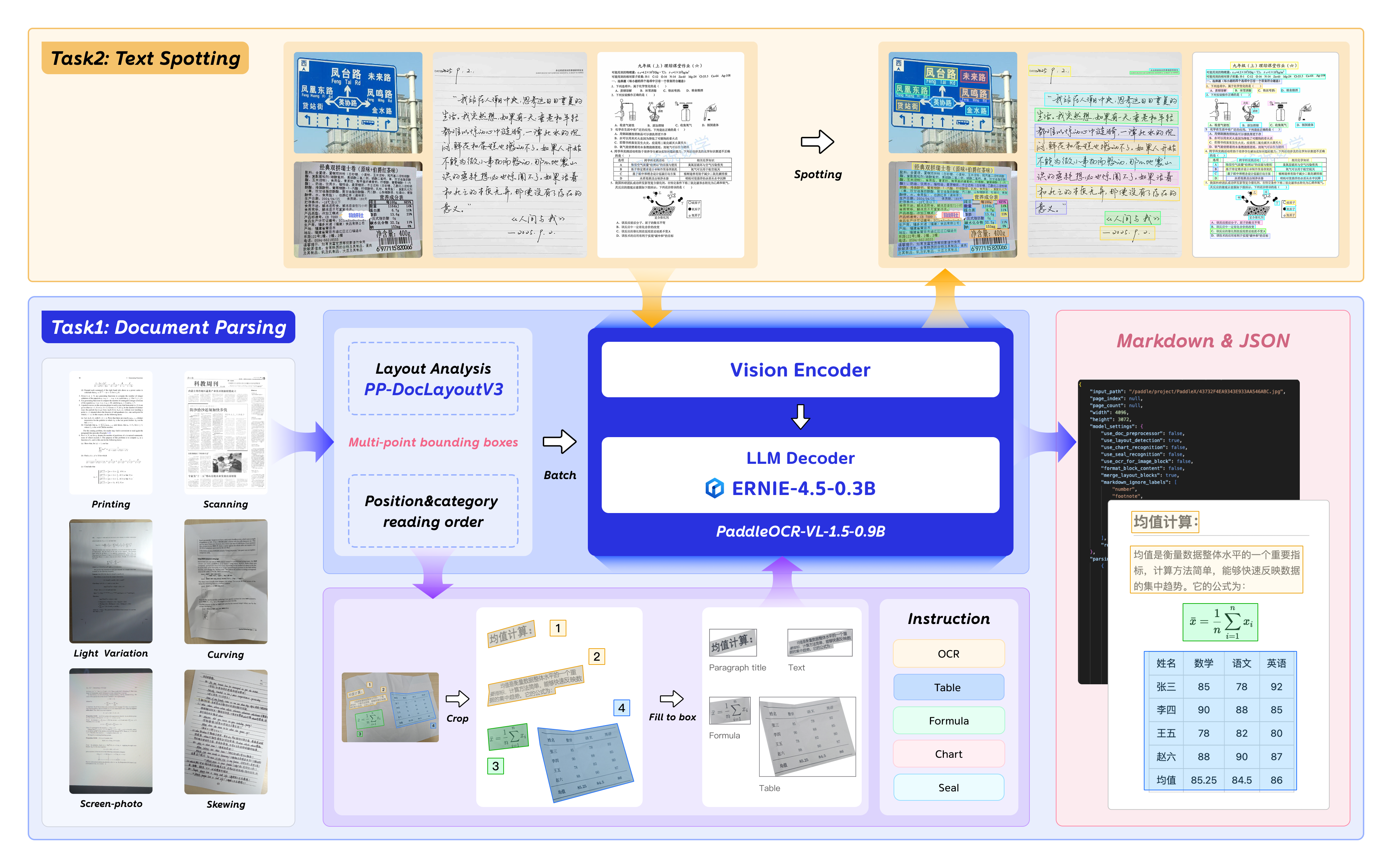
2026.01.29 🚀 We release PaddleOCR-VL-1.5, —a Multi-Task 0.9B VLM for Robust In-the-Wild Document Parsing.1# The following command installs the PaddlePaddle version for CUDA 12.6. For other CUDA versions and the CPU version, please refer to https://www.paddlepaddle.org.cn/en/install/quick?docurl=/documentation/docs/en/develop/install/pip/linux-pip_en.html
2python -m pip install paddlepaddle-gpu==3.2.1 -i https://www.paddlepaddle.org.cn/packages/stable/cu126/
3python -m pip install -U "paddleocr[doc-parser]"Please ensure that you install PaddlePaddle framework version 3.2.1 or above, along with the special version of safetensors. For macOS users, please use Docker to set up the environment.
paddleocr doc_parser -i https://paddle-model-ecology.bj.bcebos.com/paddlex/imgs/demo_image/paddleocr_vl_demo.png1from paddleocr import PaddleOCRVL
2pipeline = PaddleOCRVL()
3output = pipeline.predict("https://paddle-model-ecology.bj.bcebos.com/paddlex/imgs/demo_image/paddleocr_vl_demo.png")
4for res in output:
5 res.print()
6 res.save_to_json(save_path="output")
7 res.save_to_markdown(save_path="output")1docker run \
2 --rm \
3 --gpus all \
4 --network host \
5 ccr-2vdh3abv-pub.cnc.bj.baidubce.com/paddlepaddle/paddleocr-genai-vllm-server:latest-nvidia-gpu \
6 paddleocr genai_server --model_name PaddleOCR-VL-1.5-0.9B --host 0.0.0.0 --port 8080 --backend vllm1paddleocr doc_parser \
2 -i https://paddle-model-ecology.bj.bcebos.com/paddlex/imgs/demo_image/paddleocr_vl_demo.png \
3 --vl_rec_backend vllm-server \
4 --vl_rec_server_url http://127.0.0.1:8080/v11from paddleocr import PaddleOCRVL
2pipeline = PaddleOCRVL(vl_rec_backend="vllm-server", vl_rec_server_url="http://127.0.0.1:8080/v1")
3output = pipeline.predict("https://paddle-model-ecology.bj.bcebos.com/paddlex/imgs/demo_image/paddleocr_vl_demo.png")
4for res in output:
5 res.print()
6 res.save_to_json(save_path="output")
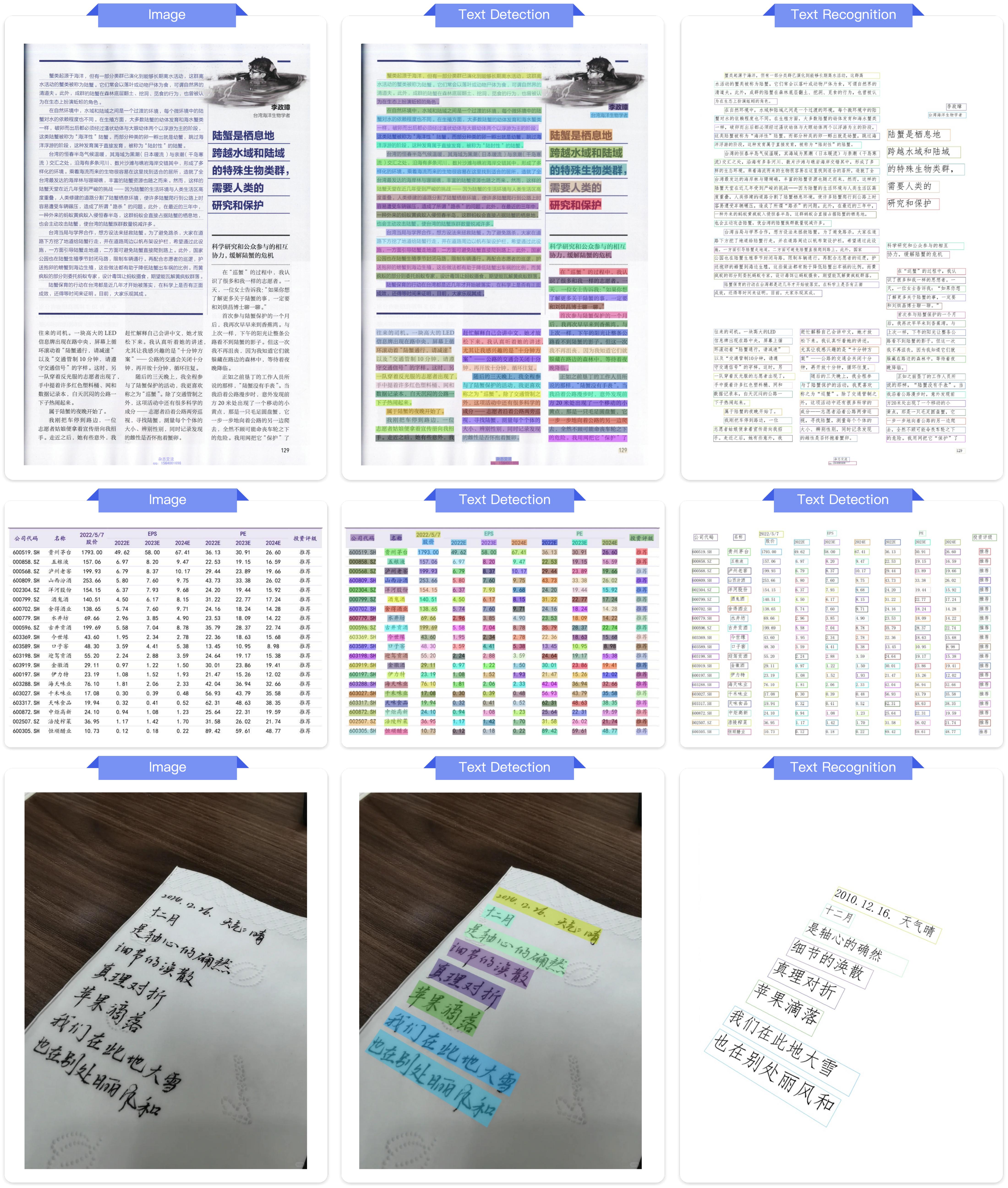
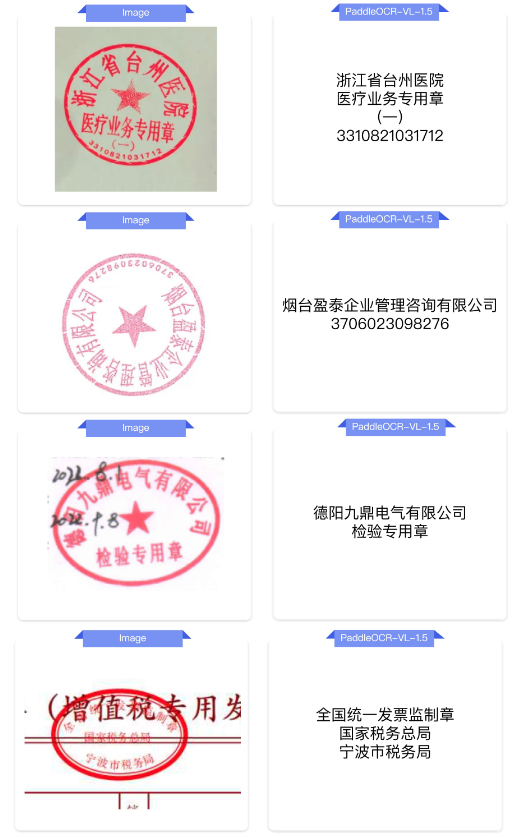
7 res.save_to_markdown(save_path="output")transformers library, supporting comprehensive text spotting and the recognition of complex elements including formulas, tables, charts, and seals. Below is a simple script we provide to support inference using the PaddleOCR-VL-1.5-0.9B model with transformers.[!NOTE] Note: We currently recommend using the official method for inference, as it is faster and supports page-level document parsing. The example code below only supports element-level recognition and text spotting.
1# ensure the transformers v5 is installed
2python -m pip install "transformers>=5.0.0"1from PIL import Image
2import torch
3from transformers import AutoProcessor, AutoModelForImageTextToText
4
5# ---- Settings ----
6model_path = "PaddlePaddle/PaddleOCR-VL-1.5"
7image_path = "test.png"
8task = "ocr" # Options: 'ocr' | 'table' | 'chart' | 'formula' | 'spotting' | 'seal'
9# ------------------
10
11# ---- Image Preprocessing For Spotting ----
12image = Image.open(image_path).convert("RGB")
13orig_w, orig_h = image.size
14spotting_upscale_threshold = 1500
15
16if task == "spotting" and orig_w < spotting_upscale_threshold and orig_h < spotting_upscale_threshold:
17 process_w, process_h = orig_w * 2, orig_h * 2
18 try:
19 resample_filter = Image.Resampling.LANCZOS
20 except AttributeError:
21 resample_filter = Image.LANCZOS
22 image = image.resize((process_w, process_h), resample_filter)
23
24# Set max_pixels: use 1605632 for spotting, otherwise use default ~1M pixels
25max_pixels = 2048 * 28 * 28 if task == "spotting" else 1280 * 28 * 28
26# ---------------------------
27
28# -------- Inference --------
29DEVICE = "cuda" if torch.cuda.is_available() else "cpu"
30PROMPTS = {
31 "ocr": "OCR:",
32 "table": "Table Recognition:",
33 "formula": "Formula Recognition:",
34 "chart": "Chart Recognition:",
35 "spotting": "Spotting:",
36 "seal": "Seal Recognition:",
37}
38
39model = AutoModelForImageTextToText.from_pretrained(model_path, torch_dtype=torch.bfloat16).to(DEVICE).eval()
40processor = AutoProcessor.from_pretrained(model_path)
41
42messages = [
43 {
44 "role": "user",
45 "content": [
46 {"type": "image", "image": image},
47 {"type": "text", "text": PROMPTS[task]},
48 ]
49 }
50]
51inputs = processor.apply_chat_template(
52 messages,
53 add_generation_prompt=True,
54 tokenize=True,
55 return_dict=True,
56 return_tensors="pt",
57 images_kwargs={"size": {"shortest_edge": processor.image_processor.min_pixels, "longest_edge": max_pixels}},
58).to(model.device)
59
60outputs = model.generate(**inputs, max_new_tokens=512)
61result = processor.decode(outputs[0][inputs["input_ids"].shape[-1]:-1])
62print(result)
63# ---------------------------1# ensure the flash-attn2 is installed
2pip install flash-attn --no-build-isolationmodel = AutoModelForImageTextToText.from_pretrained(model_path, torch_dtype=torch.bfloat16, attn_implementation="flash_attention_2").to(DEVICE).eval()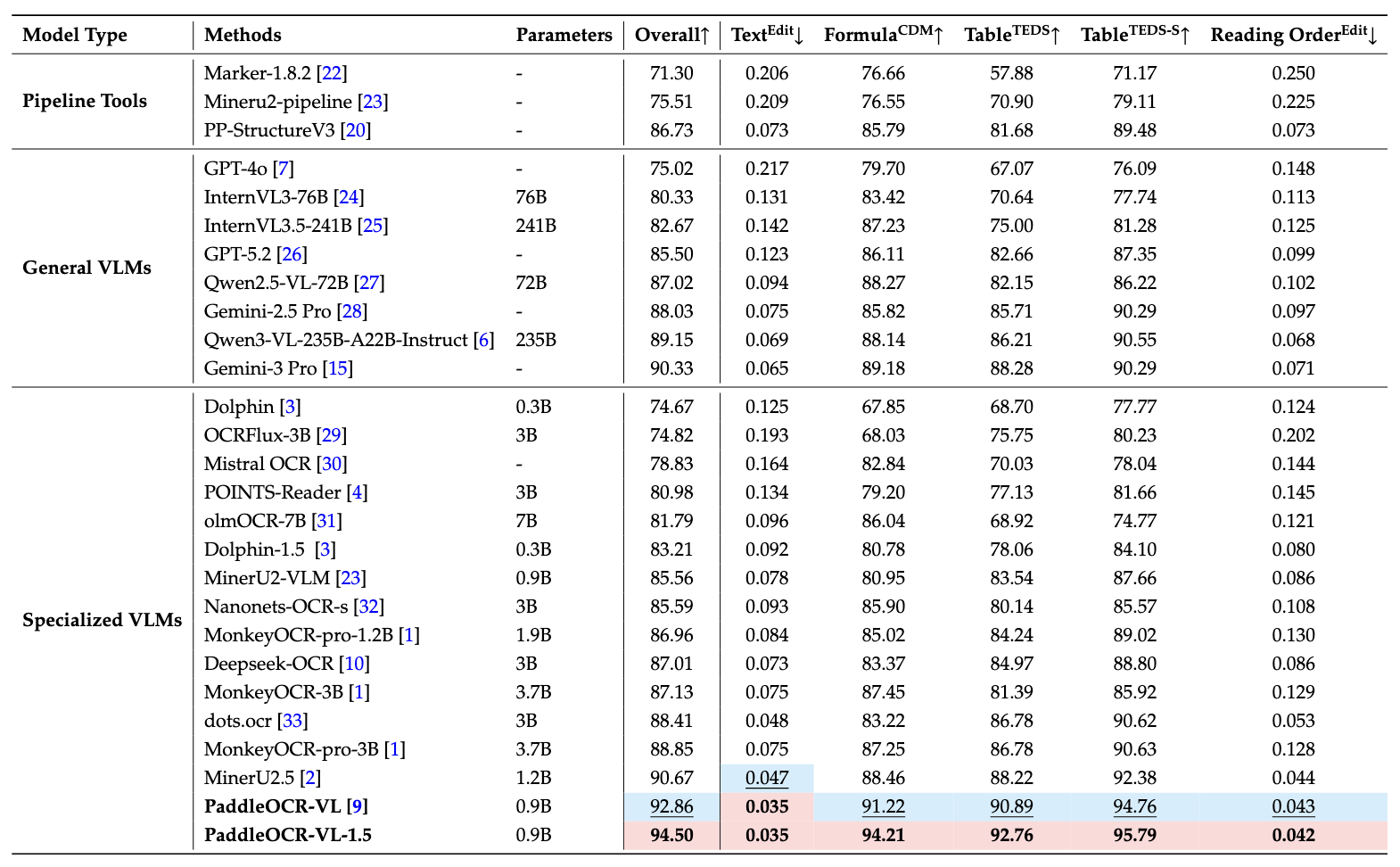
Notes:
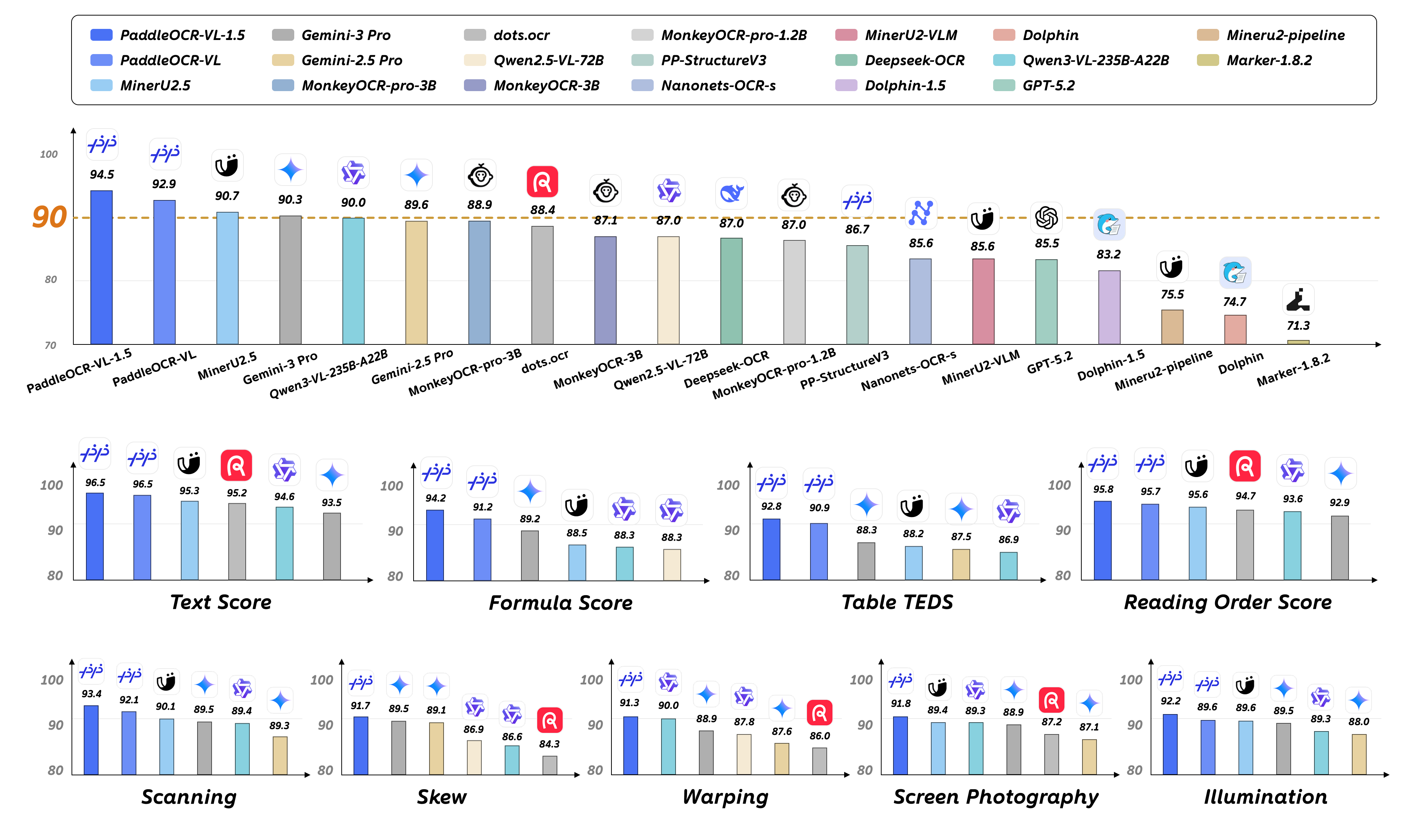
- Performance metrics are cited from the OmniDocBench official leaderboard, except for Gemini-3 Pro, Qwen3-VL-235B-A22B-Instruct and our model, which were evaluated independently.
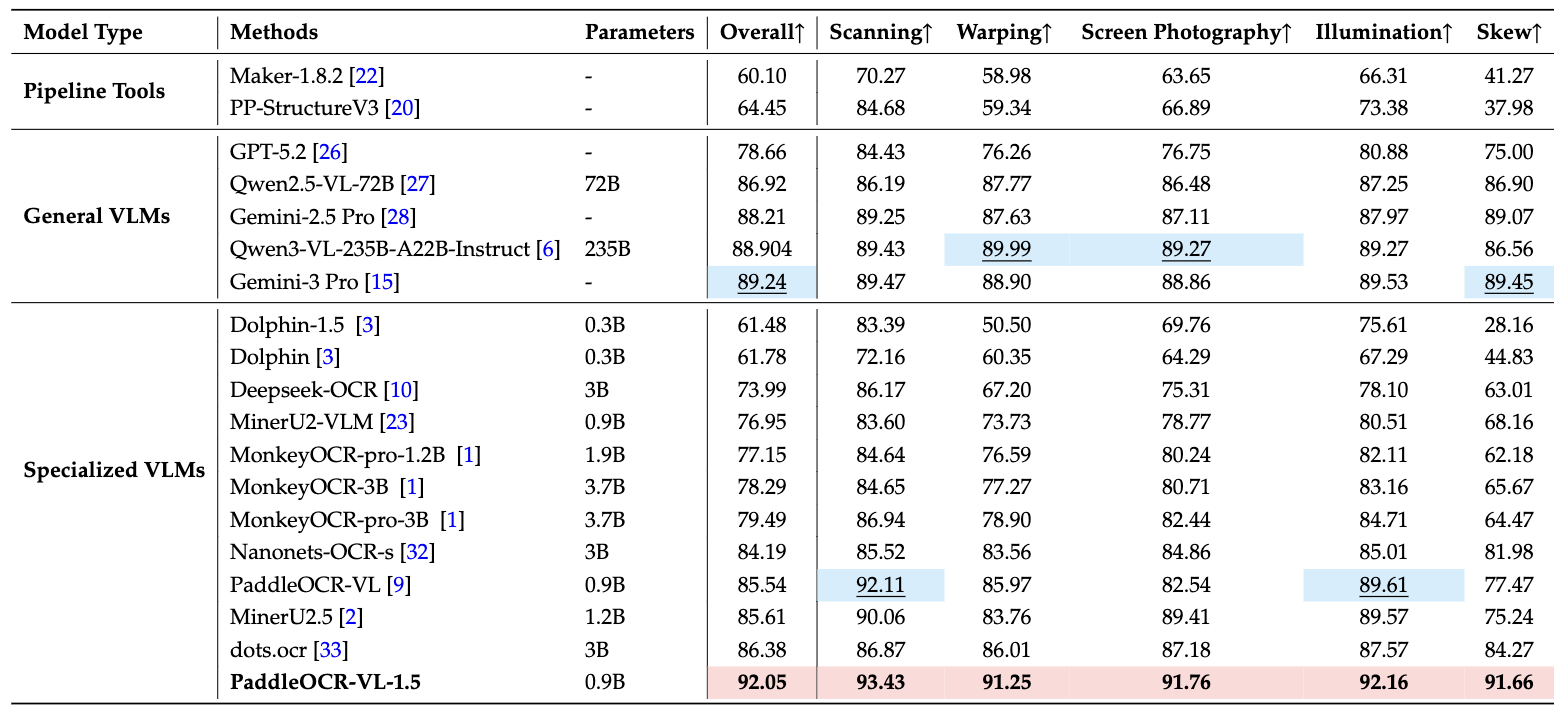
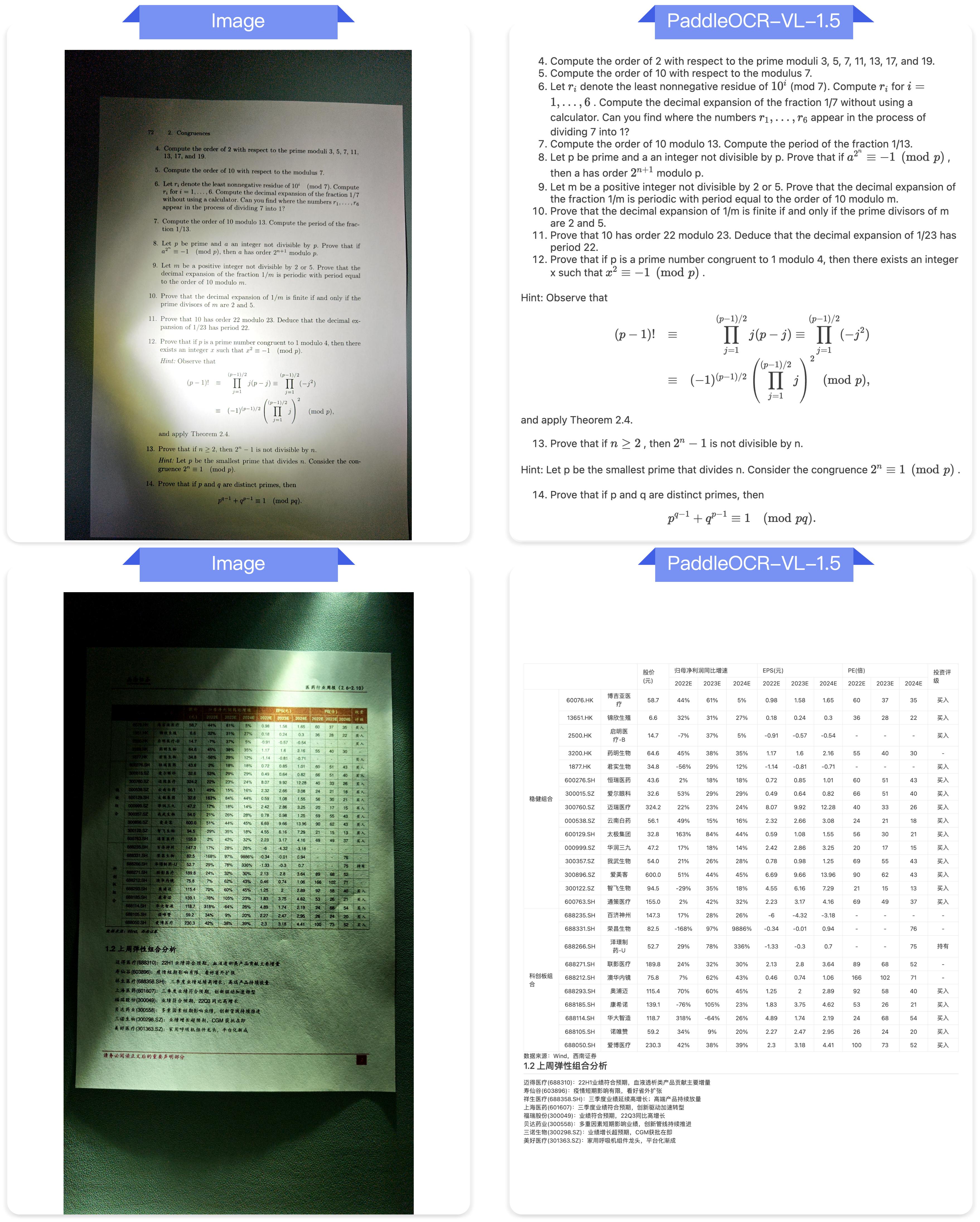
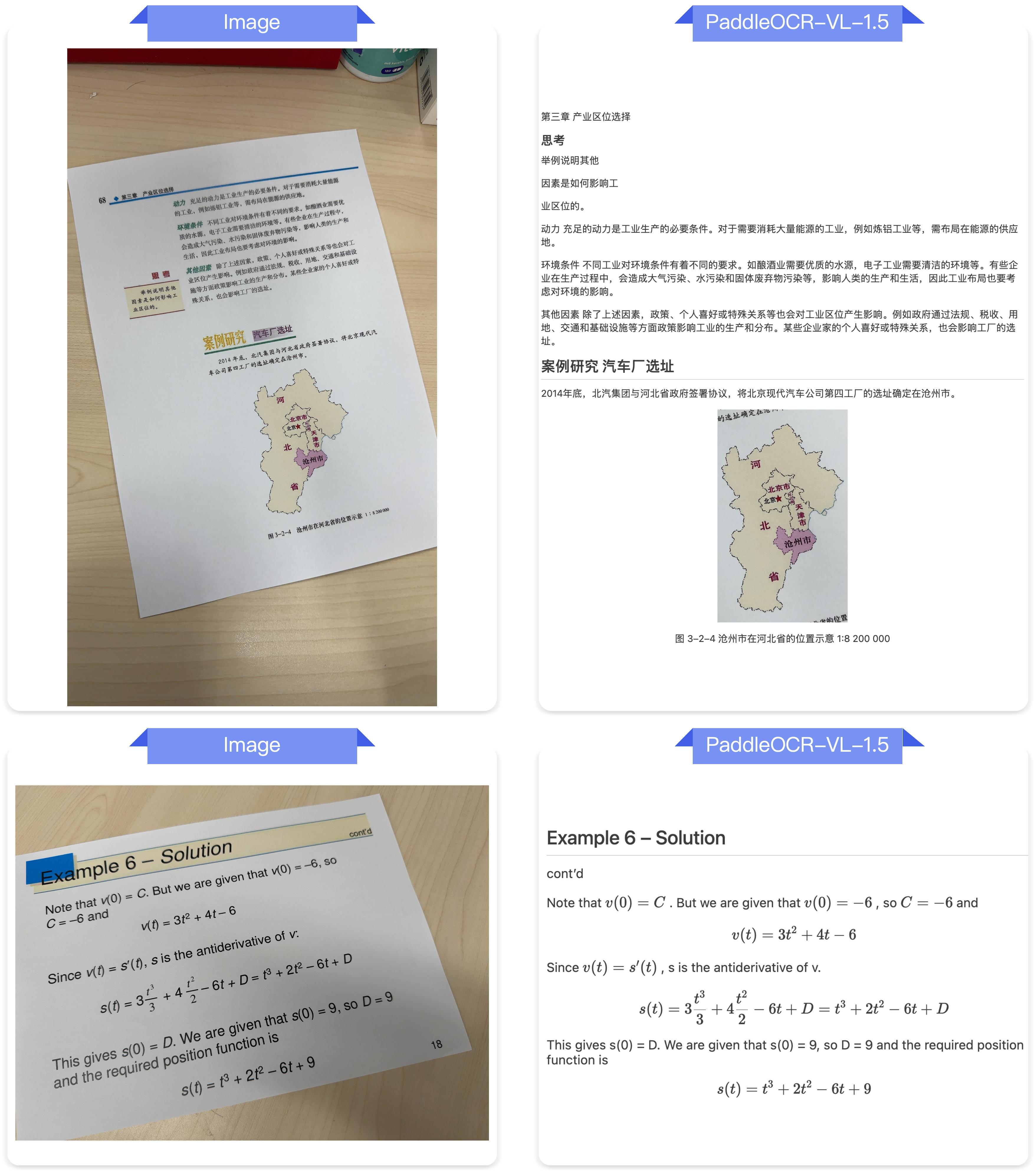
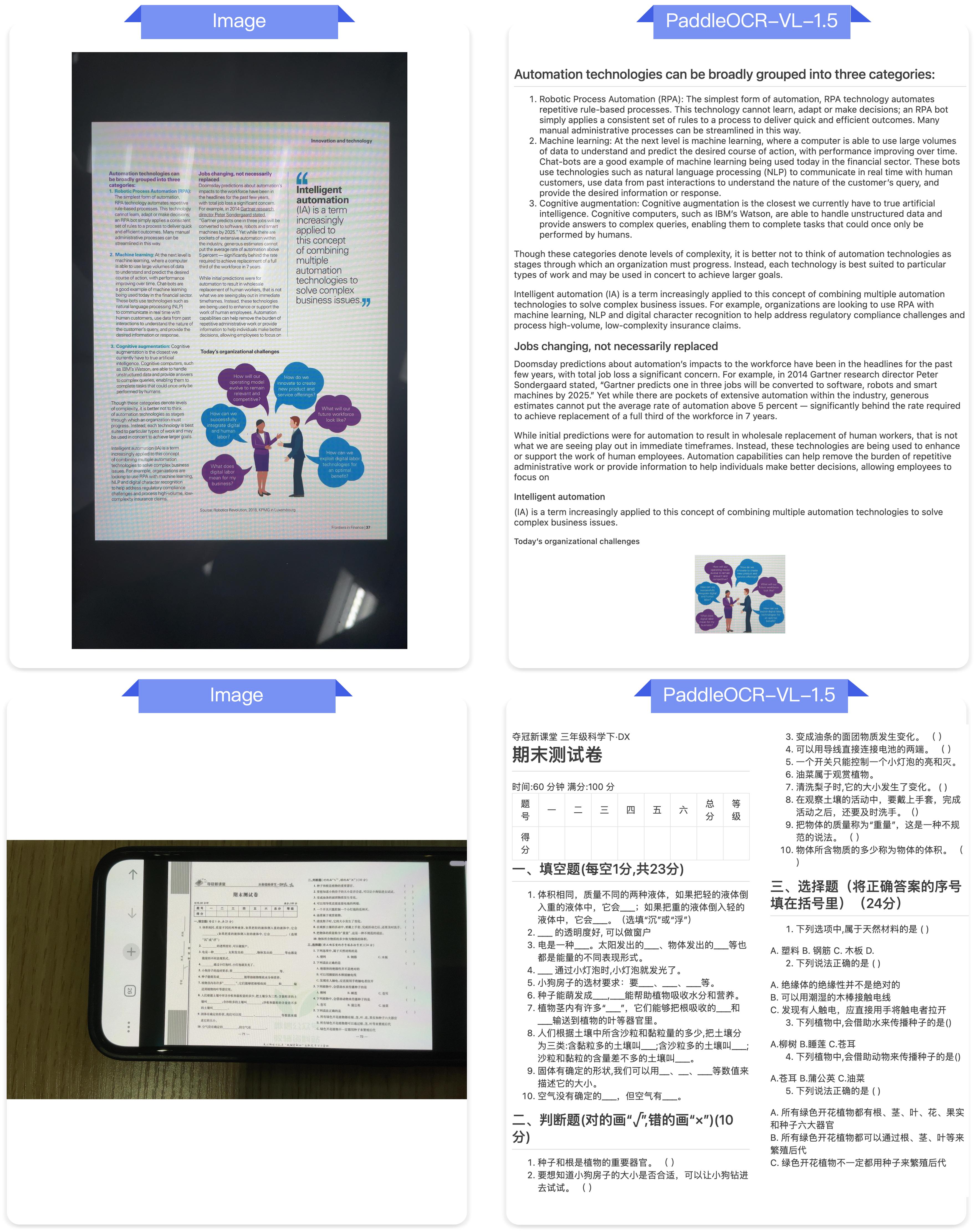
Notes:
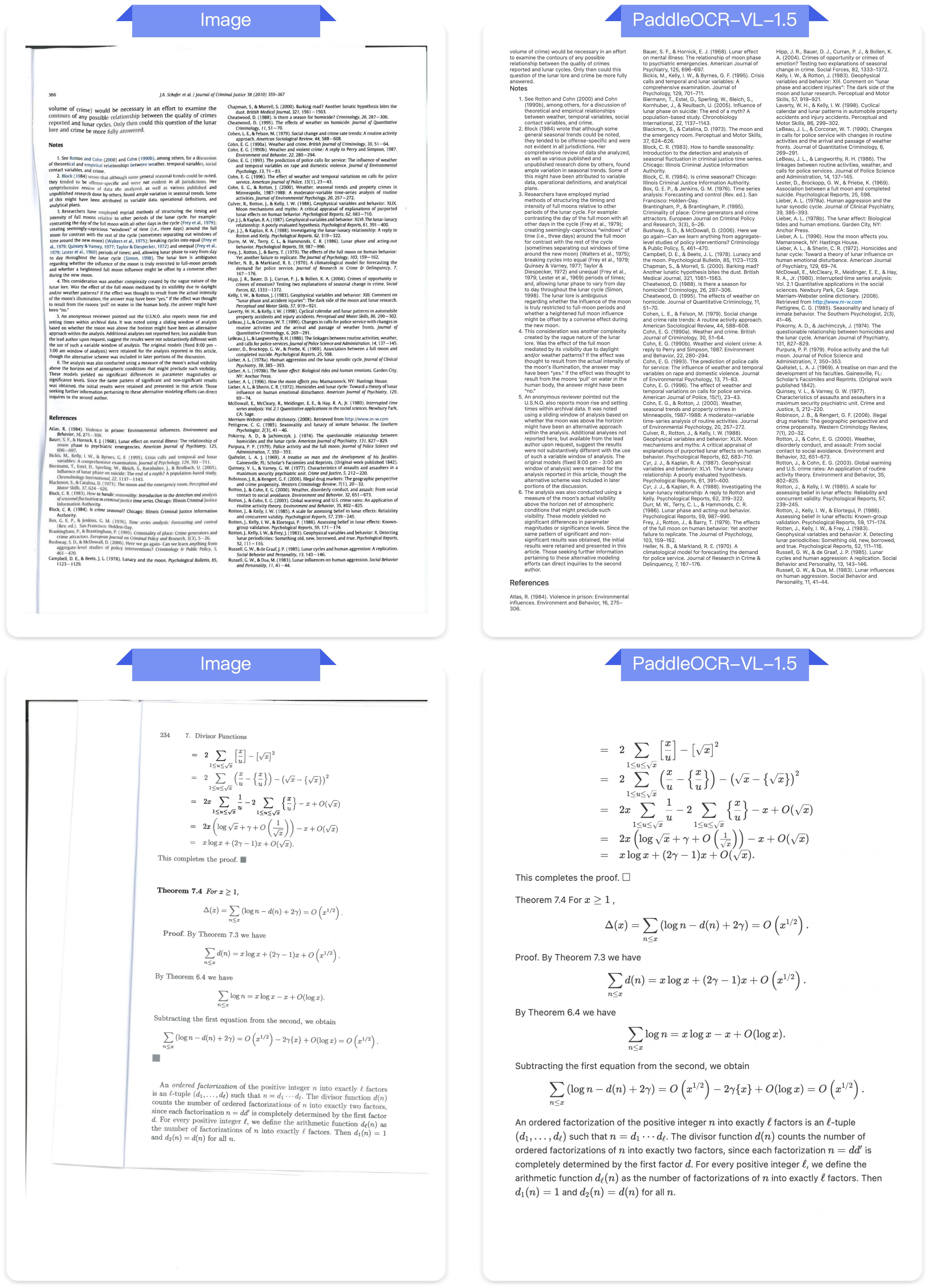
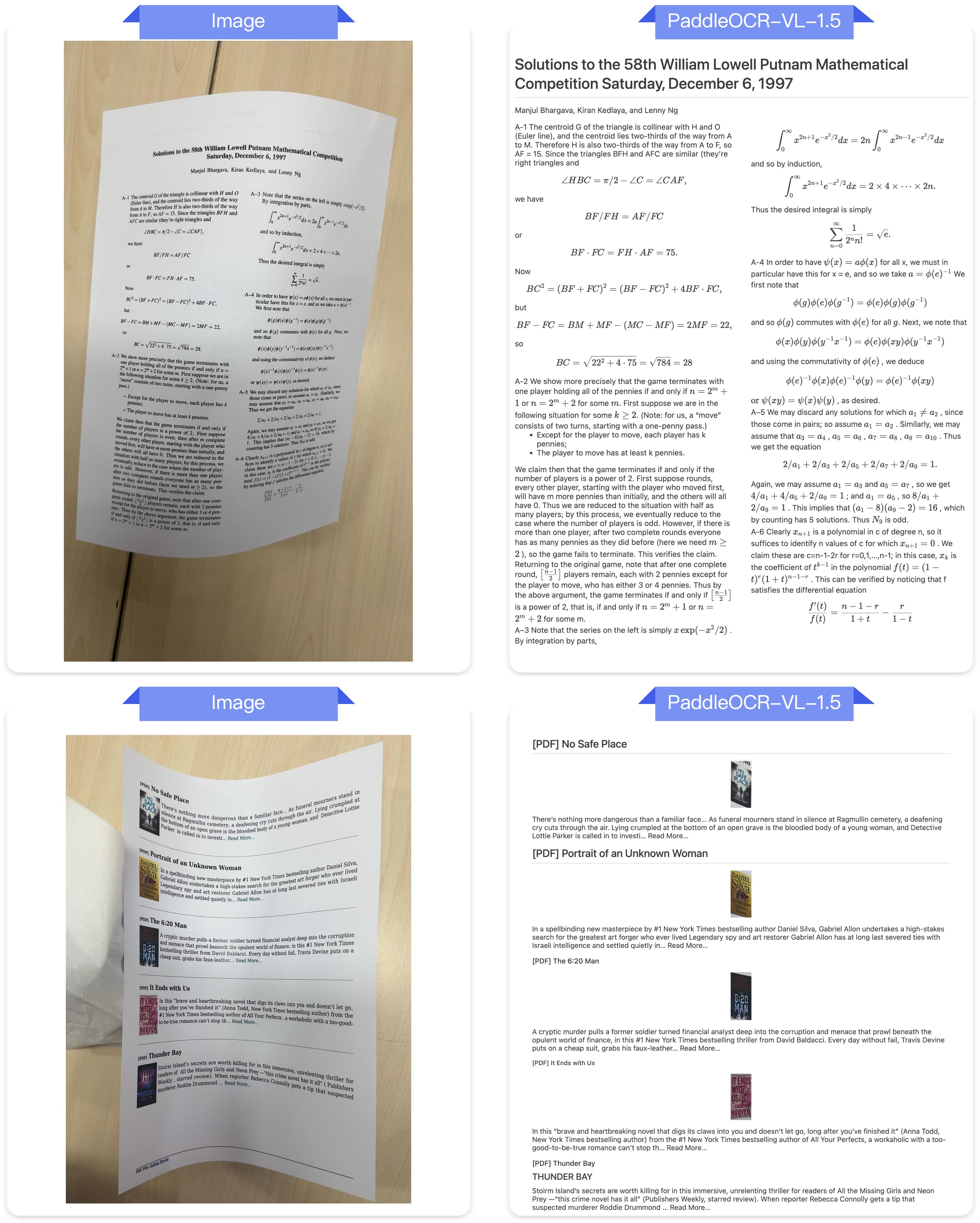
- Real5-OmniDocBench is a brand-new benchmark oriented toward real-world scenarios, which we constructed based on the OmniDocBench v1.5 dataset. The dataset comprises five distinct scenarios: Scanning, Warping, Screen-photography, Illumination, and Skew. For further details, please refer to Real5-OmniDocBench.
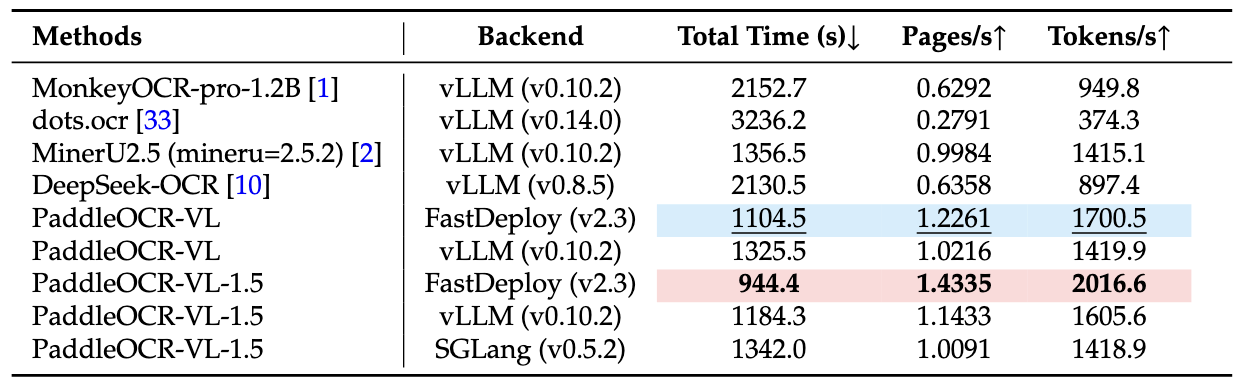
Notes:
- End-to-End Inference Performance Comparison on OmniDocBench v1.5. PDF documents were processed in batches of 512 on a single NVIDIA A100 GPU. The reported end-to-end runtime includes both PDF rendering and Markdown generation. All methods rely on their built-in PDF parsing modules and default DPI settings to reflect out-of-the-box performance.
1@misc{cui2026paddleocrvl15multitask09bvlm,
2      title={PaddleOCR-VL-1.5: Towards a Multi-Task 0.9B VLM for Robust In-the-Wild Document Parsing},
3      author={Cheng Cui and Ting Sun and Suyin Liang and Tingquan Gao and Zelun Zhang and Jiaxuan Liu and Xueqing Wang and Changda Zhou and Hongen Liu and Manhui Lin and Yue Zhang and Yubo Zhang and Yi Liu and Dianhai Yu and Yanjun Ma},
4      year={2026},
5      eprint={2601.21957},
6      archivePrefix={arXiv},
7      primaryClass={cs.CV},
8      url={https://arxiv.org/abs/2601.21957},
9}