


Views
No views yet
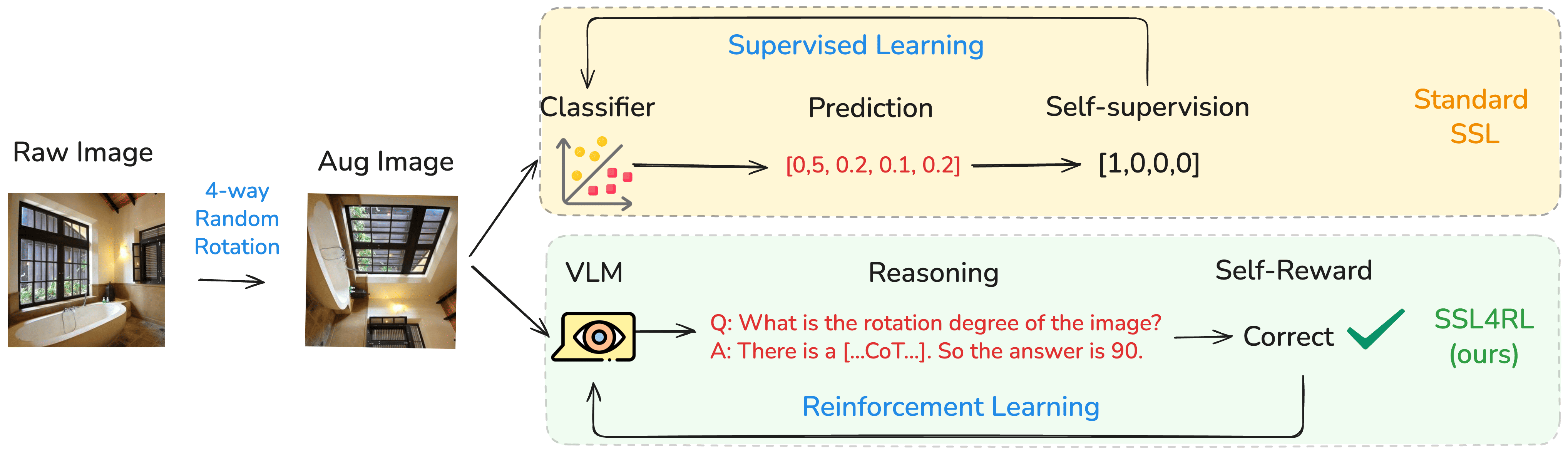
SSL4RL-MMBench-Position-3B is trained on the Position Task, which is built on the benchmark HuggingFaceM4/MMBench.
For training details, we recommend readers to our Paper SSL4RL: Revisiting Self-supervised Learning as Intrinsic Reward for Visual-Language Reasoning.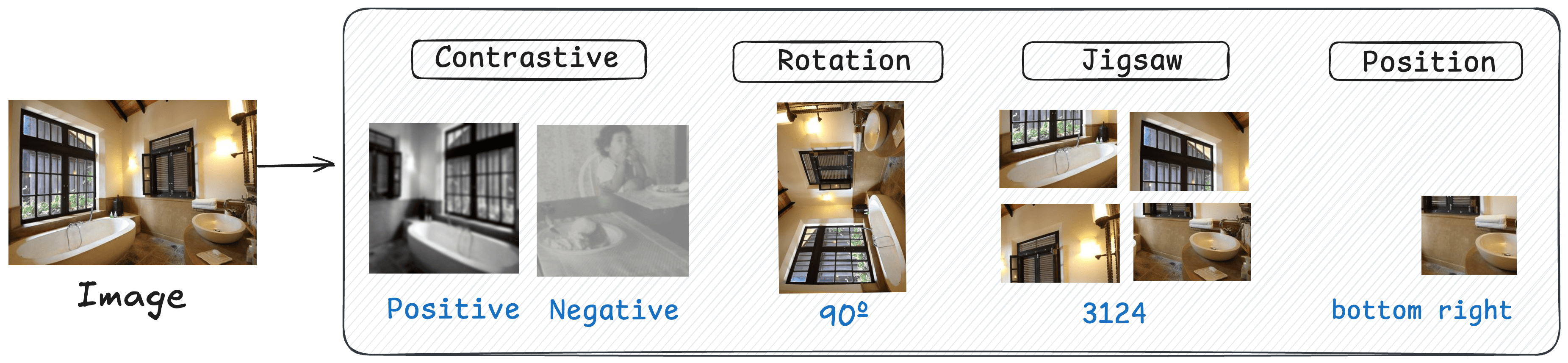
| Category | Model | Logical | Relation | Attribute | Coarse | Cross-Inst. | Single-Inst. | Average |
|---|---|---|---|---|---|---|---|---|
| Base | Qwen2.5-VL-3B | 61.77 | 41.54 | 76.62 | 73.55 | 64.32 | 82.06 | 72.99 |
| SSL4RL | Rotation | 65.84 | 80.54 | 83.89 | 80.21 | 71.53 | 84.76 | 80.38 |
| ~ | Jigsaw | 62.86 | 74.51 | 80.35 | 77.92 | 67.82 | 84.31 | 77.82 |
| ~ | Contrastive | 61.12 | 73.42 | 71.81 | 65.38 | 58.39 | 78.50 | 69.27 |
| ~ | Position | 67.65 | 77.19 | 82.22 | 82.15 | 66.51 | 85.39 | 80.08 |
| Maximal Improvement | ↑ 5.88 | ↑ 39.00 | ↑ 6.77 | ↑ 8.60 | ↑ 7.21 | ↑ 3.33 | ↑ 7.39 |
SSL4RL-MMBench-Position-3B has been in the latest Hugging face transformers and we advise you to build from source with command:pip install git+https://github.com/huggingface/transformers accelerateKeyError: 'qwen2_5_vl'SSL4RL-MMBench-Position-3B with 🤗 Transformers.SSL4RL-MMBench-Position-3B has been in the latest Hugging face transformers and we advise you to build from source with command:pip install git+https://github.com/huggingface/transformers accelerateKeyError: 'qwen2_5_vl'1# It's highly recommanded to use `[decord]` feature for faster video loading.
2pip install qwen-vl-utils[decord]==0.0.8decord from PyPI. In that case, you can use pip install qwen-vl-utils which will fall back to using torchvision for video processing. However, you can still install decord from source to get decord used when loading video.transformers and qwen_vl_utils:1from transformers import Qwen2_5_VLForConditionalGeneration, AutoTokenizer, AutoProcessor
2from qwen_vl_utils import process_vision_info
3
4# default: Load the model on the available device(s)
5model = Qwen2_5_VLForConditionalGeneration.from_pretrained(
6 "PKU-ML/SSL4RL-MMBench-Position-3B", torch_dtype="auto", device_map="auto"
7)
8
9# We recommend enabling flash_attention_2 for better acceleration and memory saving, especially in multi-image and video scenarios.
10# model = Qwen2_5_VLForConditionalGeneration.from_pretrained(
11# "PKU-ML/SSL4RL-MMBench-Position-3B",
12# torch_dtype=torch.bfloat16,
13# attn_implementation="flash_attention_2",
14# device_map="auto",
15# )
16
17# default processer
18processor = AutoProcessor.from_pretrained("PKU-ML/SSL4RL-MMBench-Position-3B")
19
20# The default range for the number of visual tokens per image in the model is 4-16384.
21# You can set min_pixels and max_pixels according to your needs, such as a token range of 256-1280, to balance performance and cost.
22# min_pixels = 256*28*28
23# max_pixels = 1280*28*28
24# processor = AutoProcessor.from_pretrained("PKU-ML/SSL4RL-MMBench-Position-3B", min_pixels=min_pixels, max_pixels=max_pixels)
25
26messages = [
27 {
28 "role": "user",
29 "content": [
30 {
31 "type": "image",
32 "image": "https://qianwen-res.oss-cn-beijing.aliyuncs.com/Qwen-VL/assets/demo.jpeg",
33 },
34 {"type": "text", "text": "Describe this image."},
35 ],
36 }
37]
38
39# Preparation for inference
40text = processor.apply_chat_template(
41 messages, tokenize=False, add_generation_prompt=True
42)
43image_inputs, video_inputs = process_vision_info(messages)
44inputs = processor(
45 text=[text],
46 images=image_inputs,
47 videos=video_inputs,
48 padding=True,
49 return_tensors="pt",
50)
51inputs = inputs.to("cuda")
52
53# Inference: Generation of the output
54generated_ids = model.generate(**inputs, max_new_tokens=128)
55generated_ids_trimmed = [
56 out_ids[len(in_ids) :] for in_ids, out_ids in zip(inputs.input_ids, generated_ids)
57]
58output_text = processor.batch_decode(
59 generated_ids_trimmed, skip_special_tokens=True, clean_up_tokenization_spaces=False
60)
61print(output_text)1# Messages containing multiple images and a text query
2messages = [
3 {
4 "role": "user",
5 "content": [
6 {"type": "image", "image": "file:///path/to/image1.jpg"},
7 {"type": "image", "image": "file:///path/to/image2.jpg"},
8 {"type": "text", "text": "Identify the similarities between these images."},
9 ],
10 }
11]
12
13# Preparation for inference
14text = processor.apply_chat_template(
15 messages, tokenize=False, add_generation_prompt=True
16)
17image_inputs, video_inputs = process_vision_info(messages)
18inputs = processor(
19 text=[text],
20 images=image_inputs,
21 videos=video_inputs,
22 padding=True,
23 return_tensors="pt",
24)
25inputs = inputs.to("cuda")
26
27# Inference
28generated_ids = model.generate(**inputs, max_new_tokens=128)
29generated_ids_trimmed = [
30 out_ids[len(in_ids) :] for in_ids, out_ids in zip(inputs.input_ids, generated_ids)
31]
32output_text = processor.batch_decode(
33 generated_ids_trimmed, skip_special_tokens=True, clean_up_tokenization_spaces=False
34)
35print(output_text)1# Sample messages for batch inference
2messages1 = [
3 {
4 "role": "user",
5 "content": [
6 {"type": "image", "image": "file:///path/to/image1.jpg"},
7 {"type": "image", "image": "file:///path/to/image2.jpg"},
8 {"type": "text", "text": "What are the common elements in these pictures?"},
9 ],
10 }
11]
12messages2 = [
13 {"role": "system", "content": "You are a helpful assistant."},
14 {"role": "user", "content": "Who are you?"},
15]
16# Combine messages for batch processing
17messages = [messages1, messages2]
18
19# Preparation for batch inference
20texts = [
21 processor.apply_chat_template(msg, tokenize=False, add_generation_prompt=True)
22 for msg in messages
23]
24image_inputs, video_inputs = process_vision_info(messages)
25inputs = processor(
26 text=texts,
27 images=image_inputs,
28 videos=video_inputs,
29 padding=True,
30 return_tensors="pt",
31)
32inputs = inputs.to("cuda")
33
34# Batch Inference
35generated_ids = model.generate(**inputs, max_new_tokens=128)
36generated_ids_trimmed = [
37 out_ids[len(in_ids) :] for in_ids, out_ids in zip(inputs.input_ids, generated_ids)
38]
39output_texts = processor.batch_decode(
40 generated_ids_trimmed, skip_special_tokens=True, clean_up_tokenization_spaces=False
41)
42print(output_texts)1# You can directly insert a local file path, a URL, or a base64-encoded image into the position where you want in the text.
2## Local file path
3messages = [
4 {
5 "role": "user",
6 "content": [
7 {"type": "image", "image": "file:///path/to/your/image.jpg"},
8 {"type": "text", "text": "Describe this image."},
9 ],
10 }
11]
12## Image URL
13messages = [
14 {
15 "role": "user",
16 "content": [
17 {"type": "image", "image": "http://path/to/your/image.jpg"},
18 {"type": "text", "text": "Describe this image."},
19 ],
20 }
21]
22## Base64 encoded image
23messages = [
24 {
25 "role": "user",
26 "content": [
27 {"type": "image", "image": "data:image;base64,/9j/..."},
28 {"type": "text", "text": "Describe this image."},
29 ],
30 }
31]@article{guo2025ssl4rl,
title={SSL4RL: Revisiting Self-supervised Learning as Intrinsic Reward for Visual-Language Reasoning},
author={Guo, Xiaojun and Zhou, Runyu and Wang, Yifei and Zhang, Qi and Zhang, Chenheng and Jegelka, Stefanie and Wang, Xiaohan and Chai, Jiajun and Yin, Guojun and Lin, Wei and others},
journal={arXiv preprint arXiv:2510.16416},
year={2025}
}