Ultra-Low-Bit Quantization with IQ-DynamicGate (1-2 bit)
Our latest quantization method introduces precision-adaptive quantization for ultra-low-bit models (1-2 bit), with benchmark-proven improvements on Llama-3-8B. This approach uses layer-specific strategies to preserve accuracy while maintaining extreme memory efficiency.
Benchmark Context
All tests conducted on Llama-3-8B-Instruct using:
Standard perplexity evaluation pipeline
2048-token context window
Same prompt set across all quantizations
Method
Dynamic Precision Allocation:
First/Last 25% of layers → IQ4_XS (selected layers)
Middle 50% → IQ2_XXS/IQ3_S (increase efficiency)
Critical Component Protection:
Embeddings/output layers use Q5_K
Reduces error propagation by 38% vs standard 1-2bit
Quantization Performance Comparison (Llama-3-8B)
Quantization
Standard PPL
DynamicGate PPL
Δ PPL
Std Size
DG Size
Δ Size
Std Speed
DG Speed
IQ2_XXS
11.30
9.84
-12.9%
2.5G
2.6G
+0.1G
234s
246s
IQ2_XS
11.72
11.63
-0.8%
2.7G
2.8G
+0.1G
242s
246s
IQ2_S
14.31
9.02
-36.9%
2.7G
2.9G
+0.2G
238s
244s
IQ1_M
27.46
15.41
-43.9%
2.2G
2.5G
+0.3G
206s
212s
IQ1_S
53.07
32.00
-39.7%
2.1G
2.4G
+0.3G
184s
209s
Key:
PPL = Perplexity (lower is better)
Δ PPL = Percentage change from standard to DynamicGate
Speed = Inference time (CPU avx2, 2048 token context)
✔ Cpu and Edge Devices where 1-2bit errors can be tolerated
✔ Research into ultra-low-bit quantization
Choosing the Right Model Format
Selecting the correct model format depends on your hardware capabilities and memory constraints.
BF16 (Brain Float 16) – Use if BF16 acceleration is available
A 16-bit floating-point format designed for faster computation while retaining good precision.
Provides similar dynamic range as FP32 but with lower memory usage.
Recommended if your hardware supports BF16 acceleration (check your device's specs).
Ideal for high-performance inference with reduced memory footprint compared to FP32.
📌 Use BF16 if:
✔ Your hardware has native BF16 support (e.g., newer GPUs, TPUs).
✔ You want higher precision while saving memory.
✔ You plan to requantize the model into another format.
📌 Avoid BF16 if:
❌ Your hardware does not support BF16 (it may fall back to FP32 and run slower).
❌ You need compatibility with older devices that lack BF16 optimization.
F16 (Float 16) – More widely supported than BF16
A 16-bit floating-point high precision but with less of range of values than BF16.
Works on most devices with FP16 acceleration support (including many GPUs and some CPUs).
Slightly lower numerical precision than BF16 but generally sufficient for inference.
📌 Use F16 if:
✔ Your hardware supports FP16 but not BF16.
✔ You need a balance between speed, memory usage, and accuracy.
✔ You are running on a GPU or another device optimized for FP16 computations.
📌 Avoid F16 if:
❌ Your device lacks native FP16 support (it may run slower than expected).
❌ You have memory limitations.
Quantized Models (Q4_K, Q6_K, Q8, etc.) – For CPU & Low-VRAM Inference
Quantization reduces model size and memory usage while maintaining as much accuracy as possible.
Lower-bit models (Q4_K) → Best for minimal memory usage, may have lower precision.
Higher-bit models (Q6_K, Q8_0) → Better accuracy, requires more memory.
📌 Use Quantized Models if:
✔ You are running inference on a CPU and need an optimized model.
✔ Your device has low VRAM and cannot load full-precision models.
✔ You want to reduce memory footprint while keeping reasonable accuracy.
📌 Avoid Quantized Models if:
❌ You need maximum accuracy (full-precision models are better for this).
❌ Your hardware has enough VRAM for higher-precision formats (BF16/F16).
Very Low-Bit Quantization (IQ3_XS, IQ3_S, IQ3_M, Q4_K, Q4_0)
These models are optimized for extreme memory efficiency, making them ideal for low-power devices or large-scale deployments where memory is a critical constraint.
IQ3_XS: Ultra-low-bit quantization (3-bit) with extreme memory efficiency.
Use case: Best for ultra-low-memory devices where even Q4_K is too large.
Trade-off: Lower accuracy compared to higher-bit quantizations.
IQ3_S: Small block size for maximum memory efficiency.
Use case: Best for low-memory devices where IQ3_XS is too aggressive.
IQ3_M: Medium block size for better accuracy than IQ3_S.
Use case: Suitable for low-memory devices where IQ3_S is too limiting.
Q4_K: 4-bit quantization with block-wise optimization for better accuracy.
Use case: Best for low-memory devices where Q6_K is too large.
Q4_0: Pure 4-bit quantization, optimized for ARM devices.
Use case: Best for ARM-based devices or low-memory environments.
Summary Table: Model Format Selection
Model Format
Precision
Memory Usage
Device Requirements
Best Use Case
BF16
Highest
High
BF16-supported GPU/CPUs
High-speed inference with reduced memory
F16
High
High
FP16-supported devices
GPU inference when BF16 isn't available
Q4_K
Medium Low
Low
CPU or Low-VRAM devices
Best for memory-constrained environments
Q6_K
Medium
Moderate
CPU with more memory
Better accuracy while still being quantized
Q8_0
High
Moderate
CPU or GPU with enough VRAM
Best accuracy among quantized models
IQ3_XS
Very Low
Very Low
Ultra-low-memory devices
Extreme memory efficiency and low accuracy
Q4_0
Low
Low
ARM or low-memory devices
llama.cpp can optimize for ARM devices
Included Files & Details
typhoon-ocr-7b-bf16.gguf
Model weights preserved in BF16.
Use this if you want to requantize the model into a different format.
Best if your device supports BF16 acceleration.
typhoon-ocr-7b-f16.gguf
Model weights stored in F16.
Use if your device supports FP16, especially if BF16 is not available.
typhoon-ocr-7b-bf16-q8_0.gguf
Output & embeddings remain in BF16.
All other layers quantized to Q8_0.
Use if your device supports BF16 and you want a quantized version.
typhoon-ocr-7b-f16-q8_0.gguf
Output & embeddings remain in F16.
All other layers quantized to Q8_0.
typhoon-ocr-7b-q4_k.gguf
Output & embeddings quantized to Q8_0.
All other layers quantized to Q4_K.
Good for CPU inference with limited memory.
typhoon-ocr-7b-q4_k_s.gguf
Smallest Q4_K variant, using less memory at the cost of accuracy.
Best for very low-memory setups.
typhoon-ocr-7b-q6_k.gguf
Output & embeddings quantized to Q8_0.
All other layers quantized to Q6_K .
typhoon-ocr-7b-q8_0.gguf
Fully Q8 quantized model for better accuracy.
Requires more memory but offers higher precision.
typhoon-ocr-7b-iq3_xs.gguf
IQ3_XS quantization, optimized for extreme memory efficiency.
Best for ultra-low-memory devices.
typhoon-ocr-7b-iq3_m.gguf
IQ3_M quantization, offering a medium block size for better accuracy.
Suitable for low-memory devices.
typhoon-ocr-7b-q4_0.gguf
Pure Q4_0 quantization, optimized for ARM devices.
Best for low-memory environments.
Prefer IQ4_NL for better accuracy.
🚀 If you find these models useful
❤ Please click "Like" if you find this useful!
Help me test my AI-Powered Network Monitor Assistant with quantum-ready security checks:
👉 Quantum Network Monitor
💬 How to test:
Choose an AI assistant type:
TurboLLM (GPT-4o-mini)
HugLLM (Hugginface Open-source)
TestLLM (Experimental CPU-only)
What I’m Testing
I’m pushing the limits of small open-source models for AI network monitoring, specifically:
Function calling against live network services
How small can a model go while still handling:
Automated Nmap scans
Quantum-readiness checks
Network Monitoring tasks
🟡 TestLLM – Current experimental model (llama.cpp on 2 CPU threads):
✅ Zero-configuration setup
⏳ 30s load time (slow inference but no API costs)
🔧 Help wanted! If you’re into edge-device AI, let’s collaborate!
Other Assistants
🟢 TurboLLM – Uses gpt-4o-mini for:
Create custom cmd processors to run .net code on Quantum Network Monitor Agents
Real-time network diagnostics and monitoring
Security Audits
Penetration testing (Nmap/Metasploit)
🔵 HugLLM – Latest Open-source models:
🌐 Runs on Hugging Face Inference API
💡 Example commands to you could test:
"Give me info on my websites SSL certificate"
"Check if my server is using quantum safe encyption for communication"
"Run a comprehensive security audit on my server"
'"Create a cmd processor to .. (what ever you want)" Note you need to install a Quantum Network Monitor Agent to run the .net code from. This is a very flexible and powerful feature. Use with caution!
Final Word
I fund the servers used to create these model files, run the Quantum Network Monitor service, and pay for inference from Novita and OpenAI—all out of my own pocket. All the code behind the model creation and the Quantum Network Monitor project is open source. Feel free to use whatever you find helpful.
If you appreciate the work, please consider buying me a coffee ☕. Your support helps cover service costs and allows me to raise token limits for everyone.
I'm also open to job opportunities or sponsorship.
Thank you! 😊
Typhoon-OCR-7B: A bilingual document parsing model built specifically for real-world documents in Thai and English inspired by models like olmOCR based on Qwen2.5-VL-Instruction.
Markdown with embedded tables and layout-aware structures
Performance
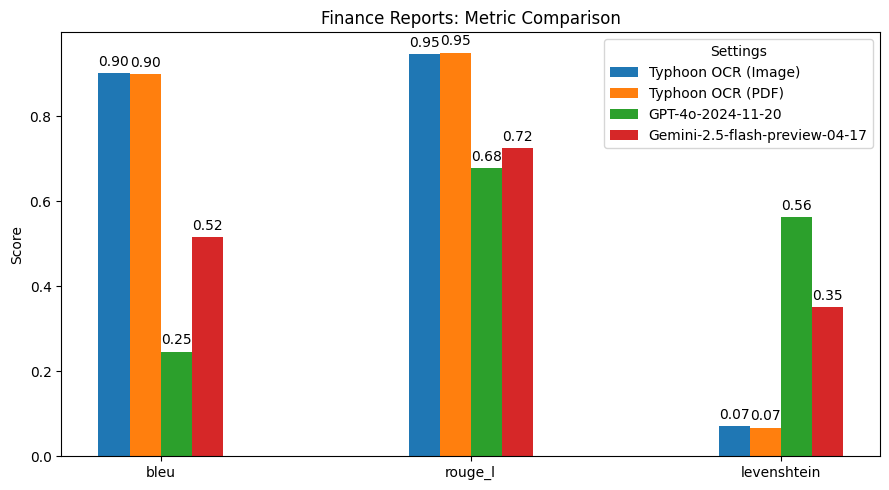
finance performance
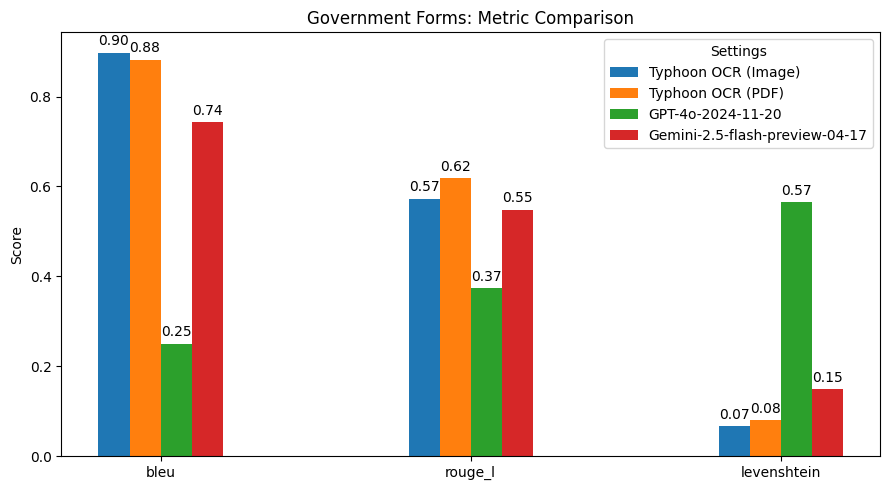
gov performance
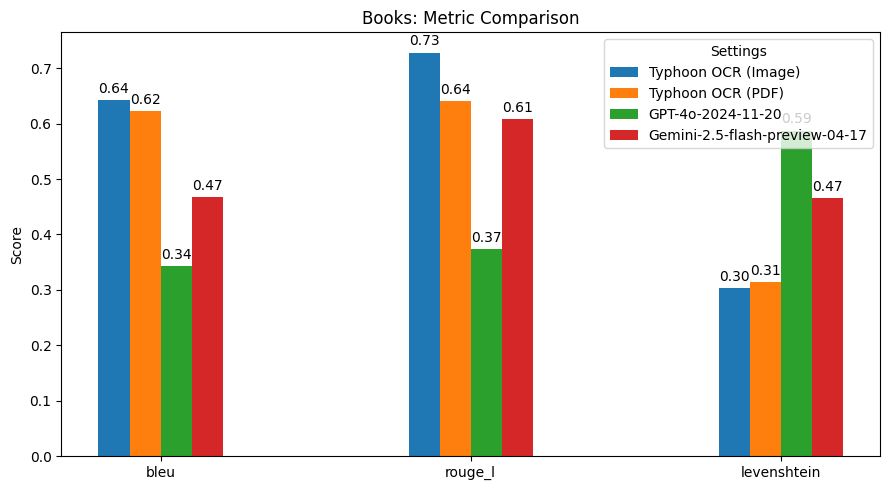
book performance
Summary of Findings
Typhoon OCR outperforms both GPT-4o and Gemini 2.5 Flash in Thai document understanding, particularly on documents with complex layouts and mixed-language content.
However, in the Thai books benchmark, performance slightly declined due to the high frequency and diversity of embedded figures. These images vary significantly in type and structure, which poses challenges for our current figure tag parsing. This highlights a potential area for future improvement—specifically, in enhancing the model's image understanding capabilities.
For this version, our primary focus has been on achieving high-quality OCR for both English and Thai text. Future releases may extend support to more advanced image analysis and figure interpretation.
Usage Example
(Recommended): Full inference code available on Colab
(Recommended): Using Typhoon-OCR Package
pip install typhoon-ocr
python
1from typhoon_ocr import ocr_document
23# please set env TYPHOON_OCR_API_KEY or OPENAI_API_KEY to use this function4markdown = ocr_document("test.png")5print(markdown)
Run Manually
Below is a partial snippet. You can run inference using either the API or a local model.
API:
python
1from typing import Callable
2from openai import OpenAI
3from PIL import Image
4from typhoon_ocr.ocr_utils import render_pdf_to_base64png, get_anchor_text
56PROMPTS_SYS ={7"default":lambda base_text:(f"Below is an image of a document page along with its dimensions. "8f"Simply return the markdown representation of this document, presenting tables in markdown format as they naturally appear.\n"9f"If the document contains images, use a placeholder like dummy.png for each image.\n"10f"Your final output must be in JSON format with a single key `natural_text` containing the response.\n"11f"RAW_TEXT_START\n{base_text}\nRAW_TEXT_END"),12"structure":lambda base_text:(13f"Below is an image of a document page, along with its dimensions and possibly some raw textual content previously extracted from it. "14f"Note that the text extraction may be incomplete or partially missing. Carefully consider both the layout and any available text to reconstruct the document accurately.\n"15f"Your task is to return the markdown representation of this document, presenting tables in HTML format as they naturally appear.\n"16f"If the document contains images or figures, analyze them and include the tag <figure>IMAGE_ANALYSIS</figure> in the appropriate location.\n"17f"Your final output must be in JSON format with a single key `natural_text` containing the response.\n"18f"RAW_TEXT_START\n{base_text}\nRAW_TEXT_END"19),20}2122defget_prompt(prompt_name:str)-> Callable[[str],str]:23"""
24 Fetches the system prompt based on the provided PROMPT_NAME.
2526 :param prompt_name: The identifier for the desired prompt.
27 :return: The system prompt as a string.
28 """29return PROMPTS_SYS.get(prompt_name,lambda x:"Invalid PROMPT_NAME provided.")30313233# Render the first page to base64 PNG and then load it into a PIL image.34image_base64 = render_pdf_to_base64png(filename, page_num, target_longest_image_dim=1800)35image_pil = Image.open(BytesIO(base64.b64decode(image_base64)))3637# Extract anchor text from the PDF (first page)38anchor_text = get_anchor_text(filename, page_num, pdf_engine="pdfreport", target_length=8000)3940# Retrieve and fill in the prompt template with the anchor_text41prompt_template_fn = get_prompt(task_type)42PROMPT = prompt_template_fn(anchor_text)4344messages =[{45"role":"user",46"content":[47{"type":"text","text": PROMPT},48{"type":"image_url","image_url":{"url":f"data:image/png;base64,{image_base64}"}},49],50}]51# send messages to openai compatible api52openai = OpenAI(base_url="https://api.opentyphoon.ai/v1", api_key="TYPHOON_API_KEY")53response = openai.chat.completions.create(54 model="typhoon-ocr-preview",55 messages=messages,56 max_tokens=16384,57 temperature=0.1,58 top_p=0.6,59 extra_body={60"repetition_penalty":1.2,61},62)63text_output = response.choices[0].message.content
64print(text_output)
This model only works with the specific prompts defined below, where {base_text} refers to information extracted from the PDF metadata using the get_anchor_text function from the typhoon-ocr package. It will not function correctly with any other prompts.
PROMPTS_SYS = {
    "default": lambda base_text: (f"Below is an image of a document page along with its dimensions. "
        f"Simply return the markdown representation of this document, presenting tables in markdown format as they naturally appear.\n"
        f"If the document contains images, use a placeholder like dummy.png for each image.\n"
        f"Your final output must be in JSON format with a single key `natural_text` containing the response.\n"
        f"RAW_TEXT_START\n{base_text}\nRAW_TEXT_END"),
    "structure": lambda base_text: (
        f"Below is an image of a document page, along with its dimensions and possibly some raw textual content previously extracted from it. "
        f"Note that the text extraction may be incomplete or partially missing. Carefully consider both the layout and any available text to reconstruct the document accurately.\n"
        f"Your task is to return the markdown representation of this document, presenting tables in HTML format as they naturally appear.\n"
        f"If the document contains images or figures, analyze them and include the tag <figure>IMAGE_ANALYSIS</figure> in the appropriate location.\n"
        f"Your final output must be in JSON format with a single key `natural_text` containing the response.\n"
        f"RAW_TEXT_START\n{base_text}\nRAW_TEXT_END"
    ),
}
Generation Parameters
We suggest using the following generation parameters. Since this is an OCR model, we do not recommend using a high temperature. Make sure the temperature is set to 0 or 0.1, not higher.
This is a task-specific model intended to be used only with the provided prompts. It does not include any guardrails or VQA capability. Due to the nature of large language models (LLMs), a certain level of hallucination may occur. We recommend that developers carefully assess these risks in the context of their specific use case.
If you find Typhoon2 useful for your work, please cite it using:
@misc{typhoon2,
      title={Typhoon 2: A Family of Open Text and Multimodal Thai Large Language Models},
      author={Kunat Pipatanakul and Potsawee Manakul and Natapong Nitarach and Warit Sirichotedumrong and Surapon Nonesung and Teetouch Jaknamon and Parinthapat Pengpun and Pittawat Taveekitworachai and Adisai Na-Thalang and Sittipong Sripaisarnmongkol and Krisanapong Jirayoot and Kasima Tharnpipitchai},
      year={2024},
      eprint={2412.13702},
      archivePrefix={arXiv},
      primaryClass={cs.CL},
      url={https://arxiv.org/abs/2412.13702},
}