


Views
No views yet
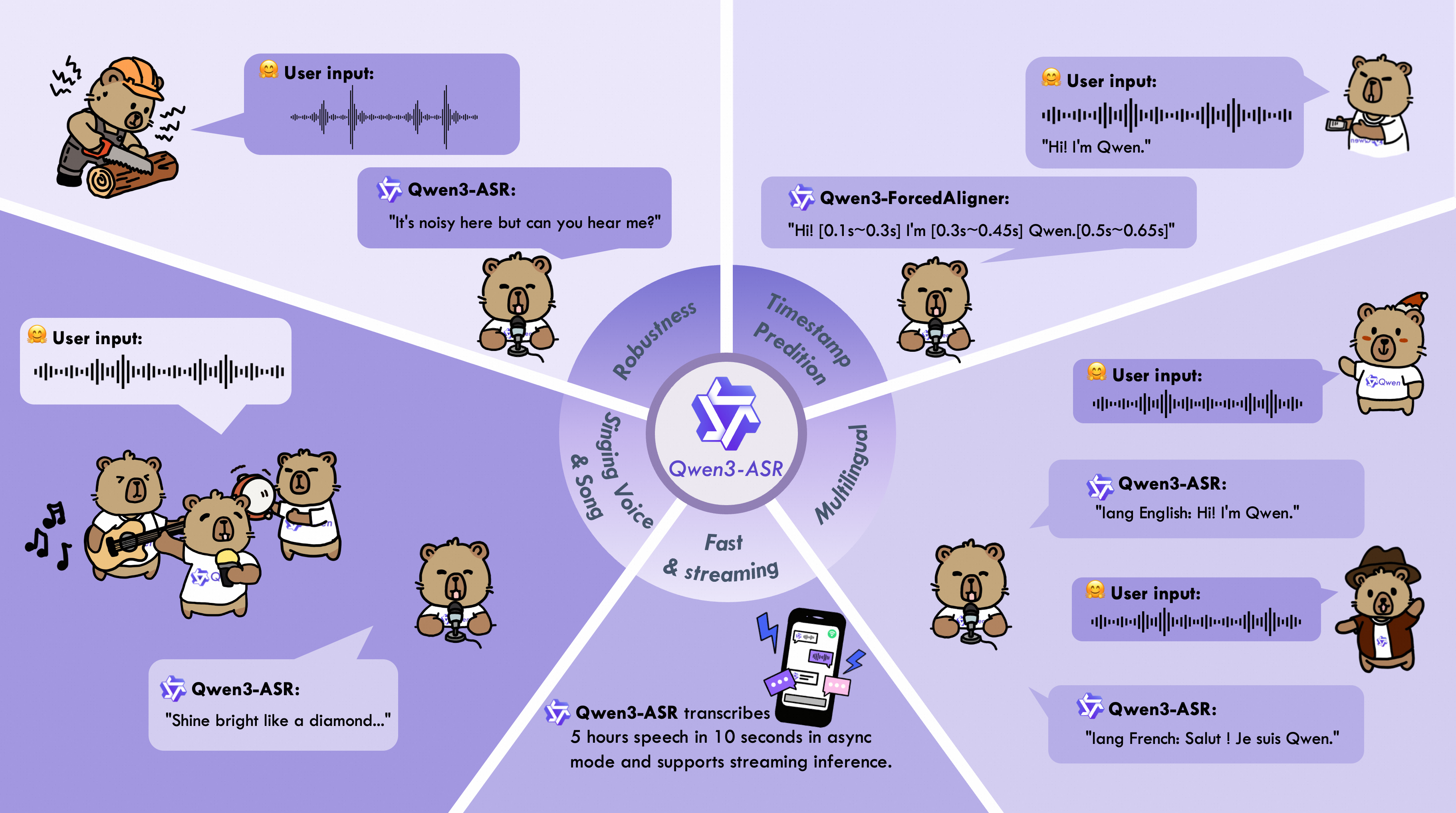
| Model | Supported Languages | Supported Dialects | Inference Mode | Audio Types |
|---|---|---|---|---|
| Qwen3-ASR-1.7B & Qwen3-ASR-0.6B | Chinese (zh), English (en), Cantonese (yue), Arabic (ar), German (de), French (fr), Spanish (es), Portuguese (pt), Indonesian (id), Italian (it), Korean (ko), Russian (ru), Thai (th), Vietnamese (vi), Japanese (ja), Turkish (tr), Hindi (hi), Malay (ms), Dutch (nl), Swedish (sv), Danish (da), Finnish (fi), Polish (pl), Czech (cs), Filipino (fil), Persian (fa), Greek (el), Hungarian (hu), Macedonian (mk), Romanian (ro) | Anhui, Dongbei, Fujian, Gansu, Guizhou, Hebei, Henan, Hubei, Hunan, Jiangxi, Ningxia, Shandong, Shaanxi, Shanxi, Sichuan, Tianjin, Yunnan, Zhejiang, Cantonese (Hong Kong accent), Cantonese (Guangdong accent), Wu language, Minnan language. | Offline / Streaming | Speech, Singing Voice, Songs with BGM |
| Qwen3-ForcedAligner-0.6B | Chinese, English, Cantonese, French, German, Italian, Japanese, Korean, Portuguese, Russian, Spanish | -- | NAR | Speech |
qwen-asr package or vLLM, model weights will be downloaded automatically based on the model name. However, if your runtime environment does not allow downloading weights during execution, you can use the following commands to manually download the model weights to a local directory:1# Download through ModelScope (recommended for users in Mainland China)
2pip install -U modelscope
3modelscope download --model Qwen/Qwen3-ASR-1.7B --local_dir ./Qwen3-ASR-1.7B
4modelscope download --model Qwen/Qwen3-ASR-0.6B --local_dir ./Qwen3-ASR-0.6B
5modelscope download --model Qwen/Qwen3-ForcedAligner-0.6B --local_dir ./Qwen3-ForcedAligner-0.6B
6# Download through Hugging Face
7pip install -U "huggingface_hub[cli]"
8huggingface-cli download Qwen/Qwen3-ASR-1.7B --local-dir ./Qwen3-ASR-1.7B
9huggingface-cli download Qwen/Qwen3-ASR-0.6B --local-dir ./Qwen3-ASR-0.6B
10huggingface-cli download Qwen/Qwen3-ForcedAligner-0.6B --local-dir ./Qwen3-ForcedAligner-0.6Bqwen-asr Python package from PyPI. This will pull in the required runtime dependencies and allow you to load any released Qwen3-ASR model. If you’d like to simplify environment setup further, you can also use our official Docker image. The qwen-asr package provides two backends: the transformers backend and the vLLM backend. For usage instructions for different backends, please refer to Python Package Usage. We recommend using a fresh, isolated environment to avoid dependency conflicts with existing packages. You can create a clean Python 3.12 environment like this:1conda create -n qwen3-asr python=3.12 -y
2conda activate qwen3-asrpip install -U qwen-asrpip install -U qwen-asr[vllm]1git clone https://github.com/QwenLM/Qwen3-ASR.git
2cd Qwen3-ASR
3pip install -e .
4# support vLLM backend
5# pip install -e ".[vllm]"pip install -U flash-attn --no-build-isolationMAX_JOBS=4 pip install -U flash-attn --no-build-isolationtorch.float16 or torch.bfloat16.qwen-asr package provides two backends: transformers backend and vLLM backend. You can pass audio inputs as a local path, a URL, base64 data, or a (np.ndarray, sr) tuple, and run batch inference. To quickly try Qwen3-ASR, you can use Qwen3ASRModel.from_pretrained(...) for the transformers backend with the following code:1import torch
2from qwen_asr import Qwen3ASRModel
3
4model = Qwen3ASRModel.from_pretrained(
5 "Qwen/Qwen3-ASR-1.7B",
6 dtype=torch.bfloat16,
7 device_map="cuda:0",
8 # attn_implementation="flash_attention_2",
9 max_inference_batch_size=32, # Batch size limit for inference. -1 means unlimited. Smaller values can help avoid OOM.
10 max_new_tokens=256, # Maximum number of tokens to generate. Set a larger value for long audio input.
11)
12
13results = model.transcribe(
14 audio="https://qianwen-res.oss-cn-beijing.aliyuncs.com/Qwen3-ASR-Repo/asr_en.wav",
15 language=None, # set "English" to force the language
16)
17
18print(results[0].language)
19print(results[0].text)forced_aligner and its init kwargs. Here is an example of batch inference with timestamps output:1import torch
2from qwen_asr import Qwen3ASRModel
3
4model = Qwen3ASRModel.from_pretrained(
5 "Qwen/Qwen3-ASR-1.7B",
6 dtype=torch.bfloat16,
7 device_map="cuda:0",
8 # attn_implementation="flash_attention_2",
9 max_inference_batch_size=32, # Batch size limit for inference. -1 means unlimited. Smaller values can help avoid OOM.
10 max_new_tokens=256, # Maximum number of tokens to generate. Set a larger value for long audio input.
11 forced_aligner="Qwen/Qwen3-ForcedAligner-0.6B",
12 forced_aligner_kwargs=dict(
13 dtype=torch.bfloat16,
14 device_map="cuda:0",
15 # attn_implementation="flash_attention_2",
16 ),
17)
18
19results = model.transcribe(
20 audio=[
21 "https://qianwen-res.oss-cn-beijing.aliyuncs.com/Qwen3-ASR-Repo/asr_zh.wav",
22 "https://qianwen-res.oss-cn-beijing.aliyuncs.com/Qwen3-ASR-Repo/asr_en.wav",
23 ],
24 language=["Chinese", "English"], # can also be set to None for automatic language detection
25 return_time_stamps=True,
26)
27
28for r in results:
29 print(r.language, r.text, r.time_stamps[0])Qwen3ASRModel.LLM(...). Example code is provided below. Note that you must install it via pip install -U qwen-asr[vllm]. If you want the model to output timestamps, it’s best to install FlashAttention via pip install -U flash-attn --no-build-isolation to speed up inference for the forced aligner model. Remember to wrap your code under if __name__ == '__main__': to avoid the spawn error described in vLLM Troubleshooting.1import torch
2from qwen_asr import Qwen3ASRModel
3
4if __name__ == '__main__':
5 model = Qwen3ASRModel.LLM(
6 model="Qwen/Qwen3-ASR-1.7B",
7 gpu_memory_utilization=0.7,
8 max_inference_batch_size=128, # Batch size limit for inference. -1 means unlimited. Smaller values can help avoid OOM.
9 max_new_tokens=4096, # Maximum number of tokens to generate. Set a larger value for long audio input.
10 forced_aligner="Qwen/Qwen3-ForcedAligner-0.6B",
11 forced_aligner_kwargs=dict(
12 dtype=torch.bfloat16,
13 device_map="cuda:0",
14 # attn_implementation="flash_attention_2",
15 ),
16 )
17
18 results = model.transcribe(
19 audio=[
20 "https://qianwen-res.oss-cn-beijing.aliyuncs.com/Qwen3-ASR-Repo/asr_zh.wav",
21 "https://qianwen-res.oss-cn-beijing.aliyuncs.com/Qwen3-ASR-Repo/asr_en.wav",
22 ],
23 language=["Chinese", "English"], # can also be set to None for automatic language detection
24 return_time_stamps=True,
25 )
26
27 for r in results:
28 print(r.language, r.text, r.time_stamps[0])qwen-asr-serve command, which is a wrapper around vllm serve. You can pass any arguments supported by vllm serve, for example:qwen-asr-serve Qwen/Qwen3-ASR-1.7B --gpu-memory-utilization 0.8 --host 0.0.0.0 --port 80001import requests
2
3url = "http://localhost:8000/v1/chat/completions"
4headers = {"Content-Type": "application/json"}
5
6data = {
7 "messages": [
8 {
9 "role": "user",
10 "content": [
11 {
12 "type": "audio_url",
13 "audio_url": {
14 "url": "https://qianwen-res.oss-cn-beijing.aliyuncs.com/Qwen3-ASR-Repo/asr_en.wav"
15 },
16 }
17 ],
18 }
19 ]
20}
21
22response = requests.post(url, headers=headers, json=data, timeout=300)
23response.raise_for_status()
24content = response.json()['choices'][0]['message']['content']
25print(content)
26
27# parse ASR output if you want
28from qwen_asr import parse_asr_output
29language, text = parse_asr_output(content)
30print(language)
31print(text)Qwen3-ForcedAligner-0.6B can align text–speech pairs and return word or character level timestamps. Here is an example of using the forced aligner directly:1import torch
2from qwen_asr import Qwen3ForcedAligner
3
4model = Qwen3ForcedAligner.from_pretrained(
5 "Qwen/Qwen3-ForcedAligner-0.6B",
6 dtype=torch.bfloat16,
7 device_map="cuda:0",
8 # attn_implementation="flash_attention_2",
9)
10
11results = model.align(
12 audio="https://qianwen-res.oss-cn-beijing.aliyuncs.com/Qwen3-ASR-Repo/asr_zh.wav",
13 text="甚至出现交易几乎停滞的情况。",
14 language="Chinese",
15)
16
17print(results[0])
18print(results[0][0].text, results[0][0].start_time, results[0][0].end_time)(np.ndarray, sr) inputs and batch inference. Please refer to the example code for details.| API Description | API Documentation (Mainland China) | API Documentation (International) |
|---|---|---|
| Real-time API for Qwen3-ASR. | https://help.aliyun.com/zh/model-studio/qwen-real-time-speech-recognition | https://www.alibabacloud.com/help/en/model-studio/qwen-real-time-speech-recognition |
| FileTrans API for Qwen3-ASR. | https://help.aliyun.com/zh/model-studio/qwen-speech-recognition | https://www.alibabacloud.com/help/en/model-studio/qwen-speech-recognition |
qwen-asr package and run qwen-asr-demo. Use the command below for help:qwen-asr-demo --help1# Transformers backend
2qwen-asr-demo \
3 --asr-checkpoint Qwen/Qwen3-ASR-1.7B \
4 --backend transformers \
5 --cuda-visible-devices 0 \
6 --ip 0.0.0.0 --port 8000
7
8# Transformers backend + Forced Aligner (enable timestamps)
9qwen-asr-demo \
10 --asr-checkpoint Qwen/Qwen3-ASR-1.7B \
11 --aligner-checkpoint Qwen/Qwen3-ForcedAligner-0.6B \
12 --backend transformers \
13 --cuda-visible-devices 0 \
14 --backend-kwargs '{"device_map":"cuda:0","dtype":"bfloat16","max_inference_batch_size":8,"max_new_tokens":256}' \
15 --aligner-kwargs '{"device_map":"cuda:0","dtype":"bfloat16"}' \
16 --ip 0.0.0.0 --port 8000
17
18# vLLM backend + Forced Aligner (enable timestamps)
19qwen-asr-demo \
20 --asr-checkpoint Qwen/Qwen3-ASR-1.7B \
21 --aligner-checkpoint Qwen/Qwen3-ForcedAligner-0.6B \
22 --backend vllm \
23 --cuda-visible-devices 0 \
24 --backend-kwargs '{"gpu_memory_utilization":0.7,"max_inference_batch_size":8,"max_new_tokens":2048}' \
25 --aligner-kwargs '{"device_map":"cuda:0","dtype":"bfloat16"}' \
26 --ip 0.0.0.0 --port 8000http://<your-ip>:8000, or access it via port forwarding in tools like VS Code.--backend-kwargs as a JSON dict. If not provided, the demo will use sensible defaults.1# Example: override transformers init args without flash attention
2--backend-kwargs '{"device_map":"cuda:0","dtype":"bfloat16"}'
3
4# Example: override vLLM init args with 65% GPU memory
5--backend-kwargs '{"gpu_memory_utilization":0.65}'cuda:0 style device selection, this demo selects GPUs by setting CUDA_VISIBLE_DEVICES via --cuda-visible-devices.1# Use GPU 0
2--cuda-visible-devices 0
3
4# Use GPU 1
5--cuda-visible-devices 1--aligner-checkpoint is provided. If you launch the demo without a forced aligner, the timestamps UI will be hidden automatically.1# No forced aligner
2qwen-asr-demo --asr-checkpoint Qwen/Qwen3-ASR-1.7B
3
4# With forced aligner
5qwen-asr-demo \
6 --asr-checkpoint Qwen/Qwen3-ASR-1.7B \
7 --aligner-checkpoint Qwen/Qwen3-ForcedAligner-0.6B--ssl-certfile and --ssl-keyfile to enable HTTPS. First, generate a private key and a self-signed certificate (valid for 365 days):1openssl req -x509 -newkey rsa:2048 \
2 -keyout key.pem -out cert.pem \
3 -days 365 -nodes \
4 -subj "/CN=localhost"1qwen-asr-demo \
2 --asr-checkpoint Qwen/Qwen3-ASR-1.7B \
3 --backend transformers \
4 --cuda-visible-devices 0 \
5 --ip 0.0.0.0 --port 8000 \
6 --ssl-certfile cert.pem \
7 --ssl-keyfile key.pem \
8 --no-ssl-verifyhttps://<your-ip>:8000 to use it. If your browser shows a warning, that’s expected for self-signed certificates. For production, use a real certificate.1qwen-asr-demo-streaming \
2 --asr-model-path Qwen/Qwen3-ASR-1.7B \
3 --host 0.0.0.0 \
4 --port 8000 \
5 --gpu-memory-utilization 0.9http://<your-ip>:8000, or access it via port forwarding in tools like VS Code.uv as the environment manager1uv venv
2source .venv/bin/activate
3uv pip install -U vllm --pre \
4 --extra-index-url https://wheels.vllm.ai/nightly/cu129 \
5 --extra-index-url https://download.pytorch.org/whl/cu129 \
6 --index-strategy unsafe-best-match
7uv pip install "vllm[audio]" # For additional audio dependenciesvllm serve Qwen/Qwen3-ASR-1.7B1import base64
2import httpx
3from openai import OpenAI
4
5# Initialize client
6client = OpenAI(
7 base_url="http://localhost:8000/v1",
8 api_key="EMPTY"
9)
10
11# Create multimodal chat completion request
12response = client.chat.completions.create(
13 model="Qwen/Qwen3-ASR-1.7B",
14 messages=[
15 {
16 "role": "user",
17 "content": [
18 {
19 "type": "audio_url",
20 "audio_url": {
21 {"url": "https://qianwen-res.oss-cn-beijing.aliyuncs.com/Qwen3-ASR-Repo/asr_en.wav"}
22 }
23 }
24 ]
25 }
26 ],
27)
28
29print(response.choices[0].message.content)1import httpx
2from openai import OpenAI
3
4# Initialize client
5client = OpenAI(
6 base_url="http://localhost:8000/v1",
7 api_key="EMPTY"
8)
9audio_url = "https://qianwen-res.oss-cn-beijing.aliyuncs.com/Qwen3-ASR-Repo/asr_en.wav"
10audio_file = httpx.get(audio_url).content
11
12transcription = client.audio.transcriptions.create(
13 model="Qwen/Qwen3-ASR-1.7B",
14 file=audio_file,
15)
16
17print(transcription.text)1curl http://localhost:8000/v1/chat/completions \
2 -H "Content-Type: application/json" \
3 -d '{
4 "messages": [
5 {"role": "user", "content": [
6 {"type": "audio_url", "audio_url": {"url": "https://qianwen-res.oss-cn-beijing.aliyuncs.com/Qwen3-ASR-Repo/asr_en.wav"}}
7 ]}
8 ]
9 }'1from vllm import LLM, SamplingParams
2from vllm.assets.audio import AudioAsset
3import base64
4import requests
5
6# Initialize the LLM
7llm = LLM(
8 model="Qwen/Qwen3-ASR-1.7B"
9)
10
11# Load audio
12audio_asset = AudioAsset("winning_call")
13
14# Create conversation with audio content
15conversation = [
16 {
17 "role": "user",
18 "content": [
19 {
20 "type": "audio_url",
21 "audio_url": {"url": audio_asset.url}
22 }
23 ]
24 }
25]
26
27sampling_params = SamplingParams(temperature=0.01, max_tokens=256)
28
29# Run inference using .chat()
30outputs = llm.chat(conversation, sampling_params=sampling_params)
31print(outputs[0].outputs[0].text)qwen-asr Python package, we provide a pre-built Docker image: qwenllm/qwen3-asr. You only need to install the GPU driver and download the model files to run the code. Please follow the NVIDIA Container Toolkit installation guide to ensure Docker can access your GPU. If you are in Mainland China and have trouble reaching Docker Hub, you may use a registry mirror to accelerate image pulls.1LOCAL_WORKDIR=/path/to/your/workspace
2HOST_PORT=8000
3CONTAINER_PORT=80
4docker run --gpus all --name qwen3-asr \
5 -v /var/run/docker.sock:/var/run/docker.sock -p $HOST_PORT:$CONTAINER_PORT \
6 --mount type=bind,source=$LOCAL_WORKDIR,target=/data/shared/Qwen3-ASR \
7 --shm-size=4gb \
8 -it qwenllm/qwen3-asr:latest/path/to/your/workspace with the actual path) will be mounted inside the container at /data/shared/Qwen3-ASR. Port 8000 on the host is mapped to port 80 in the container, so you can access services running in the container via http://<host-ip>:8000. Note that services inside the container must bind to 0.0.0.0 (not 127.0.0.1) for port forwarding to work.1docker start qwen3-asr
2docker exec -it qwen3-asr bashdocker rm -f qwen3-asrdtype=torch.bfloat16 and set max_new_tokens=1024 using vLLM. Greedy search was used for all decoding, and none of the tests specified a language parameter. The detailed evaluation results are shown below.| GPT-4o -Transcribe | Gemini-2.5 -Pro | Doubao-ASR | Whisper -large-v3 | Fun-ASR -MLT-Nano | Qwen3-ASR -0.6B | Qwen3-ASR -1.7B | |
|---|---|---|---|---|---|---|---|
| English (en) | |||||||
| Librispeech clean | other | 1.39 | 3.75 | 2.89 | 3.56 | 2.78 | 5.70 | 1.51 | 3.97 | 1.68 | 4.03 | 2.11 | 4.55 | 1.63 | 3.38 |
| GigaSpeech | 25.50 | 9.37 | 9.55 | 9.76 | - | 8.88 | 8.45 |
| CV-en | 9.08 | 14.49 | 13.78 | 9.90 | 9.90 | 9.92 | 7.39 |
| Fleurs-en | 2.40 | 2.94 | 6.31 | 4.08 | 5.49 | 4.39 | 3.35 |
| MLS-en | 5.12 | 3.68 | 7.09 | 4.87 | - | 6.00 | 4.58 |
| Tedlium | 7.69 | 6.15 | 4.91 | 6.84 | - | 3.85 | 4.50 |
| VoxPopuli | 10.29 | 11.36 | 12.12 | 12.05 | - | 9.96 | 9.15 |
| Chinese (zh) | |||||||
| WenetSpeech net | meeting | 15.30 | 32.27 | 14.43 | 13.47 | N/A | 9.86 | 19.11 | 6.35 | - | 5.97 | 6.88 | 4.97 | 5.88 |
| AISHELL-2-test | 4.24 | 11.62 | 2.85 | 5.06 | - | 3.15 | 2.71 |
| SpeechIO | 12.86 | 5.30 | 2.93 | 7.56 | - | 3.44 | 2.88 |
| Fleurs-zh | 2.44 | 2.71 | 2.69 | 4.09 | 3.51 | 2.88 | 2.41 |
| CV-zh | 6.32 | 7.70 | 5.95 | 12.91 | 6.20 | 6.89 | 5.35 |
| Chinese Dialect | |||||||
| KeSpeech | 26.87 | 24.71 | 5.27 | 28.79 | - | 7.08 | 5.10 |
| Fleurs-yue | 4.98 | 9.43 | 4.98 | 9.18 | - | 5.79 | 3.98 |
| CV-yue | 11.36 | 18.76 | 13.20 | 16.23 | - | 9.50 | 7.57 |
| CV-zh-tw | 6.32 | 7.31 | 4.06 | 7.84 | - | 5.59 | 3.77 |
| WenetSpeech-Yue short | long | 15.62 | 25.29 | 25.19 | 11.23 | 9.74 | 11.40 | 32.26 | 46.64 | - | - | 7.54 | 9.92 | 5.82 | 8.85 |
| WenetSpeech-Chuan easy | hard | 34.81 | 53.98 | 43.79 | 67.30 | 11.40 | 20.20 | 14.35 | 26.80 | - | - | 13.92 | 24.45 | 11.99 | 21.63 |
| GPT-4o -Transcribe | Gemini-2.5 -Pro | Doubao-ASR | Whisper -large-v3 | Fun-ASR -MLT-Nano | Qwen3-ASR -0.6B | Qwen3-ASR -1.7B | |
|---|---|---|---|---|---|---|---|
| Accented English | |||||||
| Dialog-Accented English | 28.56 | 23.85 | 20.41 | 21.30 | 19.96 | 16.62 | 16.07 |
| Chinese Mandarin | |||||||
| Elders&Kids | 14.27 | 36.93 | 4.17 | 10.61 | 4.54 | 4.48 | 3.81 |
| ExtremeNoise | 36.11 | 29.06 | 17.04 | 63.17 | 36.55 | 17.88 | 16.17 |
| TongueTwister | 20.87 | 4.97 | 3.47 | 16.63 | 9.02 | 4.06 | 2.44 |
| Dialog-Mandarin | 20.73 | 12.50 | 6.61 | 14.01 | 7.32 | 7.06 | 6.54 |
| Chinese Dialect | |||||||
| Dialog-Cantonese | 16.05 | 14.98 | 7.56 | 31.04 | 5.85 | 4.80 | 4.12 |
| Dialog-Chinese Dialects | 45.37 | 47.70 | 19.85 | 44.55 | 19.41 | 18.24 | 15.94 |
| GLM-ASR -Nano-2512 | Whisper -large-v3 | Fun-ASR -MLT-Nano | Qwen3-ASR -0.6B | Qwen3-ASR -1.7B | |
|---|---|---|---|---|---|
| Open-sourced Benchmarks | |||||
| MLS | 13.32 | 8.62 | 28.70 | 13.19 | 8.55 |
| CommonVoice | 19.40 | 10.77 | 17.25 | 12.75 | 9.18 |
| MLC-SLM | 34.93 | 15.68 | 29.94 | 15.84 | 12.74 |
| Fleurs | 16.08 | 5.27 | 10.03 | 7.57 | 4.90 |
| Fleurs† | 20.05 | 6.85 | 31.89 | 10.37 | 6.62 |
| Fleurs†† | 24.83 | 8.16 | 47.84 | 21.80 | 12.60 |
| Qwen-ASR Internal Benchmarks | |||||
| News-Multilingual | 49.40 | 14.80 | 65.07 | 17.39 | 12.80 |
| Whisper-large-v3 | Qwen3-ASR-0.6B | Qwen3-ASR-1.7B | |
|---|---|---|---|
| MLS | 99.9 | 99.3 | 99.9 |
| CommonVoice | 92.7 | 98.2 | 98.7 |
| MLC-SLM | 89.2 | 92.7 | 94.1 |
| Fleurs | 94.6 | 97.1 | 98.7 |
| Avg. | 94.1 | 96.8 | 97.9 |
| GPT-4o -Transcribe | Gemini-2.5 -Pro | Doubao-ASR -1.0 | Whisper -large-v3 | Fun-ASR-MLT -Nano | Qwen3-ASR -1.7B | |
|---|---|---|---|---|---|---|
| Singing | ||||||
| M4Singer | 16.77 | 20.88 | 7.88 | 13.58 | 7.29 | 5.98 |
| MIR-1k-vocal | 11.87 | 9.85 | 6.56 | 11.71 | 8.17 | 6.25 |
| Opencpop | 7.93 | 6.49 | 3.80 | 9.52 | 2.98 | 3.08 |
| Popcs | 32.84 | 15.13 | 8.97 | 13.77 | 9.42 | 8.52 |
| Songs with BGM | ||||||
| EntireSongs-en | 30.71 | 12.18 | 33.51 | N/A | N/A | 14.60 |
| EntireSongs-zh | 34.86 | 18.68 | 23.99 | N/A | N/A | 13.91 |
| Model | Infer. Mode | Librispeech | Fleurs-en | Fleurs-zh | Avg. |
|---|---|---|---|---|---|
| Qwen3-ASR-1.7B | Offline | 1.63 | 3.38 | 3.35 | 2.41 | 2.69 |
| Streaming | 1.95 | 4.51 | 4.02 | 2.84 | 3.33 | |
| Qwen3-ASR-0.6B | Offline | 2.11 | 4.55 | 4.39 | 2.88 | 3.48 |
| Streaming | 2.54 | 6.27 | 5.38 | 3.40 | 4.40 |
| Monotonic-Aligner | NFA | WhisperX | Qwen3-ForcedAligner-0.6B | |
|---|---|---|---|---|
| MFA-Labeled Raw | ||||
| Chinese | 161.1 | 109.8 | - | 33.1 |
| English | - | 107.5 | 92.1 | 37.5 |
| French | - | 100.7 | 145.3 | 41.7 |
| German | - | 122.7 | 165.1 | 46.5 |
| Italian | - | 142.7 | 155.5 | 75.5 |
| Japanese | - | - | - | 42.2 |
| Korean | - | - | - | 37.2 |
| Portuguese | - | - | - | 38.4 |
| Russian | - | 200.7 | - | 40.2 |
| Spanish | - | 124.7 | 108.0 | 36.8 |
| Avg. | 161.1 | 129.8 | 133.2 | 42.9 |
| MFA-Labeled Concat-300s | ||||
| Chinese | 1742.4 | 235.0 | - | 36.5 |
| English | - | 226.7 | 227.2 | 58.6 |
| French | - | 230.6 | 2052.2 | 53.4 |
| German | - | 220.3 | 993.4 | 62.4 |
| Italian | - | 290.5 | 5719.4 | 81.6 |
| Japanese | - | - | - | 81.3 |
| Korean | - | - | - | 42.2 |
| Portuguese | - | - | - | 50.0 |
| Russian | - | 283.3 | - | 43.0 |
| Spanish | - | 240.2 | 4549.9 | 39.6 |
| Cross-lingual | - | - | - | 34.2 |
| Avg. | 1742.4 | 246.7 | 2708.4 | 52.9 |
| Human-Labeled | ||||
| Raw | 49.9 | 88.6 | - | 27.8 |
| Raw-Noisy | 53.3 | 89.5 | - | 41.8 |
| Concat-60s | 51.1 | 86.7 | - | 25.3 |
| Concat-300s | 410.8 | 140.0 | - | 24.8 |
| Concat-Cross-lingual | - | - | - | 42.5 |
| Avg. | 141.3 | 101.2 | - | 32.4 |
1@article{Qwen3-ASR,
2  title={Qwen3-ASR Technical Report},
3  author={Xian Shi, Xiong Wang, Zhifang Guo, Yongqi Wang, Pei Zhang, Xinyu Zhang, Zishan Guo, Hongkun Hao, Yu Xi, Baosong Yang, Jin Xu, Jingren Zhou, Junyang Lin},
4  journal={arXiv preprint arXiv:2601.21337},
5  year={2026}
6}