


Views
No views yet
llama-imatrix that degraded the data set. Also removed the Fill-in-Middle tokens as they are not properly supported.<|im_start|>system
{system_prompt}<|im_end|>
<|im_start|>user
{prompt}<|im_end|>
<|im_start|>assistant| Name | Quant method | Bits | Size | Max RAM required | Use case |
|---|---|---|---|---|---|
| Yi-Coder-9B-Chat.IQ1_S.gguf | IQ1_S | 1 | 1.9 GB | 2.2 GB | smallest, significant quality loss |
| Yi-Coder-9B-Chat.IQ1_M.gguf | IQ1_M | 1 | 2.0 GB | 2.3 GB | very small, significant quality loss |
| Yi-Coder-9B-Chat.IQ2_XXS.gguf | IQ2_XXS | 2 | 2.3 GB | 2.6 GB | very small, high quality loss |
| Yi-Coder-9B-Chat.IQ2_XS.gguf | IQ2_XS | 2 | 2.5 GB | 2.8 GB | very small, high quality loss |
| Yi-Coder-9B-Chat.IQ2_S.gguf | IQ2_S | 2 | 2.7 GB | 2.9 GB | small, substantial quality loss |
| Yi-Coder-9B-Chat.IQ2_M.gguf | IQ2_M | 2 | 2.9 GB | 3.1 GB | small, greater quality loss |
| Yi-Coder-9B-Chat.IQ3_XXS.gguf | IQ3_XXS | 3 | 3.2 GB | 3.5 GB | very small, high quality loss |
| Yi-Coder-9B-Chat.IQ3_XS.gguf | IQ3_XS | 3 | 3.5 GB | 3.8 GB | small, substantial quality loss |
| Yi-Coder-9B-Chat.IQ3_S.gguf | IQ3_S | 3 | 3.6 GB | 3.9 GB | small, greater quality loss |
| Yi-Coder-9B-Chat.IQ3_M.gguf | IQ3_M | 3 | 3.8 GB | 4.1 GB | medium, balanced quality - recommended |
| Yi-Coder-9B-Chat.IQ4_XS.gguf | IQ4_XS | 4 | 4.5 GB | 4.7 GB | small, substantial quality loss |
llama.cpp commandllama.cpp from commit 0becb22 or later../llama-cli -ngl 49 -m Yi-Coder-9B-Chat.IQ4_XS.gguf --color -c 131072 --temp 0 --repeat-penalty 1.1 -p "<|im_start|>system\nYou are a helpful assistant.<|im_end|>\n<|im_start|>\n{prompt}<|im_end|>\n<|im_start|>assistant\n"-ngl 49 to the number of layers to offload to GPU. Remove it if you don't have GPU acceleration.-c 131072 to the desired sequence length.-ctk q8_0 or even -ctk q4_0 for big memory savings (depending on context size).
There is a similar option for V-cache (-ctv), only available if you enable Flash Attention (-fa) as well.1# Prebuilt wheel with basic CPU support
2pip install llama-cpp-python --extra-index-url https://abetlen.github.io/llama-cpp-python/whl/cpu
3# Prebuilt wheel with NVidia CUDA acceleration
4pip install llama-cpp-python --extra-index-url https://abetlen.github.io/llama-cpp-python/whl/cu121 (or cu122 etc.)
5# Prebuilt wheel with Metal GPU acceleration
6pip install llama-cpp-python --extra-index-url https://abetlen.github.io/llama-cpp-python/whl/metal
7# Build base version with no GPU acceleration
8pip install llama-cpp-python
9# With NVidia CUDA acceleration
10CMAKE_ARGS="-DGGML_CUDA=on" pip install llama-cpp-python
11# Or with OpenBLAS acceleration
12CMAKE_ARGS="-DGGML_BLAS=ON -DGGML_BLAS_VENDOR=OpenBLAS" pip install llama-cpp-python
13# Or with AMD ROCm GPU acceleration (Linux only)
14CMAKE_ARGS="-DGGML_HIPBLAS=on" pip install llama-cpp-python
15# Or with Metal GPU acceleration for macOS systems only
16CMAKE_ARGS="-DGGML_METAL=on" pip install llama-cpp-python
17# Or with Vulkan acceleration
18CMAKE_ARGS="-DGGML_VULKAN=on" pip install llama-cpp-python
19# Or with SYCL acceleration
20CMAKE_ARGS="-DGGML_SYCL=on -DCMAKE_C_COMPILER=icx -DCMAKE_CXX_COMPILER=icpx" pip install llama-cpp-python
21
22# In windows, to set the variables CMAKE_ARGS in PowerShell, follow this format; eg for NVidia CUDA:
23$env:CMAKE_ARGS = "-DGGML_CUDA=on"
24pip install llama-cpp-python1from llama_cpp import Llama
2
3# Chat Completion API
4
5llm = Llama(model_path="./Yi-Coder-9B-Chat.IQ4_XS.gguf", n_gpu_layers=49, n_ctx=131072)
6print(llm.create_chat_completion(
7 repeat_penalty = 1.1,
8 messages = [
9 {
10 "role": "user",
11 "content": "Pick a LeetCode challenge and solve it in Python."
12 }
13 ]
14))
'java', 'markdown', 'python', 'php', 'javascript', 'c++', 'c#', 'c', 'typescript', 'html', 'go', 'java_server_pages', 'dart', 'objective-c', 'kotlin', 'tex', 'swift', 'ruby', 'sql', 'rust', 'css', 'yaml', 'matlab', 'lua', 'json', 'shell', 'visual_basic', 'scala', 'rmarkdown', 'pascal', 'fortran', 'haskell', 'assembly', 'perl', 'julia', 'cmake', 'groovy', 'ocaml', 'powershell', 'elixir', 'clojure', 'makefile', 'coffeescript', 'erlang', 'lisp', 'toml', 'batchfile', 'cobol', 'dockerfile', 'r', 'prolog', 'verilog'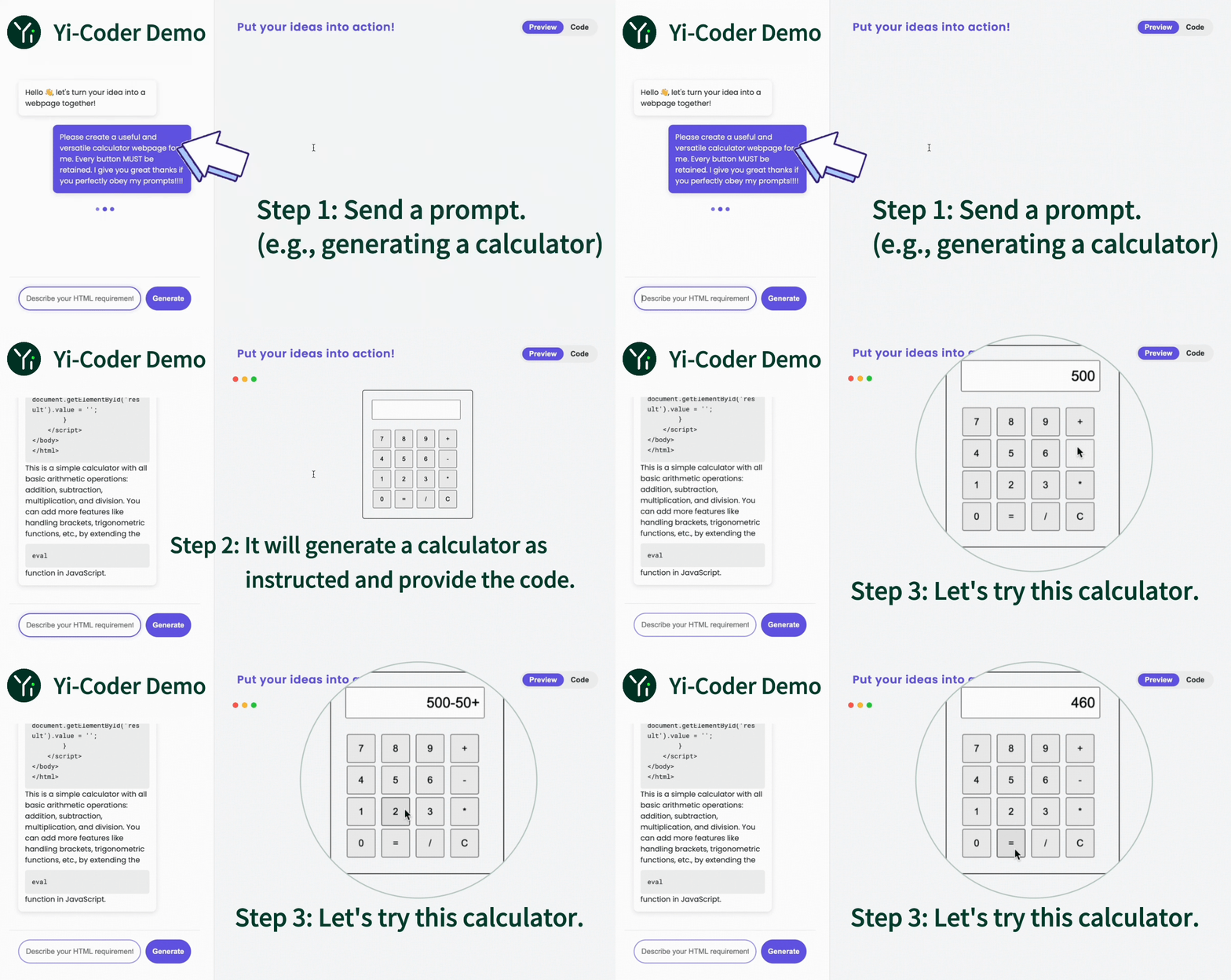
| Name | Type | Length | Download |
|---|---|---|---|
| Yi-Coder-9B-Chat | Chat | 128K | 🤗 Hugging Face • 🤖 ModelScope • 🟣 wisemodel |
| Yi-Coder-1.5B-Chat | Chat | 128K | 🤗 Hugging Face • 🤖 ModelScope • 🟣 wisemodel |
| Yi-Coder-9B | Base | 128K | 🤗 Hugging Face • 🤖 ModelScope • 🟣 wisemodel |
| Yi-Coder-1.5B | Base | 128K | 🤗 Hugging Face • 🤖 ModelScope • 🟣 wisemodel |
1from transformers import AutoTokenizer, AutoModelForCausalLM
2
3device = "cuda" # the device to load the model onto
4model_path = "01-ai/Yi-Coder-9B-Chat"
5
6tokenizer = AutoTokenizer.from_pretrained(model_path)
7model = AutoModelForCausalLM.from_pretrained(model_path, device_map="auto").eval()
8
9prompt = "Write a quick sort algorithm."
10messages = [
11    {"role": "system", "content": "You are a helpful assistant."},
12    {"role": "user", "content": prompt}
13]
14text = tokenizer.apply_chat_template(
15    messages,
16    tokenize=False,
17    add_generation_prompt=True
18)
19model_inputs = tokenizer([text], return_tensors="pt").to(device)
20
21generated_ids = model.generate(
22    model_inputs.input_ids,
23    max_new_tokens=1024,
24    eos_token_id=tokenizer.eos_token_id
25)
26generated_ids = [
27    output_ids[len(input_ids):] for input_ids, output_ids in zip(model_inputs.input_ids, generated_ids)
28]
29
30response = tokenizer.batch_decode(generated_ids, skip_special_tokens=True)[0]
31print(response)