


Views
No views yet

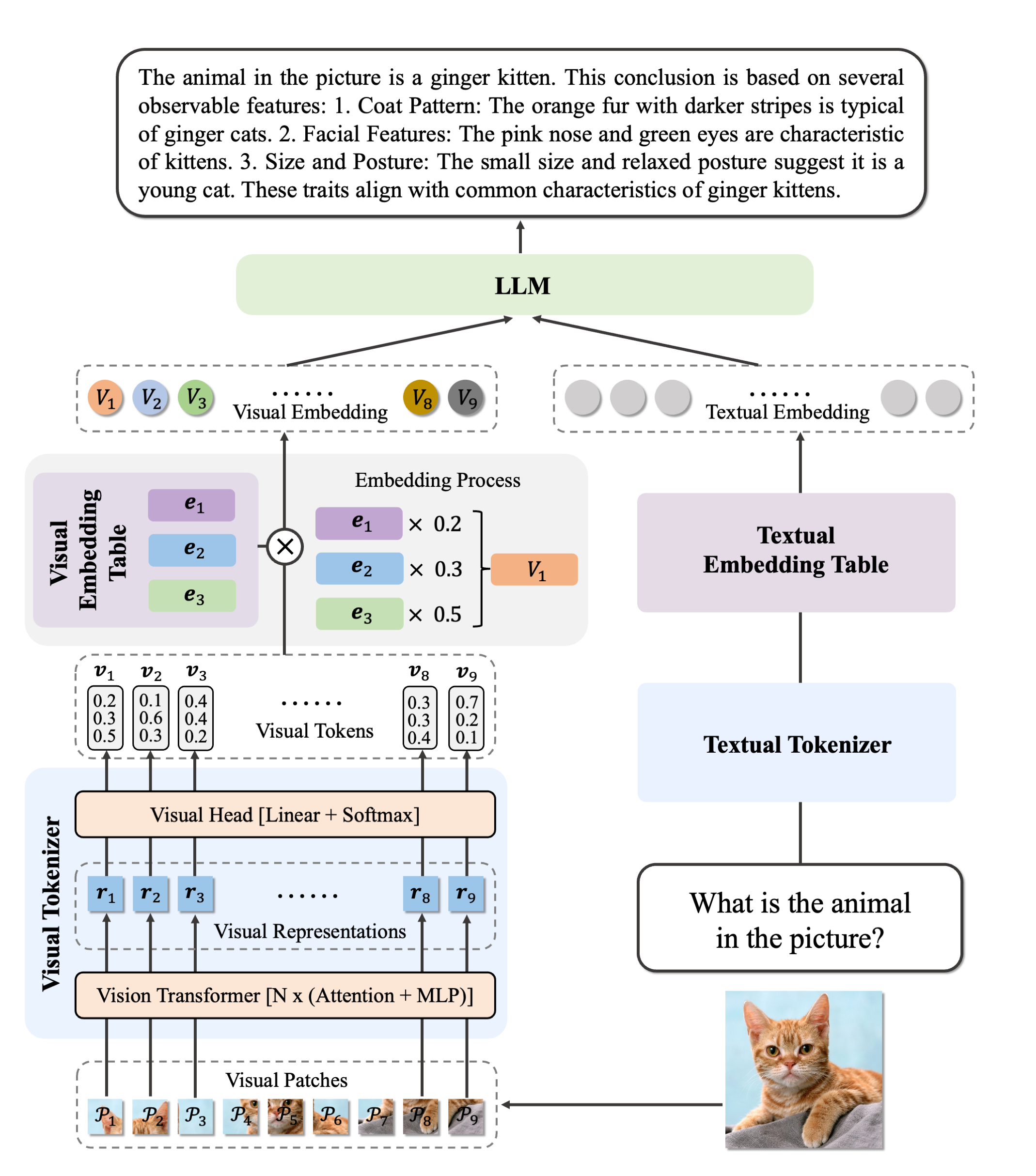
| Ovis MLLMs | ViT | LLM | Model Weights | Demo |
|---|---|---|---|---|
| Ovis2-1B | aimv2-large-patch14-448 | Qwen2.5-0.5B-Instruct | Huggingface | Space |
| Ovis2-2B | aimv2-large-patch14-448 | Qwen2.5-1.5B-Instruct | Huggingface | Space |
| Ovis2-4B | aimv2-huge-patch14-448 | Qwen2.5-3B-Instruct | Huggingface | Space |
| Ovis2-8B | aimv2-huge-patch14-448 | Qwen2.5-7B-Instruct | Huggingface | Space |
| Ovis2-16B | aimv2-huge-patch14-448 | Qwen2.5-14B-Instruct | Huggingface | Space |
| Ovis2-34B | aimv2-1B-patch14-448 | Qwen2.5-32B-Instruct | Huggingface | - |
| Ovis2-2B-GPTQ-Int4 | aimv2-large-patch14-448 | Qwen2.5-1.5B-Instruct | Huggingface | - |
| Ovis2-4B-GPTQ-Int4 | aimv2-huge-patch14-448 | Qwen2.5-3B-Instruct | Huggingface | - |
| Ovis2-8B-GPTQ-Int4 | aimv2-huge-patch14-448 | Qwen2.5-7B-Instruct | Huggingface | - |
| Ovis2-16B-GPTQ-Int4 | aimv2-huge-patch14-448 | Qwen2.5-14B-Instruct | Huggingface | - |
| Ovis2-34B-GPTQ-Int4 | aimv2-1B-patch14-448 | Qwen2.5-32B-Instruct | Huggingface | Space |
| Ovis2-34B-GPTQ-Int8 | aimv2-1B-patch14-448 | Qwen2.5-32B-Instruct | Huggingface | - |
1conda create -n <your_env_name> python=3.10
2conda activate <your_env_name>
3pip install torch==2.4.0 transformers==4.49.0 pillow==10.3.0
4pip install flash-attn==2.7.0.post2 --no-build-isolation
5pip install gptqmodel
6pip install numpy==1.25.01import torch
2from PIL import Image
3from transformers import GenerationConfig
4from gptqmodel import GPTQModel
5
6# load model
7# customize load device
8load_device = "cuda:0"
9torch.cuda.set_device(load_device)
10# We take AIDC-AI/Ovis2-34B-GPTQ-Int4 as an example. Note that the code snippet is
11# applicable to any GPTQ-quantized Ovis2 model.
12model = GPTQModel.load("AIDC-AI/Ovis2-34B-GPTQ-Int4", device=load_device, trust_remote_code=True)
13model.model.generation_config = GenerationConfig.from_pretrained("AIDC-AI/Ovis2-34B-GPTQ-Int4")
14text_tokenizer = model.get_text_tokenizer()
15visual_tokenizer = model.get_visual_tokenizer()
16
17# For inference, quantization affects only the model loading part. The rest is the same
18# as unquantized Ovis2 models. Here we show how to inference with single image input
19# and without batching. For other input types and batch inference, please refer to
20# https://huggingface.co/AIDC-AI/Ovis2-34B.
21image_path = input("Enter image path: ")
22images = [Image.open(image_path)]
23max_partition = 9
24text = input("Enter prompt: ")
25query = f'<image>\n{text}'
26
27# format conversation
28prompt, input_ids, pixel_values = model.preprocess_inputs(query, images, max_partition=max_partition)
29attention_mask = torch.ne(input_ids, text_tokenizer.pad_token_id)
30input_ids = input_ids.unsqueeze(0).to(device=model.device)
31attention_mask = attention_mask.unsqueeze(0).to(device=model.device)
32if pixel_values is not None:
33 pixel_values = pixel_values.to(dtype=visual_tokenizer.dtype, device=visual_tokenizer.device)
34pixel_values = [pixel_values]
35
36# generate output
37with torch.inference_mode():
38 gen_kwargs = dict(
39 max_new_tokens=1024,
40 do_sample=False,
41 top_p=None,
42 top_k=None,
43 temperature=None,
44 repetition_penalty=None,
45 eos_token_id=model.generation_config.eos_token_id,
46 pad_token_id=text_tokenizer.pad_token_id,
47 use_cache=True
48 )
49 output_ids = model.generate(input_ids, pixel_values=pixel_values, attention_mask=attention_mask, **gen_kwargs)[0]
50 output = text_tokenizer.decode(output_ids, skip_special_tokens=True)
51 print(f'Output:\n{output}')1import torch
2from gptqmodel import QuantizeConfig, GPTQModel
3
4model_path = "path/to/finetuned/model"
5quantize_save_path = "path/to/save/quantized/model"
6
7quantize_config = QuantizeConfig(
8 bits=4, # 4 or 8
9 group_size=128 # it is recommended to set the value to 128
10)
11
12model = GPTQModel.load(
13 model_path,
14 quantize_config,
15 torch_dtype=torch.bfloat16,
16 trust_remote_code=True,
17 use_cache=False
18)
19model.model.llm.model.config.use_cache = False
20model.model.config.llm_config.use_cache = False
21
22
23# Data list for calibration, should be in the following format:
24# Single Image/Multi-Image/Video: For video input, frames should be pre-selected and form
25# a list, thus equaling multi-image input. See more on video input in
26# https://huggingface.co/AIDC-AI/Ovis2-34B.
27# data_list = [
28# {
29# "image": ["path/to/image(s)/of/this/sample", ...],
30# "conversations": [
31# {
32# "from": "human",
33# "value": "<image>\n[Your sample prompt]"
34# # For multi-image input, the number of '<image>' marks should be equal
35# # to the number of input images. For video input, the mark should be a
36# # single '<video>'.
37# },
38# {
39# "from": "gpt",
40# "value": "[Your sample answer]"
41# }
42# ]
43# },
44# ...
45# ]
46#
47# Pure Text
48# data_list = [
49# {
50# "conversations": [
51# {
52# "from": "human",
53# "value": "[Your sample prompt]"
54# },
55# {
56# "from": "gpt",
57# "value": "[Your sample answer]"
58# }
59# ]
60# },
61# ...
62# ]
63data_list = [...]
64
65
66model.quantize(data_list, batch_size=1, calibration_enable_gpu_cache=True)
67print(f"Quantized! Now Saving...")
68
69model.save(quantize_save_path, max_shard_size='5GB')
70print(f"ALL Done!")


@article{lu2024ovis,
  title={Ovis: Structural Embedding Alignment for Multimodal Large Language Model},
  author={Shiyin Lu and Yang Li and Qing-Guo Chen and Zhao Xu and Weihua Luo and Kaifu Zhang and Han-Jia Ye},
  year={2024},
  journal={arXiv:2405.20797}
}