


Views
No views yet
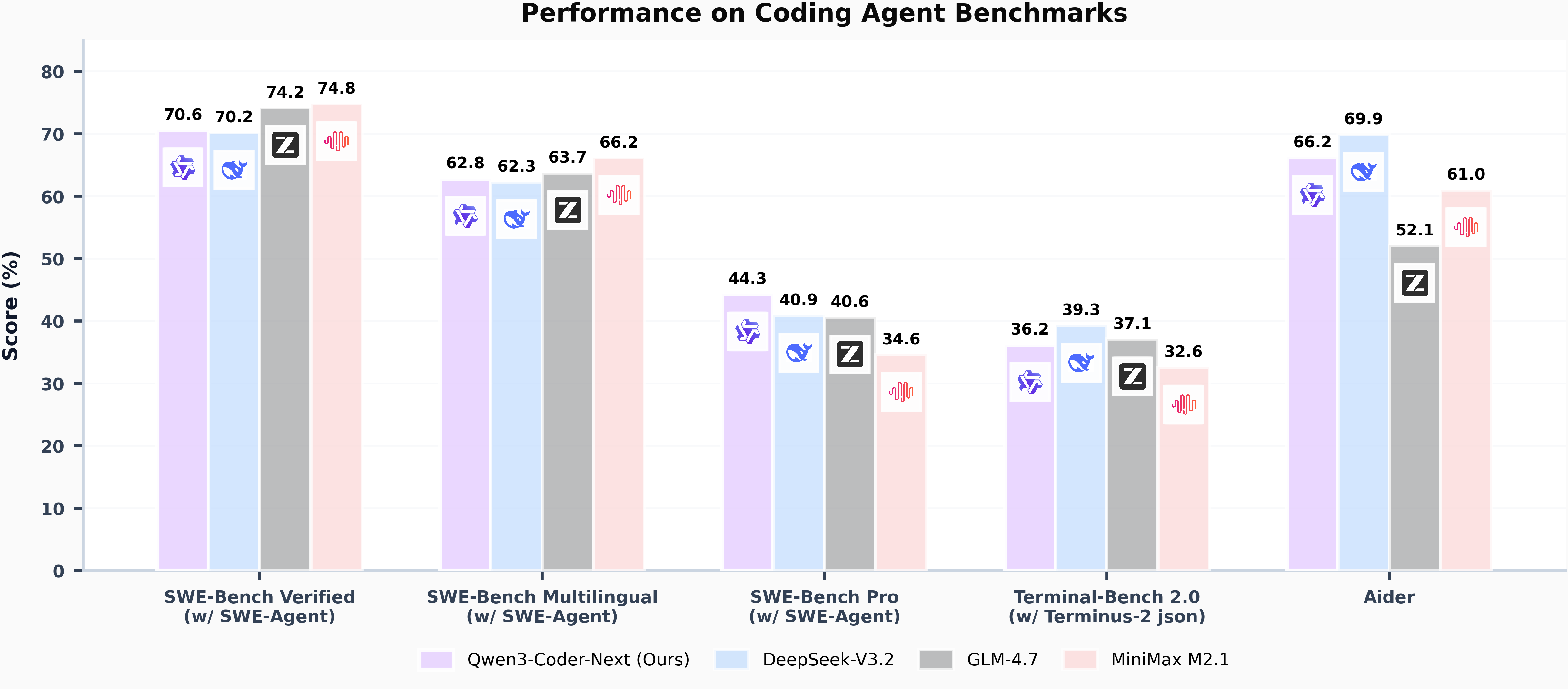
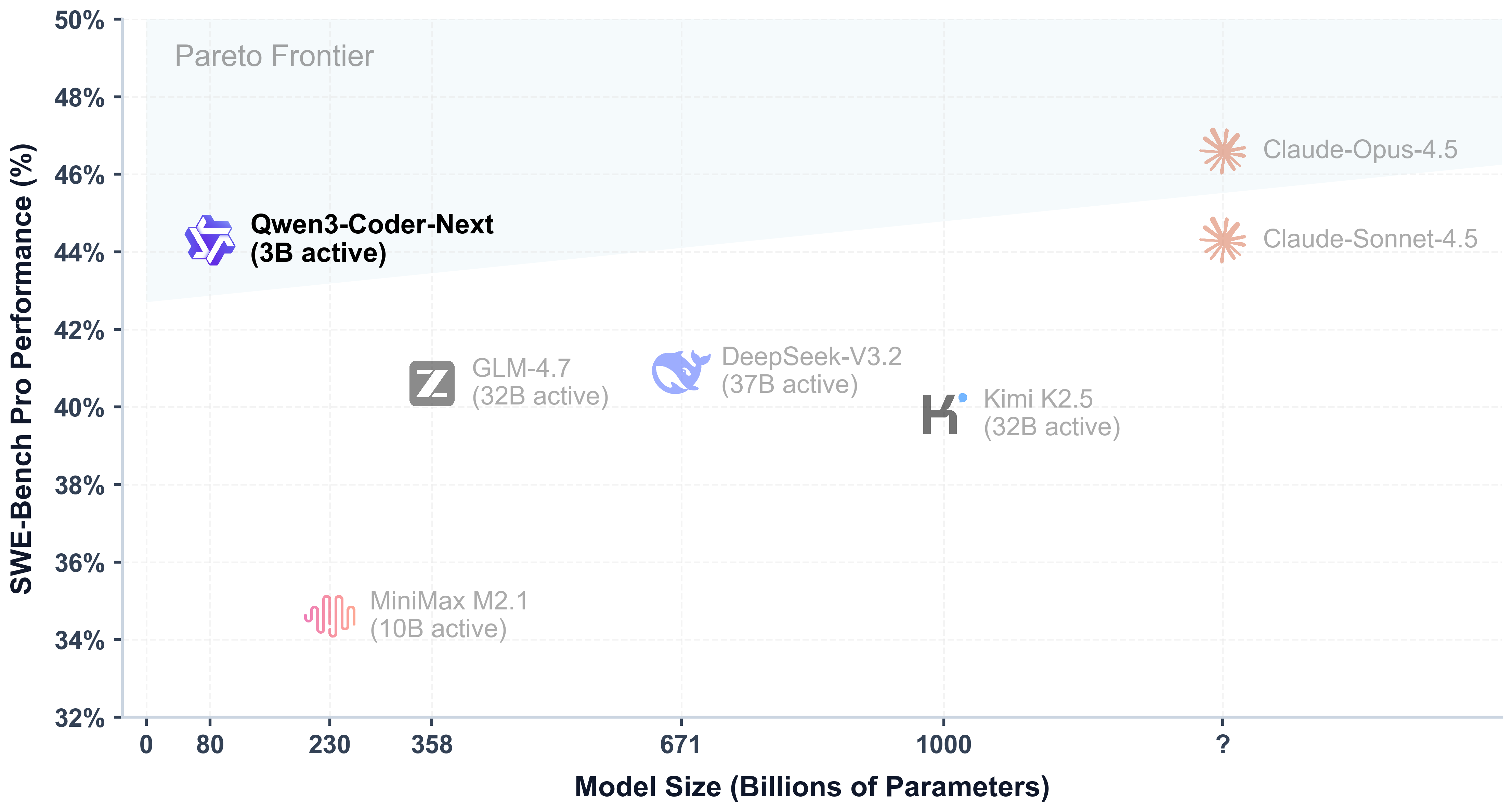
<think></think> blocks in its output. Meanwhile, specifying enable_thinking=False is no longer required.transformers.1from transformers import AutoModelForCausalLM, AutoTokenizer
2
3model_name = "Qwen/Qwen3-Coder-Next"
4
5# load the tokenizer and the model
6tokenizer = AutoTokenizer.from_pretrained(model_name)
7model = AutoModelForCausalLM.from_pretrained(
8 model_name,
9 torch_dtype="auto",
10 device_map="auto"
11)
12
13# prepare the model input
14prompt = "Write a quick sort algorithm."
15messages = [
16 {"role": "user", "content": prompt}
17]
18text = tokenizer.apply_chat_template(
19 messages,
20 tokenize=False,
21 add_generation_prompt=True,
22)
23model_inputs = tokenizer([text], return_tensors="pt").to(model.device)
24
25# conduct text completion
26generated_ids = model.generate(
27 **model_inputs,
28 max_new_tokens=65536
29)
30output_ids = generated_ids[0][len(model_inputs.input_ids[0]):].tolist()
31
32content = tokenizer.decode(output_ids, skip_special_tokens=True)
33
34print("content:", content)32,768.sglang or vllm to create an OpenAI-compatible API endpoint.sglang>=v0.5.8 is required for Qwen3-Coder-Next, which can be installed using:pip install 'sglang[all]>=v0.5.8'http://localhost:30000/v1 with maximum context length 256K tokens using tensor parallel on 4 GPUs.python -m sglang.launch_server --model Qwen/Qwen3-Coder-Next --port 30000 --tp-size 2 --tool-call-parser qwen3_coder[!Note] The default context length is 256K. Consider reducing the context length to a smaller value, e.g.,32768, if the server fails to start.
vllm>=0.15.0 is required for Qwen3-Coder-Next, which can be installed using:pip install 'vllm>=0.15.0'http://localhost:8000/v1 with maximum context length 256K tokens using tensor parallel on 4 GPUs.vllm serve Qwen/Qwen3-Coder-Next --port 8000 --tensor-parallel-size 2 --enable-auto-tool-choice --tool-call-parser qwen3_coder[!Note] The default context length is 256K. Consider reducing the context length to a smaller value, e.g.,32768, if the server fails to start.
1# Your tool implementation
2def square_the_number(num: float) -> dict:
3    return num ** 2
4
5# Define Tools
6tools=[
7    {
8        "type":"function",
9        "function":{
10            "name": "square_the_number",
11            "description": "output the square of the number.",
12            "parameters": {
13                "type": "object",
14                "required": ["input_num"],
15                "properties": {
16                    'input_num': {
17                        'type': 'number',
18                        'description': 'input_num is a number that will be squared'
19                        }
20                },
21            }
22        }
23    }
24]
25
26from openai import OpenAI
27# Define LLM
28client = OpenAI(
29    # Use a custom endpoint compatible with OpenAI API
30    base_url='http://localhost:8000/v1',  # api_base
31    api_key="EMPTY"
32)
33
34messages = [{'role': 'user', 'content': 'square the number 1024'}]
35
36completion = client.chat.completions.create(
37    messages=messages,
38    model="Qwen3-Coder-Next",
39    max_tokens=65536,
40    tools=tools,
41)
42
43print(completion.choices[0])temperature=1.0, top_p=0.95, top_k=40.@techreport{qwen_qwen3_coder_next_tech_report,
title = {Qwen3-Coder-Next Technical Report},
author = {{Qwen Team}},
url = {https://github.com/QwenLM/Qwen3-Coder/blob/main/qwen3_coder_next_tech_report.pdf},
note = {Accessed: 2026-02-03}
}