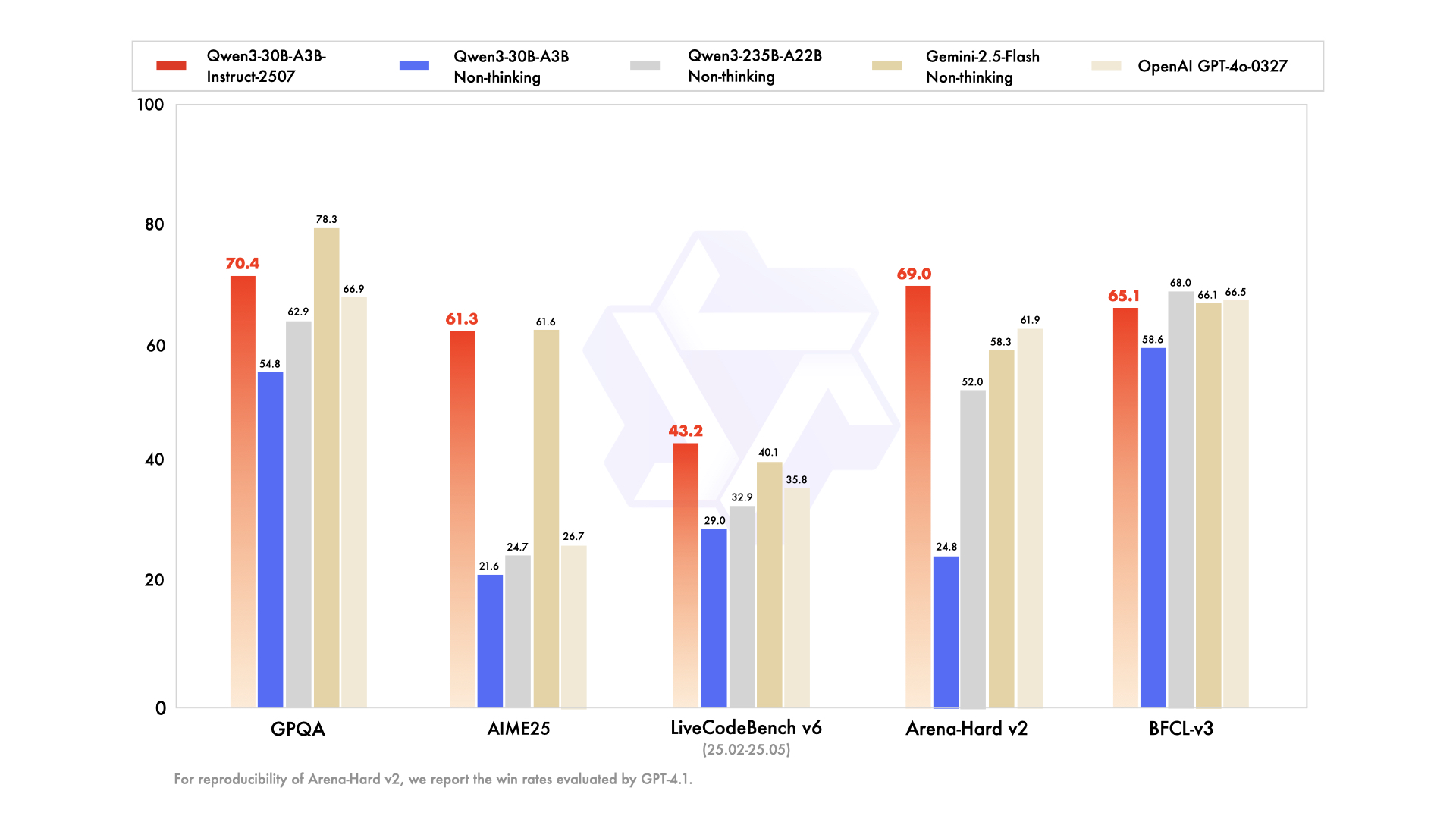
We introduce the updated version of the Qwen3-30B-A3B non-thinking mode, named Qwen3-30B-A3B-Instruct-2507, featuring the following key enhancements:
Significant improvements in general capabilities, including instruction following, logical reasoning, text comprehension, mathematics, science, coding and tool usage.
Substantial gains in long-tail knowledge coverage across multiple languages.
Markedly better alignment with user preferences in subjective and open-ended tasks, enabling more helpful responses and higher-quality text generation.
Enhanced capabilities in 256K long-context understanding.
image/jpeg
Model Overview
Qwen3-30B-A3B-Instruct-2507 has the following features:
Type: Causal Language Models
Training Stage: Pretraining & Post-training
Number of Parameters: 30.5B in total and 3.3B activated
Number of Paramaters (Non-Embedding): 29.9B
Number of Layers: 48
Number of Attention Heads (GQA): 32 for Q and 4 for KV
Number of Experts: 128
Number of Activated Experts: 8
Context Length: 262,144 natively.
NOTE: This model supports only non-thinking mode and does not generate <think></think> blocks in its output. Meanwhile, specifying enable_thinking=False is no longer required.
For more details, including benchmark evaluation, hardware requirements, and inference performance, please refer to our blog, GitHub, and Documentation.
Performance
Deepseek-V3-0324
GPT-4o-0327
Gemini-2.5-Flash Non-Thinking
Qwen3-235B-A22B Non-Thinking
Qwen3-30B-A3B Non-Thinking
Qwen3-30B-A3B-Instruct-2507
Knowledge
MMLU-Pro
81.2
79.8
81.1
75.2
69.1
78.4
MMLU-Redux
90.4
91.3
90.6
89.2
84.1
89.3
GPQA
68.4
66.9
78.3
62.9
54.8
70.4
SuperGPQA
57.3
51.0
54.6
48.2
42.2
53.4
Reasoning
AIME25
46.6
26.7
61.6
24.7
21.6
61.3
HMMT25
27.5
7.9
45.8
10.0
12.0
43.0
ZebraLogic
83.4
52.6
57.9
37.7
33.2
90.0
LiveBench 20241125
66.9
63.7
69.1
62.5
59.4
69.0
Coding
LiveCodeBench v6 (25.02-25.05)
45.2
35.8
40.1
32.9
29.0
43.2
MultiPL-E
82.2
82.7
77.7
79.3
74.6
83.8
Aider-Polyglot
55.1
45.3
44.0
59.6
24.4
35.6
Alignment
IFEval
82.3
83.9
84.3
83.2
83.7
84.7
Arena-Hard v2*
45.6
61.9
58.3
52.0
24.8
69.0
Creative Writing v3
81.6
84.9
84.6
80.4
68.1
86.0
WritingBench
74.5
75.5
80.5
77.0
72.2
85.5
Agent
BFCL-v3
64.7
66.5
66.1
68.0
58.6
65.1
TAU1-Retail
49.6
60.3#
65.2
65.2
38.3
59.1
TAU1-Airline
32.0
42.8#
48.0
32.0
18.0
40.0
TAU2-Retail
71.1
66.7#
64.3
64.9
31.6
57.0
TAU2-Airline
36.0
42.0#
42.5
36.0
18.0
38.0
TAU2-Telecom
34.0
29.8#
16.9
24.6
18.4
12.3
Multilingualism
MultiIF
66.5
70.4
69.4
70.2
70.8
67.9
MMLU-ProX
75.8
76.2
78.3
73.2
65.1
72.0
INCLUDE
80.1
82.1
83.8
75.6
67.8
71.9
PolyMATH
32.2
25.5
41.9
27.0
23.3
43.1
*: For reproducibility, we report the win rates evaluated by GPT-4.1.
#: Results were generated using GPT-4o-20241120, as access to the native function calling API of GPT-4o-0327 was unavailable.
Quickstart
The code of Qwen3-MoE has been in the latest Hugging Face transformers and we advise you to use the latest version of transformers.
With transformers<4.51.0, you will encounter the following error:
KeyError: 'qwen3_moe'
The following contains a code snippet illustrating how to use the model generate content based on given inputs.
python
1from transformers import AutoModelForCausalLM, AutoTokenizer
23model_name ="Qwen/Qwen3-30B-A3B-Instruct-2507"45# load the tokenizer and the model6tokenizer = AutoTokenizer.from_pretrained(model_name)7model = AutoModelForCausalLM.from_pretrained(8 model_name,9 torch_dtype="auto",10 device_map="auto"11)1213# prepare the model input14prompt ="Give me a short introduction to large language model."15messages =[16{"role":"user","content": prompt}17]18text = tokenizer.apply_chat_template(19 messages,20 tokenize=False,21 add_generation_prompt=True,22)23model_inputs = tokenizer([text], return_tensors="pt").to(model.device)2425# conduct text completion26generated_ids = model.generate(27**model_inputs,28 max_new_tokens=1638429)30output_ids = generated_ids[0][len(model_inputs.input_ids[0]):].tolist()3132content = tokenizer.decode(output_ids, skip_special_tokens=True)3334print("content:", content)
For deployment, you can use sglang>=0.4.6.post1 or vllm>=0.8.5 or to create an OpenAI-compatible API endpoint:
Note: If you encounter out-of-memory (OOM) issues, consider reducing the context length to a shorter value, such as 32,768.
For local use, applications such as Ollama, LMStudio, MLX-LM, llama.cpp, and KTransformers have also supported Qwen3.
Agentic Use
Qwen3 excels in tool calling capabilities. We recommend using Qwen-Agent to make the best use of agentic ability of Qwen3. Qwen-Agent encapsulates tool-calling templates and tool-calling parsers internally, greatly reducing coding complexity.
To define the available tools, you can use the MCP configuration file, use the integrated tool of Qwen-Agent, or integrate other tools by yourself.
python
1from qwen_agent.agents import Assistant
23# Define LLM4llm_cfg ={5'model':'Qwen3-30B-A3B-Instruct-2507',67# Use a custom endpoint compatible with OpenAI API:8'model_server':'http://localhost:8000/v1',# api_base9'api_key':'EMPTY',10}1112# Define Tools13tools =[14{'mcpServers':{# You can specify the MCP configuration file15'time':{16'command':'uvx',17'args':['mcp-server-time','--local-timezone=Asia/Shanghai']18},19"fetch":{20"command":"uvx",21"args":["mcp-server-fetch"]22}23}24},25'code_interpreter',# Built-in tools26]2728# Define Agent29bot = Assistant(llm=llm_cfg, function_list=tools)3031# Streaming generation32messages =[{'role':'user','content':'https://qwenlm.github.io/blog/ Introduce the latest developments of Qwen'}]33for responses in bot.run(messages=messages):34pass35print(responses)
Processing Ultra-Long Texts
To support ultra-long context processing (up to 1 million tokens), we integrate two key techniques:
Dual Chunk Attention (DCA): A length extrapolation method that splits long sequences into manageable chunks while preserving global coherence.
MInference: A sparse attention mechanism that reduces computational overhead by focusing on critical token interactions.
Together, these innovations significantly improve both generation quality and inference efficiency for sequences beyond 256K tokens. On sequences approaching 1M tokens, the system achieves up to a 3× speedup compared to standard attention implementations.
[!NOTE]
To effectively process a 1 million token context, users will require approximately 240 GB of total GPU memory. This accounts for model weights, KV-cache storage, and peak activation memory demands.
Step 1: Update Configuration File
Download the model and replace the content of your config.json with config_1m.json, which includes the config for length extrapolation and sparse attention.
The fraction of the memory used for static allocation (model weights and KV cache memory pool). Use a smaller value if you see out-of-memory errors.
--tp 4
Tensor parallelism size (matches model sharding)
--chunked-prefill-size 131072
Prefill chunk size for handling long inputs without OOM
Troubleshooting:
Encountering the error: "The model's max sequence length (xxxxx) is larger than the maximum number of tokens that can be stored in the KV cache." or "RuntimeError: Not enough memory. Please try to increase --mem-fraction-static."
The VRAM reserved for the KV cache is insufficient.
vLLM: Consider reducing the max_model_len or increasing the tensor_parallel_size and gpu_memory_utilization. Alternatively, you can reduce max_num_batched_tokens, although this may significantly slow down inference.
SGLang: Consider reducing the context-length or increasing the tp and mem-frac. Alternatively, you can reduce chunked-prefill-size, although this may significantly slow down inference.
Encountering the error: "torch.OutOfMemoryError: CUDA out of memory."
The VRAM reserved for activation weights is insufficient. You can try lowering gpu_memory_utilization or mem-frac, but be aware that this might reduce the VRAM available for the KV cache.
Encountering the error: "Input prompt (xxxxx tokens) + lookahead slots (0) is too long and exceeds the capacity of the block manager." or "The input (xxx xtokens) is longer than the model's context length (xxx tokens)."
The input is too lengthy. Consider using a shorter sequence or increasing the max_model_len or context-length.
Long-Context Performance
We test the model on an 1M version of the RULER benchmark.
Model Name
Acc avg
4k
8k
16k
32k
64k
96k
128k
192k
256k
384k
512k
640k
768k
896k
1000k
Qwen3-30B-A3B (Non-Thinking)
72.0
97.1
96.1
95.0
92.2
82.6
79.7
76.9
70.2
66.3
61.9
55.4
52.6
51.5
52.0
50.9
Qwen3-30B-A3B-Instruct-2507 (Full Attention)
86.8
98.0
96.7
96.9
97.2
93.4
91.0
89.1
89.8
82.5
83.6
78.4
79.7
77.6
75.7
72.8
Qwen3-30B-A3B-Instruct-2507 (Sparse Attention)
86.8
98.0
97.1
96.3
95.1
93.6
92.5
88.1
87.7
82.9
85.7
80.7
80.0
76.9
75.5
72.2
All models are evaluated with Dual Chunk Attention enabled.
Since the evaluation is time-consuming, we use 260 samples for each length (13 sub-tasks, 20 samples for each).
Best Practices
To achieve optimal performance, we recommend the following settings:
Sampling Parameters:
We suggest using Temperature=0.7, TopP=0.8, TopK=20, and MinP=0.
For supported frameworks, you can adjust the presence_penalty parameter between 0 and 2 to reduce endless repetitions. However, using a higher value may occasionally result in language mixing and a slight decrease in model performance.
Adequate Output Length: We recommend using an output length of 16,384 tokens for most queries, which is adequate for instruct models.
Standardize Output Format: We recommend using prompts to standardize model outputs when benchmarking.
Math Problems: Include "Please reason step by step, and put your final answer within \boxed{}." in the prompt.
Multiple-Choice Questions: Add the following JSON structure to the prompt to standardize responses: "Please show your choice in the answer field with only the choice letter, e.g., "answer": "C"."
Citation
If you find our work helpful, feel free to give us a cite.