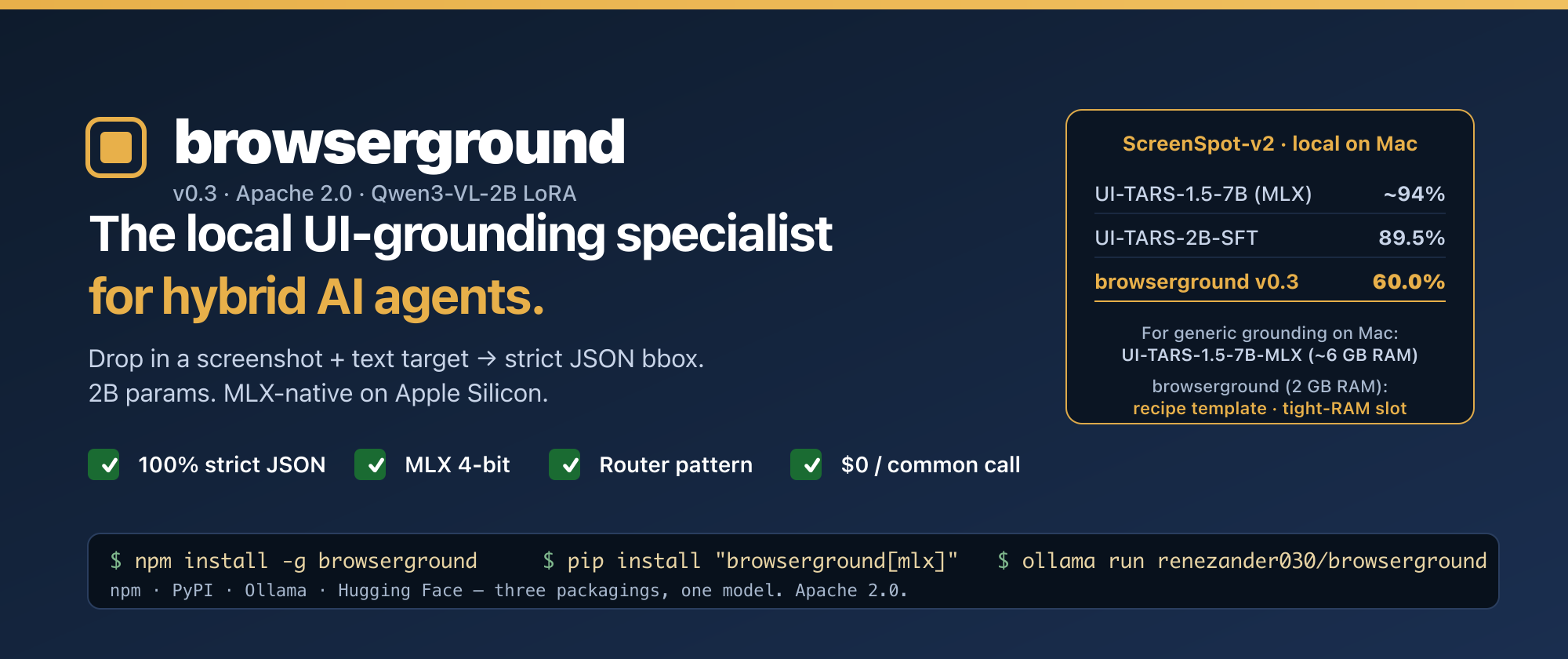
browserground v0.3 — local UI-grounding specialist for hybrid AI agents. MLX 4-bit, npm, pip, Ollama. ScreenSpot-v2 60%. Strict JSON output.
browserground — Qwen3-VL-2B LoRA for hybrid AI agents (v0.3)
The local UI-grounding specialist for hybrid AI agents. Drop in a screenshot + text target, get a strict JSON bbox. 2B params. MLX-native. Apache 2.0.
TL;DR — when to use browserground (and when to use UI-TARS-MLX instead)
If you're on Apple Silicon with ≥16 GB RAM and you need generic, max-accuracy UI grounding, use mlx-community/UI-TARS-1.5-7B-4bit. It's the obvious default — ~94% on ScreenSpot-v2, MLX-native, drops into mlx-vlm directly. ByteDance research-lab compute, you couldn't reproduce it on a budget.
browserground is for two narrower jobs:
1. The recipe for your product's custom UI grounder
UI-TARS is a finished model. You can use it; you can't easily extend it. The training pipeline is closed, the data mix is proprietary, the base is non-trivial to swap.
browserground is the opposite — it's a template. Open base (Qwen3-VL-2B), open training scripts, open data mix. Total recipe cost: $5 of L40S time + 26k examples + a public LoRA. Swap in your dashboard's screenshots / your customer app / your internal tooling → ship a domain-trained grounder over a weekend. The 60% generic ScreenSpot-v2 score isn't the deliverable; the recipe is. A 60-point baseline on generic screens often becomes 85-95% on your own product's narrow surface because the test distribution finally matches the training distribution.
2. The smallest viable slot in a multi-model stack
Model
Disk @ 4-bit
RAM at inference
UI-TARS-1.5-7B-MLX
~4 GB
~5-6 GB
browserground 4-bit MLX
~1 GB
~2 GB
2 GB matters when you're on an 8 GB Mac, or when your agent already runs a 7B planner + an OCR model + an embedding model and you need a small grounder in the same RAM budget. Plus strict JSON output (100% parseable, no regex on prose) — small win, but real.
A direct head-to-head benchmark of browserground vs UI-TARS-1.5-7B-MLX on the same Apple Silicon hardware is forthcoming.
When NOT to pick browserground
You're on a Mac with ≥16 GB RAM and want max generic accuracy → use UI-TARS-1.5-7B-MLX
You're not going to fine-tune for your product, and accuracy is the only thing that matters → use UI-TARS-1.5-7B-MLX
You need a complete agent toolkit, not a piece → look at ByteDance's full UI-TARS stack
When to pick browserground
You want to ship a custom UI grounder trained on your product's screenshots without spending lab-scale money — use the recipe in this repo as a template
You're squeezing into a tight RAM budget (8 GB Mac, multi-model hybrid stack)
You want a CLI / npm / pip / Ollama distribution layer with daemon, HTTP REST, batch, confidence-routed cloud fallback, eval-on-your-data — and you specifically want it on top of an open recipe you can re-run
Full per-split numbers (60% breakdown): mobile-app buttons 78%, text-labelled targets ~74%, icon-only ~41%. On labelled-button-heavy workloads (the common browser case), real-world accuracy is closer to the high end. Icons get fixed in v0.4 with more icon-rich training data.
The hybrid AI argument — for people new to this pattern
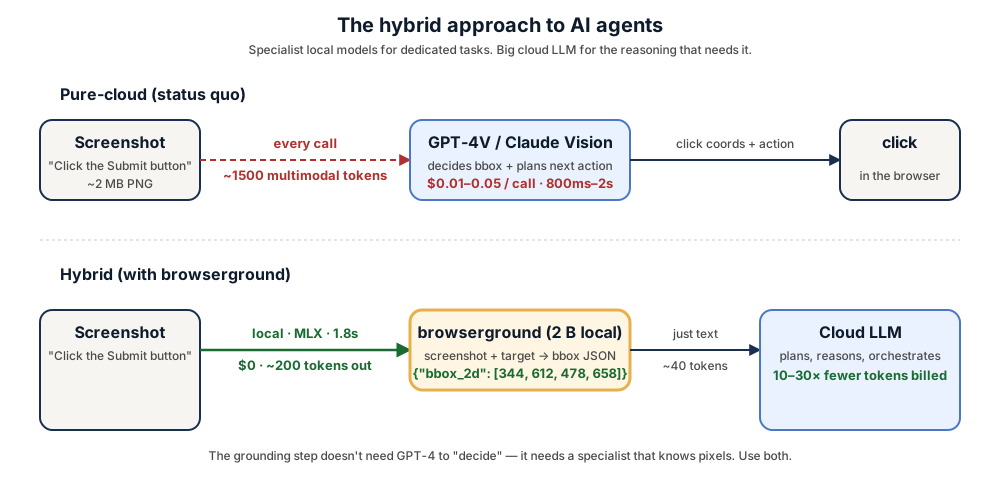
Today, most AI agents route every screenshot to a cloud frontier model (GPT-4V, Claude Vision, Gemini) just to find click coordinates. That's a $0.01–0.05 multimodal call adding 800ms–2s of latency, repeated 20–50× per agent run. Cost and latency compound. Screenshots full of private UI leave your machine.
A general 200B-parameter LLM is overkill for "where is the Submit button?" — that's a narrow vision task. The right shape is a hybrid one: cheap fast specialist local models for the dedicated tasks they handle better, and the cloud LLM only for the planning and reasoning it's uniquely good at.
That's exactly what browserground is — the click-grounding specialist.
hybrid architecture
Pure-cloud (status quo)
Hybrid (+ browserground + confidence routing)
Per-screenshot cost on the common case
$0.01–0.05
$0 (local), cloud only on low-confidence escalations
Given a screenshot and a target description ("submit form button", "the red Sign Up link", "the second profile picture from the left"), this LoRA-fine-tuned Qwen3-VL-2B emits a strict JSON object:
{"bbox_2d": [x1, y1, x2, y2]}
— the pixel coordinates of the element to click. 100% format compliance on the held-out evaluation. Drop it into any browser-agent / screen-automation pipeline that needs to ground language → click target.
Point-grounding accuracy, 300 held-out items (100 per split: mobile / desktop / web). A hit = predicted bbox center falls inside the ground-truth bbox.
Model
Params
Overall
Mobile
Desktop
Web
Format-OK
GPT-5.4 (cloud frontier) ¹
—
85.4%
—
—
—
—
SeeClick (Qwen-VL-Chat)
9.6B
55.1%
—
—
—
—
ShowUI-2B
2B
75.5%
—
—
—
—
UI-TARS-2B-SFT (ByteDance)
2B
89.5%
—
—
—
—
OS-Atlas-Base-7B
7B
~91%
—
—
—
—
browserground v0.3
2B
60.0%
78.0%
44.0%
58.0%
100%
Qwen3-VL-2B-Instruct (zero-shot baseline)
2B
6.3%
7.0%
6.0%
6.0%
100%
¹ GPT-5.4 score is on the harder ScreenSpot-Pro benchmark — no public ScreenSpot-v2 number for the 2026 cloud generation. Open-source numbers in the table use v2 throughout.
+10× over zero-shot baseline on the same benchmark (6.3% → 60.0%)
Daemon, HTTP server, batch, confidence, eval — all in the CLI. See the GitHub README for the full surface.
Python
bash
1pip install"browserground[mlx]"# Apple Silicon (recommended)2pip install"browserground[transformers]"# everywhere else
python
1from browserground import ground, click_xy
23res = ground("screenshot.png","the green Subscribe button")4print(res["bbox_2d"])56x, y = click_xy("screenshot.png","the back arrow")
Ollama
bash
1ollama pull renezander030/browserground
2ollama run renezander030/browserground "Locate: Submit button" /path/to/screen.png
From this LoRA directly (transformers)
python
1from transformers import AutoProcessor, Qwen3VLForConditionalGeneration
2from peft import PeftModel
3import torch
4from PIL import Image
56processor = AutoProcessor.from_pretrained("Qwen/Qwen3-VL-2B-Instruct")7model = Qwen3VLForConditionalGeneration.from_pretrained(8"Qwen/Qwen3-VL-2B-Instruct", dtype=torch.bfloat16, device_map="auto"9)10model = PeftModel.from_pretrained(model,"renezander030/browserground")11model = model.merge_and_unload(); model.eval()1213img = Image.open("screenshot.png").convert("RGB")14messages =[15{"role":"system","content":[{"type":"text","text":16'You are a UI-grounding model. Given a screenshot and a target description, '17'output the bounding box of the SINGLE UI element to click. Output ONLY a JSON '18'object: {"bbox_2d": [x1, y1, x2, y2]} with pixel coordinates, origin at top-left.'}]},19{"role":"user","content":[20{"type":"image","image": img},21{"type":"text","text":"Locate the element described: Submit button"},22]},23]24prompt = processor.apply_chat_template(messages, tokenize=False, add_generation_prompt=True)25inputs = processor(text=[prompt], images=[[img]], return_tensors="pt").to(model.device)26out = model.generate(**inputs, max_new_tokens=64, do_sample=False)27print(processor.tokenizer.decode(out[0, inputs.input_ids.shape[1]:], skip_special_tokens=True))
What would it take to reach UI-TARS-level accuracy (~89-90%)?
The gap is compute + data, not architecture. Concrete recipe to close it:
Lever
v0.3 (this)
v0.5+ target
Training records
26k
250k–500k (10–20× more)
Epochs
1
3–5
Adapter size
LoRA rank 32 (1.6% of base)
rank 128 or full fine-tune
Icon-rich data
thin
balanced — closes the 41% icon split
Training stages
SFT only
SFT → DPO with preference data
Compute spend
$2.20
~$200–500
This is reproducible — the training scripts in imgparse-tier1 are the template. The current v0.3 is the recipe-validated milestone at the cheap end of the spectrum.
Training recipe (v0.2 LoRA — what's in this repo)
v0.3 is the same underlying LoRA as v0.2 — what shipped in v0.3 is packaging: MLX 4-bit, GGUF, Ollama, PyPI, browser-use + Skyvern adapters, batch / confidence / HTTP daemon / eval CLI surfaces.
Base: Qwen/Qwen3-VL-2B-Instruct
Method: LoRA rank 32, alpha 64, dropout 0.05, on all 7 linear modules of the LM (q/k/v/o/gate/up/down)
Custom agent stacks that need a $0/call grounding step for the common-case calls instead of GPT-4V per screenshot
Self-hosted compound-AI systems with a routing layer (specialist model for grounding, general LLM for planning)
Limitations & next
Icon UI accuracy (~41%) lags text UI (~74%) — icons under-represented in the 26k training mix; planned for v0.4
Web and desktop accuracy lag mobile — more web/desktop training data in v0.4
No mouse-action prediction — this model only locates; doesn't decide click vs hover vs type. Pair with an action predictor for full computer-use loops
English-only training data
MLX latency numbers are targets until v0.4 independent benchmarks
Work with me
This adapter is a public reference of the recipe I deliver to freelance clients: small, fast, structured-output local specialists that slot into compound-AI agent stacks and cut cloud-LLM bills without losing capability.
If you need one of these, I can build it:
a UI-grounding model trained on your own product's screenshots — your dashboard, your app, your customer interfaces — for higher recall on the elements your agents actually click
a hybrid agent architecture that routes narrow tasks (grounding, OCR, classification, embedding, extraction) to local specialist models and reserves cloud frontier LLMs for the reasoning that actually needs them
an on-prem agent deployment — Apple Silicon (MLX), CUDA box, or your existing K8s — with no screenshots leaving your infrastructure
a confidence-routed harness that tells you when the local model is actually good enough to keep the call out of the cloud bill in production