Scenic is a codebase with a focus on research around attention-based models
for computer vision. Scenic has been successfully used to develop
classification, segmentation, and detection models for multiple modalities
including images, video, audio, and multimodal combinations of them.
More precisely, Scenic is a (i) set of shared light-weight libraries solving
tasks commonly encountered tasks when training large-scale (i.e. multi-device,
multi-host) vision models; and (ii) several projects containing fully
fleshed out problem-specific training and evaluation loops using these
libraries.
Scenic aims to facilitate rapid prototyping of large-scale vision models. To
keep the code simple to understand and extend we prefer forking and
copy-pasting over adding complexity or increasing abstraction. Only when
functionality proves to be widely useful across many models and tasks it may be
upstreamed to Scenic's shared libraries.
Getting started
See projects/baselines/README.md for a walk-through baseline models and
instructions on how to run the code.
If you would like to contribute to Scenic, please check out the
Philisophy, Code structure and
Contributing sections.
Should your contribution be a part of the shared libraries, please send us a
pull request!
Quickstart
You will need Python 3.9 or later. Download the code from GitHub
shell
1$ git clone https://github.com/google-research/scenic.git
2$ cd scenic
3$ pip install.
Note that for specific projects and baselines, you might need to install extra
packages that are mentioned in their README.md or requirements.txt files.
Here
is also a minimal colab to train a simple feed-forward model using Scenic.
Scenic component design
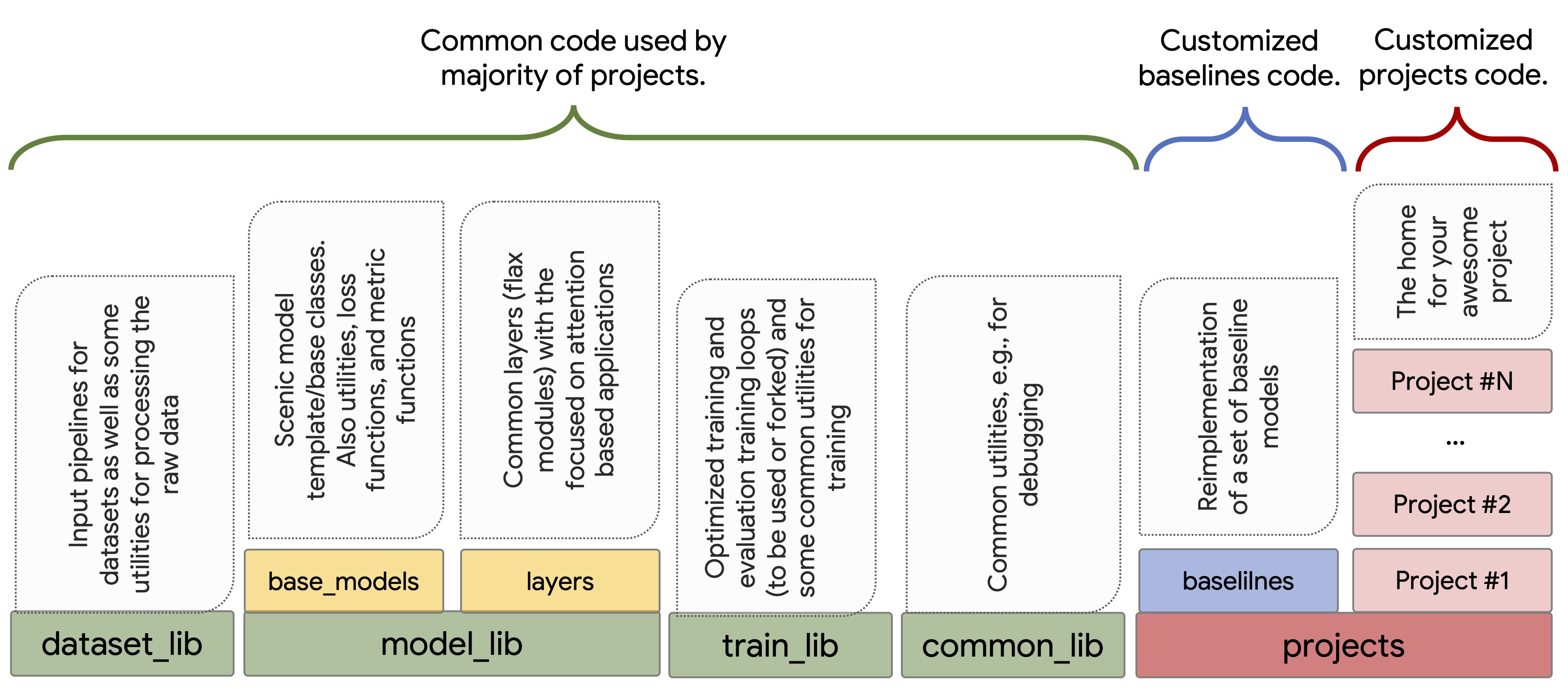
Scenic is designed to propose different levels of abstraction, to support
hosting projects that only require changing hyper-parameters by defining config
files, to those that need customization on the input pipeline, model
architecture, losses and metrics, and the training loop. To make this happen,
the code in Scenic is organized as either project-level code,
which refers to customized code for specific projects or baselines or
library-level code, which refers to common functionalities and general
patterns that are adapted by the majority of projects. The project-level
code lives in the projects directory.
scenic design
Library-level code
The goal is to keep the library-level code minimal and well-tested and to avoid
introducing extra abstractions to support minor use-cases. Shared libraries
provided by Scenic are split into:
dataset_lib: Implements IO pipelines for loading and pre-processing data
for common Computer Vision tasks and benchmarks (see "Tasks and Datasets"
section). All pipelines are designed to be scalable and support multi-host
and multi-device setups, taking care dividing data among multiple hosts,
incomplete batches, caching, pre-fetching, etc.
model_lib : Provides
several abstract model interfaces (e.g. ClassificationModel or
SegmentationModel in model_lib.base_models) with task-specific
losses and metrics;
neural network layers in model_lib.layers, focusing on efficient
implementation of attention and transformer layers;
accelerator-friendly implementations of bipartite matching
algorithms in model_lib.matchers.
train_lib: Provides tools for constructing training loops and implements
several optimized trainers (classification trainer and segmentation trainer)
that can be forked for customization.
common_lib: General utilities, like logging and debugging modules,
functionalities for processing raw data, etc.
Project-level code
Scenic supports the development of customized solutions for customized tasks and
data via the concept of "project". There is no one-fits-all recipe for how much
code should be re-used by a project. Projects can consist of only configs and
use the common models, trainers, task/data that live in library-level code, or
they can simply fork any of the mentioned functionalities and redefine, layers,
losses, metrics, logging methods, tasks, architectures, as well as training and
evaluation loops. The modularity of library-level code makes it flexible for
projects to fall placed on any spot in the "run-as-is" to "fully customized"
spectrum.
Common baselines such as a ResNet and Vision Transformer (ViT) are implemented
in the projects/baselines
project. Forking models in this directory is a good starting point for new
projects.
Citing Scenic
If you use Scenic, you can cite our white paper.
Here is an example BibTeX entry:
bibtex
1@InProceedings{dehghani2021scenic,
2    author    = {Dehghani, Mostafa and Gritsenko, Alexey and Arnab, Anurag and Minderer, Matthias and Tay, Yi},
3    title     = {Scenic: A JAX Library for Computer Vision Research and Beyond},
4    booktitle = {Proceedings of the IEEE/CVF Conference on Computer Vision and Pattern Recognition (CVPR)},
5    year      = {2022},
6    pages     = {21393-21398}
7}
Disclaimer: This is not an official Google product.