


Views
No views yet

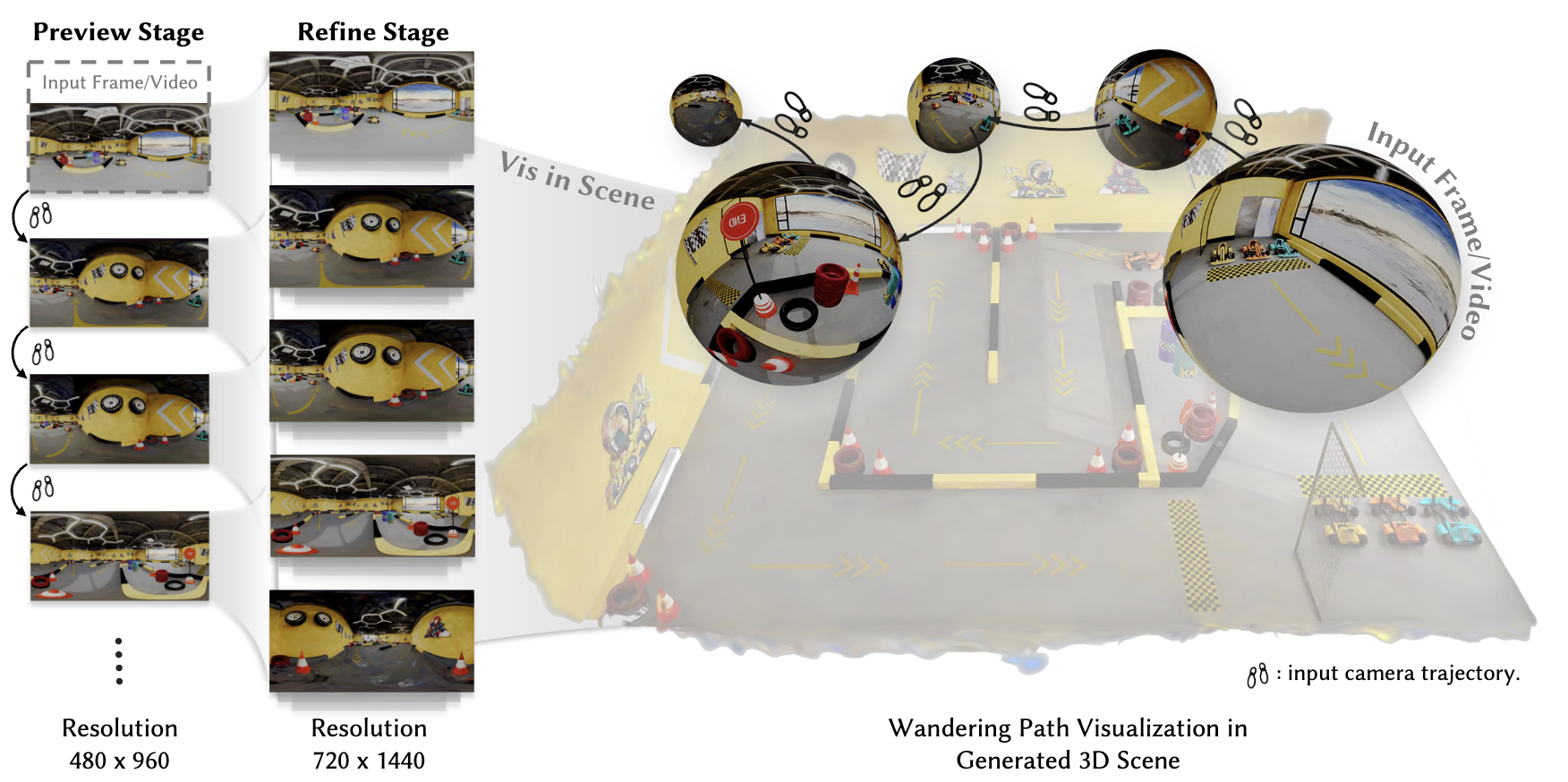
1# Download Rust and Cargo
2curl --proto '=https' --tlsv1.2 -sSf https://sh.rustup.rs/ | sh
3. "$HOME/.cargo/env"
4
5# Clone repository
6git clone https://github.com/yuhengliu02/OmniRoam.git
7cd OmniRoam
8
9# Create and activate conda environment
10conda create -n omniroam python=3.10
11conda activate omniroam
12
13# Install DiffSynth-Studio
14# DiffSynth-Studio: https://github.com/modelscope/DiffSynth-Studio
15pip install -e .1# Download using provided script
2python download_wan2.1.py
3
4# Or manually download from Hugging Face
5# Visit: https://huggingface.co/Wan-AI/Wan2.1-T2V-1.3B
6# Download to: models/Wan-AI/Wan2.1-T2V-1.3B/1# Option 1: Using our download script
2python download_omniroam_models.py
3
4# Option 2: Manual download from Hugging Face
5# Visit: https://huggingface.co/Yuheng02/OmniRoam
6# Download the following files:
7# - preview.ckpt → models/OmniRoam/Preview/
8# - self-forcing.pt → models/OmniRoam/Self-forcing/
9# - refine.ckpt → models/OmniRoam/Refine/models/
├── Wan-AI/
│ └── Wan2.1-T2V-1.3B/
└── OmniRoam/
├── Preview/
│ └── preview.ckpt
├── Self-forcing/
│ └── self-forcing.pt
└── Refine/
└── refine.ckpt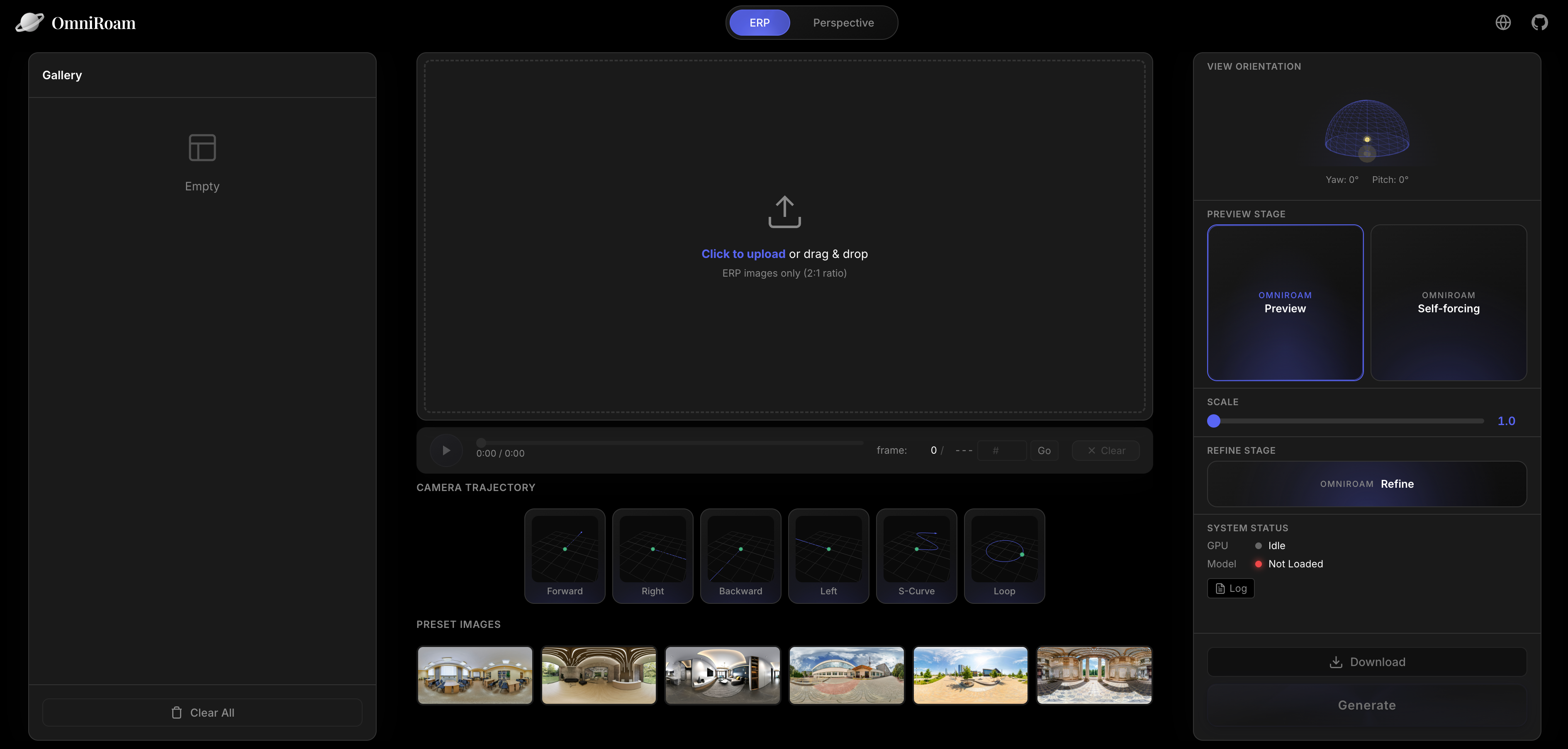
1cd Studio
2
3# Run before installing all dependencies
4
5# Terminal 1: Start backend
6conda activate omniroam
7python main.py
8
9# Terminal 2: Start frontend
10cd frontend
11npm install  # First time only
12npm run dev1cd InteriorGS-Render
2
3# Download 3DGS models and camera trajectories (see InteriorGS-Render/README.md)
4# Then run rendering
5./run_simple.sh 1 2 3 4 5 200 # Process splits 1-5 out of 200data/InteriorGS-360video/
├── 0001_839920/
│ ├── pano_camera0/
│ │ ├── frame_0001.png
│ │ ├── frame_0002.png
│ │ └── ...
│ ├── video.mp4
│ └── transforms.json
├── 0002_123456/
└── ...1# Basic usage
2python infer_omniroam.py \
3 --local_images_dir vis_images \
4 --height 480 \
5 --width 960 \
6 --num_frames 81 \
7 --ckpt_path models/OmniRoam/Preview/preview.ckpt \
8 --enable_speed_control \
9 --speed_fixed 1.0 \
10 --use_cam_traj \
11 --traj_mode fixed \
12 --traj_preset forward \
13 --re_scale_pose fixed:1.0 \
14 --traj_s_curve_amp_m 1.4 \
15 --traj_loop_radius_m 1.5 \
16 --cfg_scale 5.0 \
17 --num_inference_steps 50 \
18 --output_dir ./vis_ours_480p_speed_1_forward \
19 --devices cuda:0,cuda:1,cuda:2,cuda:3,cuda:4,cuda:5,cuda:6,cuda:7
20
21# Or use the provided script
22./infer_preview.shforward, backward, left, right, s_curve, loopscale using --speed_fixed between 1.0 and 8.0.1cd Self-Forcing
2
3# Run inference on local panoramas
4./inference_local_panoramas.sh
5
6# Or use custom inference script
7python custom_inference.py \
8 --config_path configs/self_forcing_dmd_omniroam.yaml \
9 --checkpoint_path models/OmniRoam/Self-forcing/self-forcing.pt \
10 --local_folder /path/to/panoramas \
11 --traj_preset forward \
12 --traj_step_m 1.0 \
13 --output_folder ./self_forcing_output \
14 --num_samples 5--traj_preset: Camera trajectory (forward, backward, left, right)--traj_step_m: Step size in meters per latent timestep--speed_scalar: Speed multiplier (default: 1.0)--height: Output height (default: 480)--width: Output width (default: 960)1# Refine preview videos
2python infer_omniroam.py \
3 --enable_refine \
4 --refine_local_dir path/to/generated/preview/videos \
5 --refine_num_segments 8 \
6 --refine_degrade_down_h 480 \
7 --refine_degrade_down_w 960 \
8 --refine_use_crossfade \
9 --refine_crossfade_alpha 0.5 \
10 --height 720 \
11 --width 1440 \
12 --num_frames 81 \
13 --ckpt_path models/OmniRoam/Refine/refine.ckpt \
14 --output_dir ./refined \
15 --devices cuda:0,cuda:1,cuda:2,cuda:3,cuda:4,cuda:5,cuda:6,cuda:7
16
17# Or use the provided script
18./infer_refine.sh--refine_num_segments: Number of temporal segments for long video generation./train_preview.shtrain_preview.sh to customize:
DATA_ROOT, SPLIT_JSON)PRETRAIN_MODEL_PATH)OUTPUT_DIR)1# Train refine model for upsampling
2./train_refine.shtrain_refine.sh for custom settingsOUTPUT_DIR:OUTPUT_DIR/
├── checkpoints/
│ ├── checkpoint_epoch_001.ckpt
│ ├── checkpoint_epoch_002.ckpt
│ └── ...
├── logs/
│ └── training.log
└── samples/
└── epoch_001/OmniRoam/
├── configs/ # Configuration files
├── data/ # Dataset directory
├── diffsynth/ # Core diffusion synthesis modules
├── models/ # Model checkpoints
├── output/ # Training outputs
├── Self-Forcing/ # Self-forcing stage code
├── Studio/ # Web interface
├── InteriorGS-Render/ # Dataset rendering pipeline
├── Tools/ # Utility tools
├── infer_omniroam.py # Main inference script
├── train_omniroam.py # Main training script
├── download_wan2.1.py # Download base model
└── download_omniroam_models.py # Download OmniRoam models1cd Tools
2
3# Single direction
4python erp_to_perspective.py -i input.mp4 -o output.mp4 --direction forward
5
6# Batch processing
7python erp_to_perspective.py --batch "vis_ours_480p_speed_1_{dir}/in_01/generated.mp4"1cd Tools
2python panoramic_cam.py --traj_type forward --num_cameras 40 --step 0.11@article{omniroam2026,
2 title={OmniRoam: World Wandering via Long-Horizon Panoramic Video Generation},
3 author={Yuheng Liu and Xin Lin and Xinke Li and Baihan Yang and Chen Wang and Kalyan Sunkavalli and Yannick Hold-Geoffroy and Hao Tan and Kai Zhang and Xiaohui Xie and Zifan Shi and Yiwei Hu},
4 journal={SIGGRAPH},
5 year={2026}
6}



