See below for quickstart installation and usage examples. For comprehensive guidance on training, validation, prediction, and deployment, refer to our full Ultralytics Docs.
You can use Ultralytics YOLO directly from the Command Line Interface (CLI) with the yolo command:
bash
1# Predict using a pretrained YOLO model (e.g., YOLO26n) on an image2yolo predict model=yolo26n.pt source='https://ultralytics.com/images/bus.jpg'
The yolo command supports various tasks and modes, accepting additional arguments like imgsz=640. Explore the YOLO CLI Docs for more examples.
Python
Ultralytics YOLO can also be integrated directly into your Python projects. It accepts the same configuration arguments as the CLI:
python
1from ultralytics import YOLO
23# Load a pretrained YOLO26n model4model = YOLO("yolo26n.pt")56# Train the model on the COCO8 dataset for 100 epochs7train_results = model.train(8 data="coco8.yaml",# Path to dataset configuration file9 epochs=100,# Number of training epochs10 imgsz=640,# Image size for training11 device="cpu",# Device to run on (e.g., 'cpu', 0, [0,1,2,3])12)1314# Evaluate the model's performance on the validation set15metrics = model.val()1617# Perform object detection on an image18results = model("path/to/image.jpg")# Predict on an image19results[0].show()# Display results2021# Export the model to ONNX format for deployment22path = model.export(format="onnx")# Returns the path to the exported model
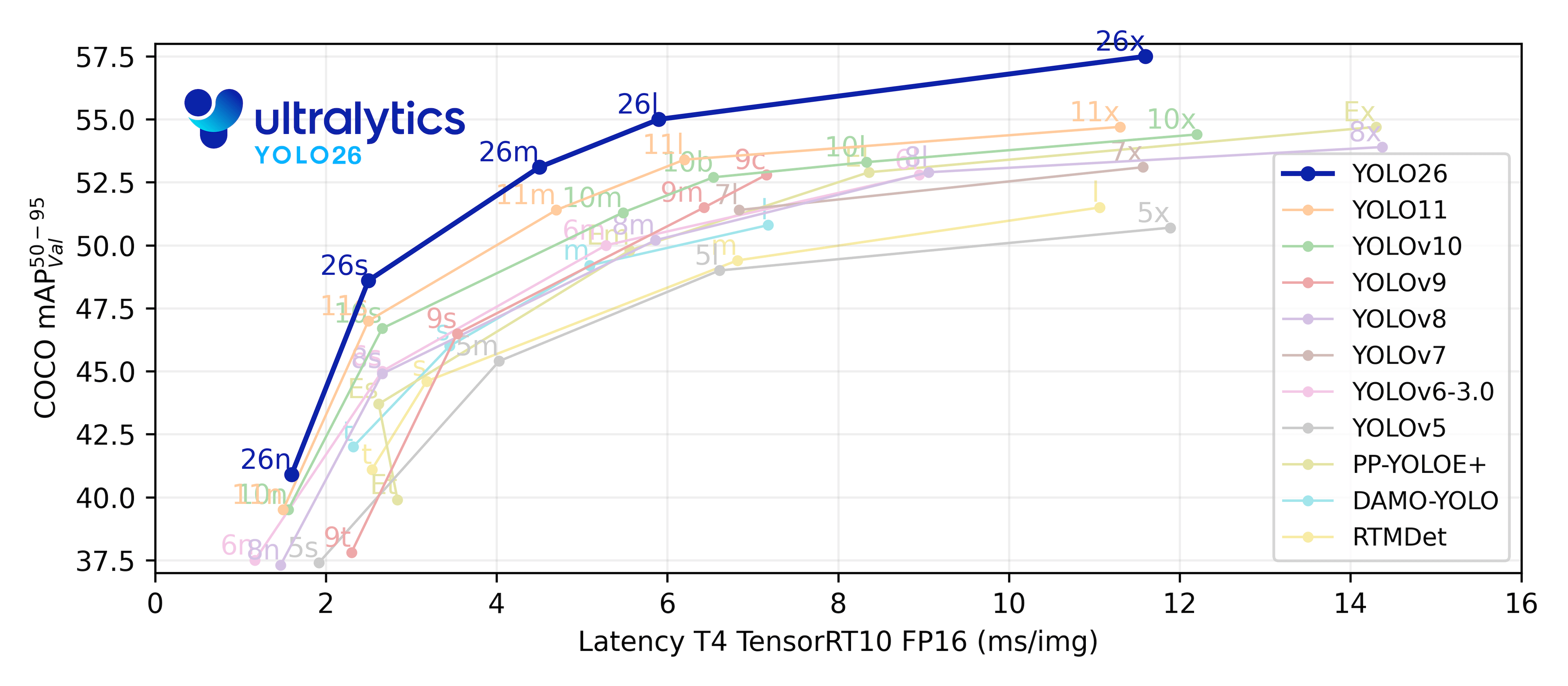
mAPval values refer to single-model single-scale performance on the COCO val2017 dataset. See YOLO Performance Metrics for details. Reproduce with yolo val detect data=coco.yaml device=0
Speed metrics are averaged over COCO val images using an Amazon EC2 P4d instance. CPU speeds measured with ONNX export. GPU speeds measured with TensorRT export. Reproduce with yolo val detect data=coco.yaml batch=1 device=0|cpu
Segmentation (COCO)
Refer to the Segmentation Docs for usage examples. These models are trained on COCO-Seg, including 80 classes.
mAPval values are for single-model single-scale on the COCO val2017 dataset. See YOLO Performance Metrics for details. Reproduce with yolo val segment data=coco.yaml device=0
Speed metrics are averaged over COCO val images using an Amazon EC2 P4d instance. CPU speeds measured with ONNX export. GPU speeds measured with TensorRT export. Reproduce with yolo val segment data=coco.yaml batch=1 device=0|cpu
mIoUval values are for single-model single-scale on the Cityscapes validation set. Reproduce with yolo semantic val data=cityscapes.yaml device=0 imgsz=2048
Speed metrics are averaged over Cityscapes validation images using an RTX3090 instance. Reproduce with yolo semantic val data=cityscapes.yaml batch=1 device=0|cpu imgsz=2048
Classification (ImageNet)
Consult the Classification Docs for usage examples. These models are trained on ImageNet, covering 1000 classes.
acc values represent model accuracy on the ImageNet dataset validation set. Reproduce with yolo val classify data=path/to/ImageNet device=0
Speed metrics are averaged over ImageNet val images using an Amazon EC2 P4d instance. CPU speeds measured with ONNX export. GPU speeds measured with TensorRT export. Reproduce with yolo val classify data=path/to/ImageNet batch=1 device=0|cpu
Pose (COCO)
See the Pose Estimation Docs for usage examples. These models are trained on COCO-Pose, focusing on the 'person' class.
mAPval values are for single-model single-scale on the COCO Keypoints val2017 dataset. See YOLO Performance Metrics for details. Reproduce with yolo val pose data=coco-pose.yaml device=0
Speed metrics are averaged over COCO val images using an Amazon EC2 P4d instance. CPU speeds measured with ONNX export. GPU speeds measured with TensorRT export. Reproduce with yolo val pose data=coco-pose.yaml batch=1 device=0|cpu
Oriented Bounding Boxes (DOTAv1)
Check the OBB Docs for usage examples. These models are trained on DOTAv1, including 15 classes.
mAPtest values are for single-model multiscale performance on the DOTAv1 test set. Reproduce by yolo val obb data=DOTAv1.yaml device=0 split=test and submit merged results to the DOTA evaluation server.
Speed metrics are averaged over DOTAv1 val images using an Amazon EC2 P4d instance. CPU speeds measured with ONNX export. GPU speeds measured with TensorRT export. Reproduce by yolo val obb data=DOTAv1.yaml batch=1 device=0|cpu
🧩 Integrations
Our key integrations with leading AI platforms extend the functionality of Ultralytics' offerings, enhancing tasks like dataset labeling, training, visualization, and model management. Discover how Ultralytics, in collaboration with partners like Weights & Biases, Comet ML, Roboflow, and Intel OpenVINO, can optimize your AI workflow. Explore more at Ultralytics Integrations.
We thrive on community collaboration! Ultralytics YOLO wouldn't be the SOTA framework it is without contributions from developers like you. Please see our Contributing Guide to get started. We also welcome your feedback—share your experience by completing our Survey. A huge Thank You 🙏 to everyone who contributes!
We look forward to your contributions to help make the Ultralytics ecosystem even better!
📜 License
Ultralytics offers two licensing options to suit different needs:
AGPL-3.0 License: This OSI-approved open-source license is perfect for students, researchers, and enthusiasts. It encourages open collaboration and knowledge sharing. See the LICENSE file for full details.
Ultralytics Enterprise License: For development and production use, this license enables seamless integration of Ultralytics software and AI models into business products and services, including internal tools, automated workflows, and production deployments, bypassing the open-source requirements of AGPL-3.0. To get started, please contact us via Ultralytics Licensing.
📞 Contact
For bug reports and feature requests related to Ultralytics software, please visit GitHub Issues. For questions, discussions, and community support, join our active communities on Discord, Reddit, and the Ultralytics Community Forums. We're here to help with all things Ultralytics!