


Views
No views yet
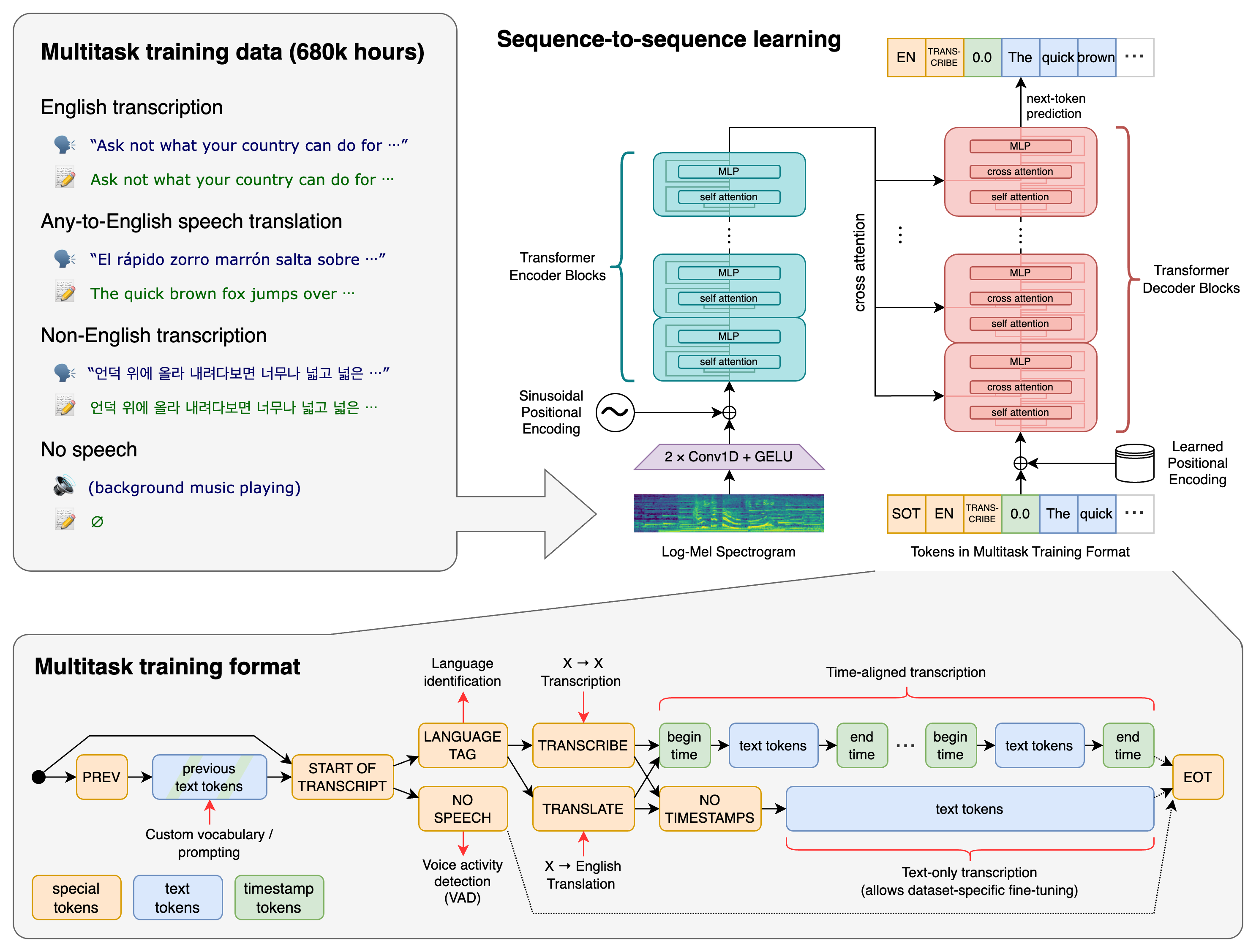
pip install -U openai-whisperpip install git+https://github.com/openai/whisper.git pip install --upgrade --no-deps --force-reinstall git+https://github.com/openai/whisper.gitffmpeg to be installed on your system, which is available from most package managers:1# on Ubuntu or Debian
2sudo apt update && sudo apt install ffmpeg
3
4# on Arch Linux
5sudo pacman -S ffmpeg
6
7# on MacOS using Homebrew (https://brew.sh/)
8brew install ffmpeg
9
10# on Windows using Chocolatey (https://chocolatey.org/)
11choco install ffmpeg
12
13# on Windows using Scoop (https://scoop.sh/)
14scoop install ffmpegrust installed as well, in case tiktoken does not provide a pre-built wheel for your platform. If you see installation errors during the pip install command above, please follow the Getting started page to install Rust development environment. Additionally, you may need to configure the PATH environment variable, e.g. export PATH="$HOME/.cargo/bin:$PATH". If the installation fails with No module named 'setuptools_rust', you need to install setuptools_rust, e.g. by running:pip install setuptools-rust| Size | Parameters | English-only model | Multilingual model | Required VRAM | Relative speed |
|---|---|---|---|---|---|
| tiny | 39 M | tiny.en | tiny | ~1 GB | ~32x |
| base | 74 M | base.en | base | ~1 GB | ~16x |
| small | 244 M | small.en | small | ~2 GB | ~6x |
| medium | 769 M | medium.en | medium | ~5 GB | ~2x |
| large | 1550 M | N/A | large | ~10 GB | 1x |
.en models for English-only applications tend to perform better, especially for the tiny.en and base.en models. We observed that the difference becomes less significant for the small.en and medium.en models.large-v2 model (The smaller the numbers, the better the performance). Additional WER scores corresponding to the other models and datasets can be found in Appendix D.1, D.2, and D.4. Meanwhile, more BLEU (Bilingual Evaluation Understudy) scores can be found in Appendix D.3. Both are found in the paper.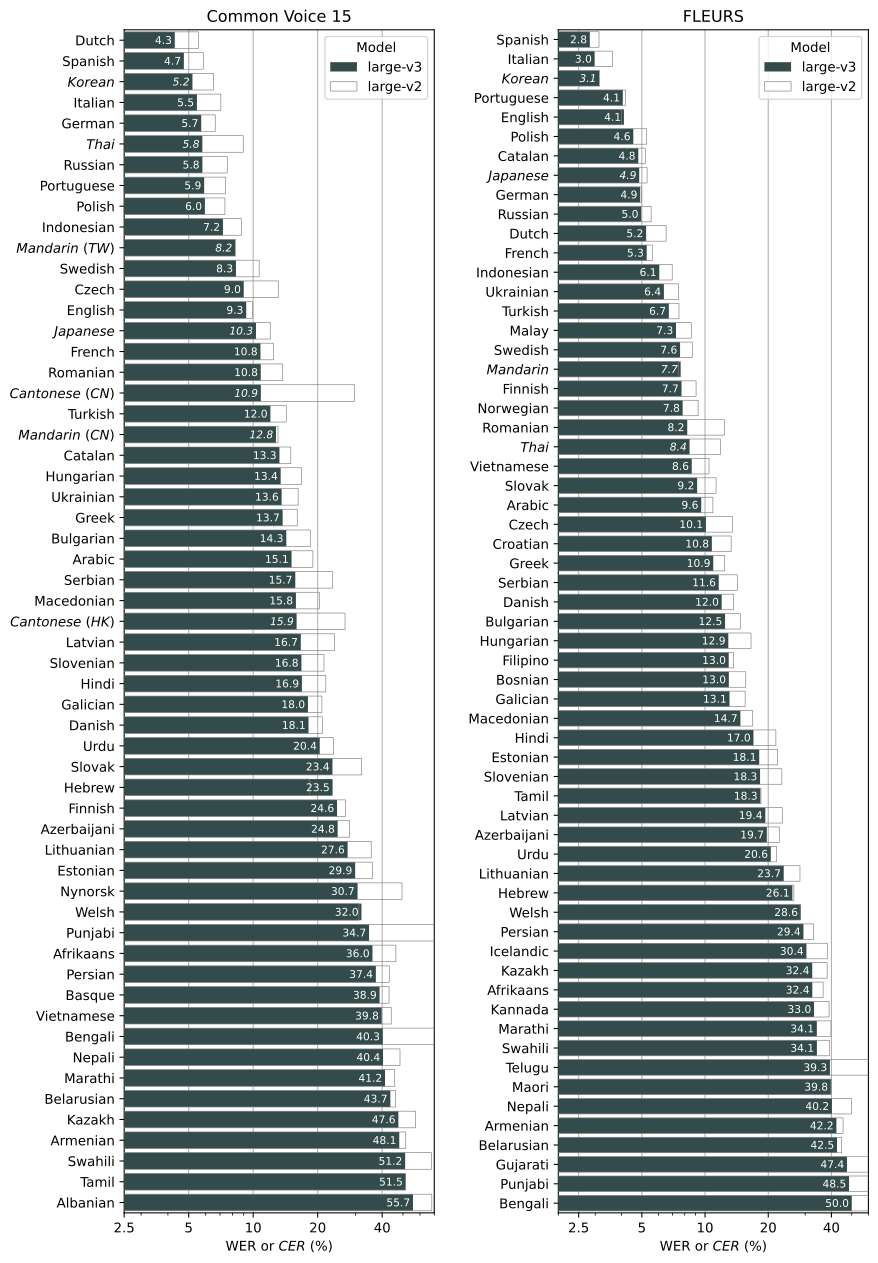
medium model:whisper audio.flac audio.mp3 audio.wav --model mediumsmall model) works well for transcribing English. To transcribe an audio file containing non-English speech, you can specify the language using the --language option:whisper japanese.wav --language Japanese--task translate will translate the speech into English:whisper japanese.wav --language Japanese --task translatewhisper --help1import whisper
2
3model = whisper.load_model("base")
4result = model.transcribe("audio.mp3")
5print(result["text"])transcribe() method reads the entire file and processes the audio with a sliding 30-second window, performing autoregressive sequence-to-sequence predictions on each window.whisper.detect_language() and whisper.decode() which provide lower-level access to the model.1import whisper
2
3model = whisper.load_model("base")
4
5# load audio and pad/trim it to fit 30 seconds
6audio = whisper.load_audio("audio.mp3")
7audio = whisper.pad_or_trim(audio)
8
9# make log-Mel spectrogram and move to the same device as the model
10mel = whisper.log_mel_spectrogram(audio).to(model.device)
11
12# detect the spoken language
13_, probs = model.detect_language(mel)
14print(f"Detected language: {max(probs, key=probs.get)}")
15
16# decode the audio
17options = whisper.DecodingOptions()
18result = whisper.decode(model, mel, options)
19
20# print the recognized text
21print(result.text)